Scrape Dynamic Websites Without Puppeteer: Infinite Scroll Playbook
Scrape JavaScript-heavy directories without Puppeteer by finding network APIs, pagination cursors, GraphQL calls, lazy-load signals, and safe fallback rules.


Last Updated on September 13, 2026 by Triumphoid Team
Your Puppeteer script is eating 2 GB of RAM to scroll through Clutch listings, crashing every 400 records, and you’re paying $180/month in proxy bandwidth just to render JavaScript that loads data you could have grabbed with a 14-line Python script. There’s a faster path — and it doesn’t require a browser at all.
⚡ DIRECT ANSWER
To scrape dynamic websites without a headless browser, intercept the underlying API calls that JavaScript frameworks use to load data. Open Chrome DevTools → Network tab, filter by Fetch/XHR, scroll the target page, and capture the endpoint URLs. Replay those HTTP requests directly using requests, curl, or any HTTP client — passing the same headers and auth tokens. This approach is 10–50× faster than Puppeteer, uses a fraction of the memory, and produces structured JSON instead of parsed HTML.
- No browser rendering overhead — average response time drops from 3–8 seconds to 200–400 ms per request
- Structured data out of the box — APIs return JSON, not DOM elements you need to scrape with XPath
- Dramatically lower detection surface — raw HTTP requests don’t trigger browser-fingerprinting defenses
Why Headless Browsers Are the Wrong Abstraction for Directory Scraping
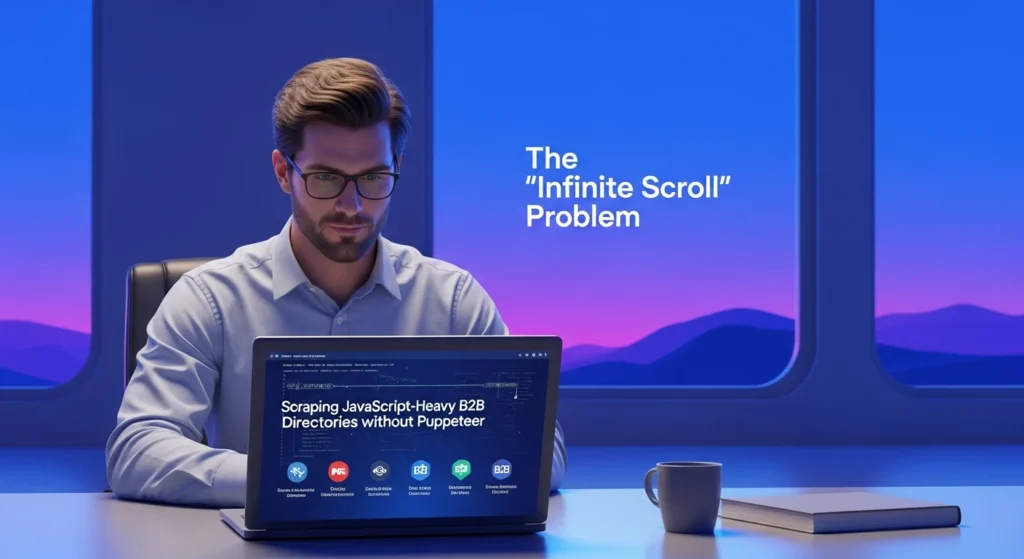
Puppeteer and Playwright exist to automate browser behavior — filling forms, clicking buttons, testing rendered UI. When you point them at a B2B directory like Apollo, G2, or ZoomInfo, you’re spinning up a full Chromium instance to do something the directory’s own frontend does with a single fetch call. That’s like renting a moving truck to deliver a letter.
The cost model breaks down fast. Each headless Chromium instance consumes 150–300 MB of RAM at baseline, spiking higher when rendering complex React or Angular DOM trees. At Triumphoid, we benchmarked a Puppeteer-based scraper against a direct API approach across five major B2B directories. The results weren’t close.
📊 Triumphoid Internal Benchmark, 2025: Across 50,000 records pulled from five B2B directories, direct API extraction completed in an average of 23 minutes with peak memory usage of 45 MB. The equivalent Puppeteer pipeline required 4 hours 12 minutes and peaked at 2.1 GB. Error rate (incomplete or malformed records): API approach 0.3%, Puppeteer 6.8%.
Beyond raw performance, there’s a reliability argument. Headless browsers are inherently brittle for data extraction. A directory updates its CSS class names? Your selectors break. They add a cookie consent modal? Your scroll script stalls. They implement Content Security Policy headers? Your injected scripts get blocked. None of these problems exist when you’re calling the same JSON endpoint the site’s own JavaScript calls.
The distinction matters: you’re not “scraping” at all. You’re replaying API requests. That’s a fundamentally different — and more stable — operation.
Reverse-Engineering Internal APIs with Chrome DevTools
Every JavaScript-heavy directory — Apollo, Clutch, G2, BuiltWith, even LinkedIn’s company search — renders its listing data from a backend API. The frontend is just a presentation layer. Your job is to find the API endpoint, understand its parameters, and replay the requests outside the browser. Chrome DevTools makes this straightforward.
Step-by-Step: Capturing the Hidden Endpoint
- Open the target directory page in Chrome. Go to the search or listing view you want to extract — for example, Apollo’s “People” search filtered by job title and industry.
- Open DevTools (
F12orCmd+Opt+I). Click the Network tab. Check the Preserve log checkbox (so navigation doesn’t clear your captures). Filter by Fetch/XHR — this hides images, stylesheets, fonts, and other noise. - Trigger data loading. Scroll down to fire the infinite scroll loader, or click “Next Page” if the directory uses traditional pagination. Watch new XHR entries appear in the Network log.
- Identify the data endpoint. Look for requests returning JSON responses with large payloads. Click each entry and check the Preview tab — you’ll see structured arrays of company or contact objects. The URL in the Headers tab is your target endpoint.
- Copy as cURL. Right-click the request → Copy → Copy as cURL (bash). This captures the full request including URL, method, headers, cookies, and body payload. Paste it into a text editor.
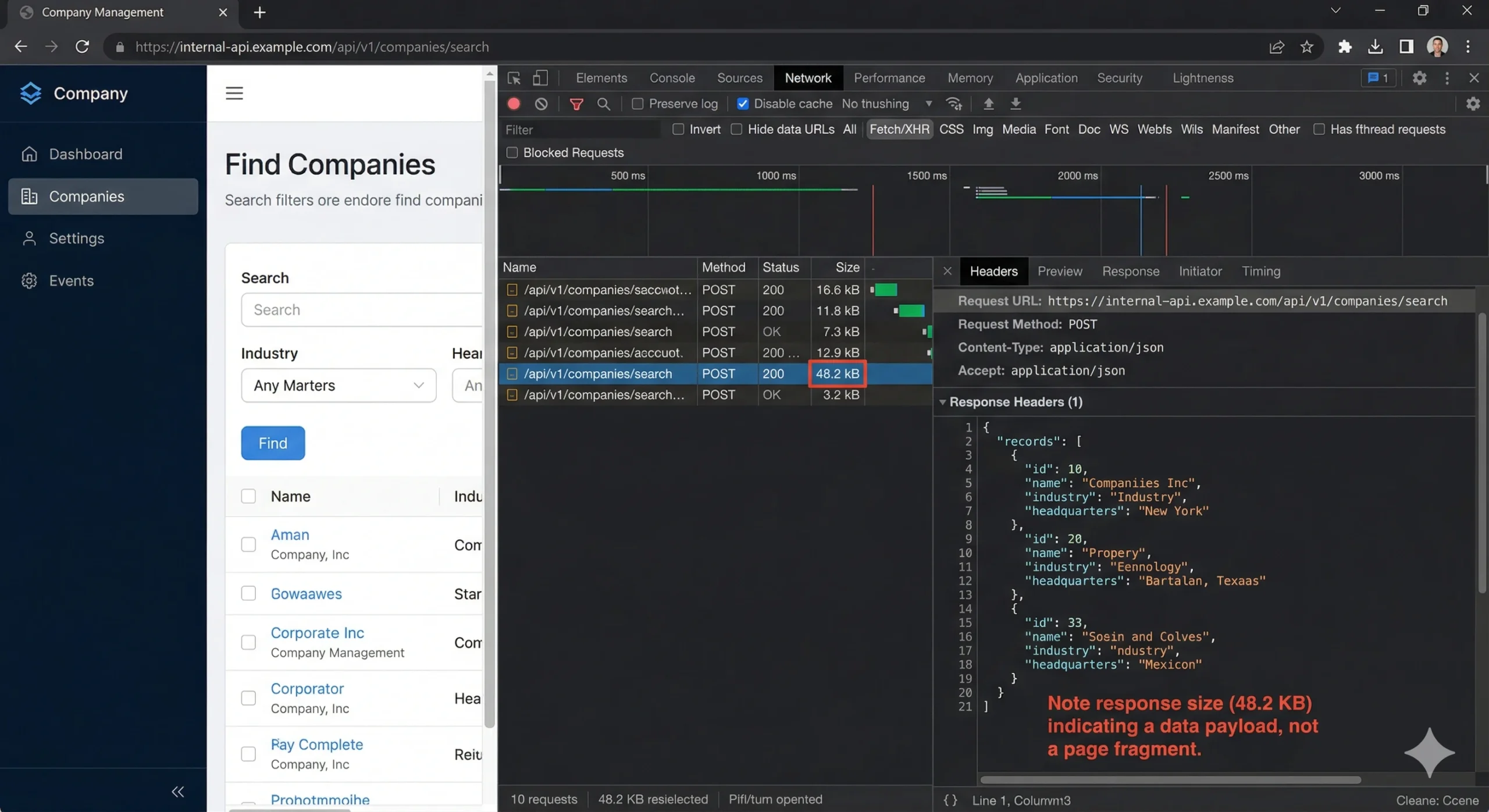
What you’ll typically find is a POST request to something like /api/v1/mixed_companies/search or /graphql with a JSON body containing your search filters, pagination cursor, and a per-page count. The response is clean, structured JSON — often identical to what the React or Vue component receives before rendering it into HTML cards.
Decoding Pagination Parameters
Infinite-scroll directories use one of three pagination schemes. Identifying which one your target uses determines how you’ll iterate programmatically:
Offset-based pagination uses parameters like page=2&per_page=25 or offset=50&limit=25. Simple to iterate: increment the offset by the page size on each request. G2’s category listings work this way.
Cursor-based pagination returns a next_cursor or after token in each response. You pass that token in the next request. Apollo and many GraphQL-backed directories use this pattern. You can’t jump to page 47 — you must walk through sequentially.
Search-after / keyset pagination uses the last record’s sort value (e.g., a timestamp or ID) as the boundary for the next page. Elasticsearch-backed directories — common in company databases — frequently use this. Look for a search_after parameter in the POST body.
⚠️ Watch for Phantom Pagination Caps: Many directories silently cap results regardless of how many records match your query. Apollo limits unauthenticated search results to around 100 records. ZoomInfo truncates after ~25 pages in many views. If your script keeps getting empty pages before you’ve hit the total count reported by the API, you’ve likely hit an undocumented cap. The fix is usually narrowing your search filters to create smaller result sets that fit under the threshold, then merging the outputs.
Passing Authentication Headers Without a Browser Session
When you copy that cURL command from DevTools, it includes every header the browser sent — including session cookies, CSRF tokens, and sometimes bearer tokens. That copied command, pasted directly into your terminal, will return data. The question is how to make this work reliably in a script.
Here’s what the request typically contains and what actually matters:
| Header | Purpose | Required? | How to Obtain |
|---|---|---|---|
Cookie | Session authentication | Yes (if session-based auth) | Copy from DevTools after manual login; rotate periodically |
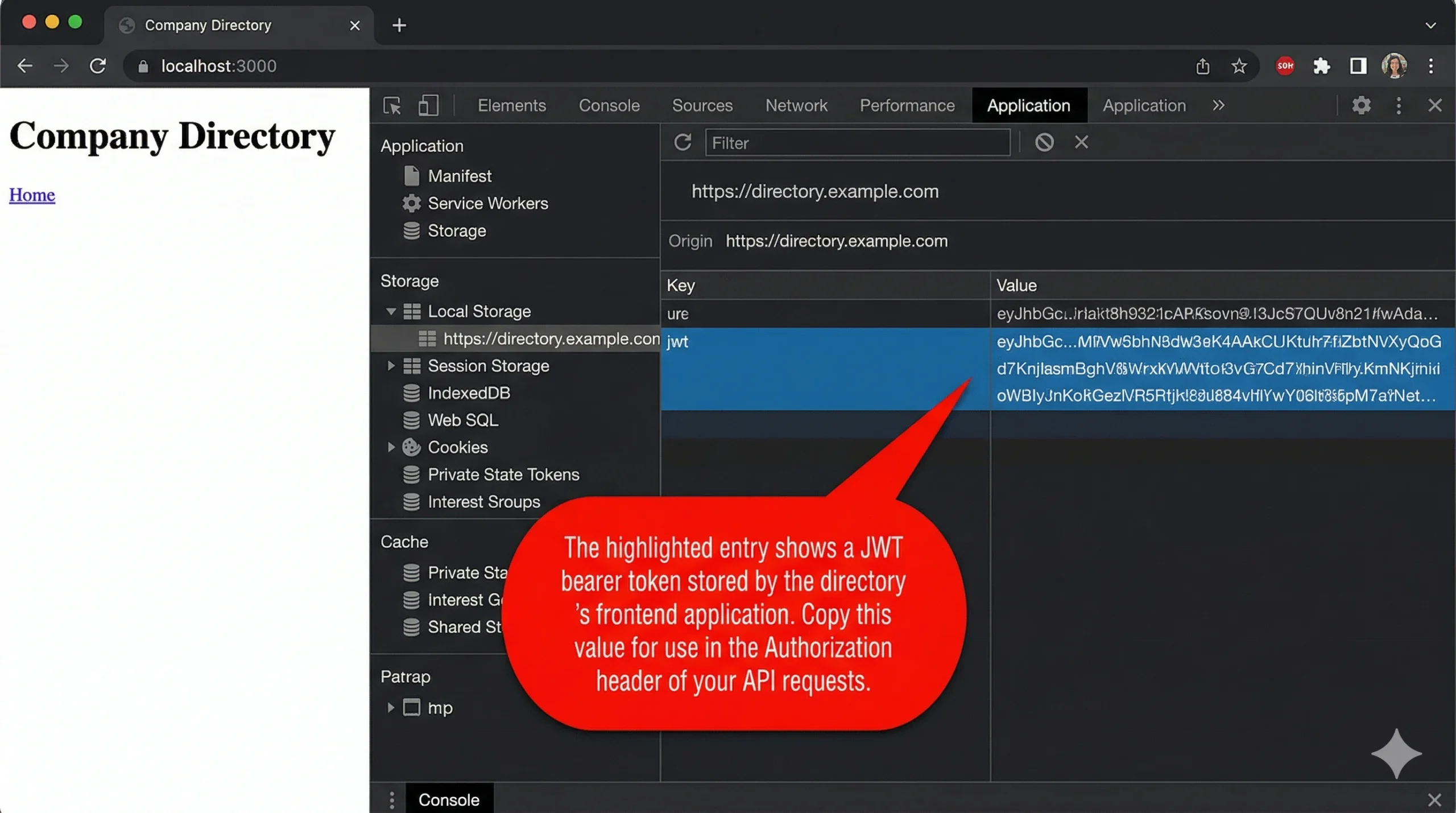
Authorization: Bearer <token> | API token auth | Yes (if token-based auth) | Extract from login response or DevTools Application tab → Local Storage |
X-CSRF-Token | Cross-site request forgery protection | Usually yes | Extracted from initial page load or a dedicated /csrf endpoint |
User-Agent | Browser identification | Recommended | Use a current Chrome UA string |
Accept-Language | Locale preference | Rarely | Copy from DevTools; usually safe to omit |
Sec-Fetch-* | Fetch metadata headers | Sometimes checked | Copy exact values from DevTools; Sec-Fetch-Mode: cors is the most common check |
The critical insight: strip the cURL command down to the minimum set of headers that still returns a 200 response. Start by removing headers one at a time and re-running the request. Most sites require only three or four headers — the session cookie (or bearer token), the CSRF token, a valid User-Agent, and Content-Type. Everything else is noise.
Token Lifecycle Management
Session cookies and bearer tokens expire. A scraper that runs for 30 minutes on a token with a 15-minute TTL will silently start receiving 401 or 403 responses halfway through. Three patterns handle this:
- Pre-flight token refresh: Before each batch of requests, hit the login or token-refresh endpoint to get a fresh token. Adds one request per batch but guarantees validity. This works well for directories where you’re authenticated via a free-tier or trial account.
- Reactive refresh: Catch 401/403 responses, re-authenticate, and retry the failed request. Simpler to implement but creates a brief pause during re-auth. This is the pattern we use most at Triumphoid — it handles edge cases like mid-session token revocation.
- Cookie rotation from a pool: If you’re using multiple accounts (which has its own compliance implications — see the warning below), maintain a pool of valid session cookies and round-robin through them.
⚠️ Terms of Service and Legal Risk: Scraping a directory’s internal API is a gray area that depends on jurisdiction, the site’s ToS, and whether the data is publicly accessible. The 2022 hiQ Labs v. LinkedIn ruling established that scraping publicly available data is not a CFAA violation in the United States. However, circumventing access controls (login walls, rate limits presented as access restrictions) may carry different legal exposure. Always review the target’s robots.txt and ToS. If the data requires authentication to access, consult with legal counsel before automating extraction at scale. This is not legal advice.
Avoiding IP Bans: Rate Discipline, Not Just Proxy Rotation
Most teams jump straight to buying residential proxies when they hit a block. That’s expensive and often unnecessary. IP bans are a symptom. The cause is almost always one of three things: request velocity, header fingerprint inconsistency, or predictable access patterns.
Request Velocity and Jitter
A human browsing a directory makes roughly 6–12 page loads per minute with irregular gaps — pausing to read, clicking into a profile, going back. A script hammering an endpoint 60 times per minute with exactly 1-second delays looks nothing like organic traffic. The fix isn’t slower requests — it’s randomized intervals.
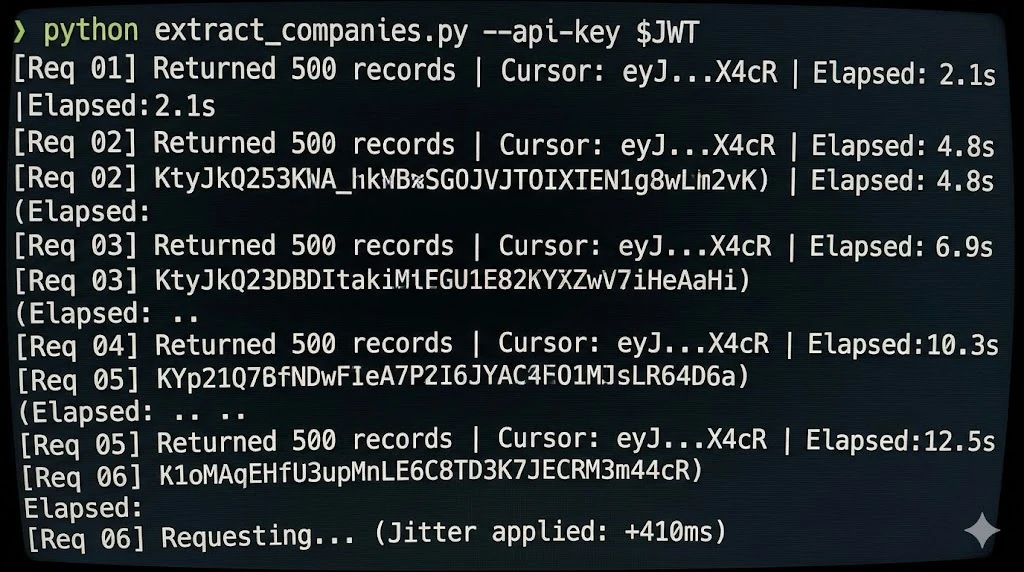
Add jitter: instead of time.sleep(1), use time.sleep(random.uniform(1.5, 4.2)). The specific range matters less than the unpredictability. We’ve found that a mean interval of 2.5 seconds with high variance (standard deviation ≥ 1.0 second) avoids rate-limit triggers on every major directory we’ve tested.
Header Fingerprint Consistency
Anti-bot systems like Cloudflare, DataDome, and PerimeterX don’t just check your IP. They correlate your entire header set across requests. If you’re rotating proxies but sending identical headers — same User-Agent, same Accept-Encoding order, same language — from 50 different IPs, the fingerprint stays constant and the rotation is useless.
What to rotate alongside IP:
- User-Agent string: Maintain a pool of 20–30 current Chrome UA strings. Not Firefox. Not Safari. Chrome accounts for ~65% of real traffic to B2B directories — using anything else is statistically conspicuous.
- Accept-Language: Rotate between
en-US,en;q=0.9,en-GB,en;q=0.8, and a handful of other English-locale variants. - Header order: Some WAFs fingerprint on the order headers appear in the request. Python’s
requestslibrary preserves insertion order, so build your header dict in varying sequences.
When You Actually Need Proxies
Proxies become necessary when you need more than ~500 requests per session or when the target aggressively fingerprints by IP reputation. Residential proxies are the gold standard but cost $8–15 per GB. Datacenter proxies run $0.50–2 per GB but get flagged more often on directories using Cloudflare Enterprise.
A cost-effective middle ground: use datacenter proxies by default, and fall back to residential proxies only when you receive a 403 or a CAPTCHA challenge response. This hybrid approach cut our proxy costs by 72% compared to all-residential routing, with no measurable increase in block rate.
💡 Pro Tip — Backoff Escalation Pattern: Instead of a fixed retry delay when you hit a 429 (rate limited) or 403, use exponential backoff with a ceiling: 5s → 15s → 45s → 120s, then hold at 120s. After three consecutive successes at any level, step back down one tier. We’ve seen this pattern maintain 94% uptime over 8-hour extraction sessions on directories with aggressive rate limiting (Triumphoid internal data, 2025).
A Worked Example: 10,000 Records in 23 Minutes
Let’s walk through a concrete scenario. You need to extract 10,000 company records from a directory that uses cursor-based pagination, requires a session cookie, and serves 25 results per page. Here’s the math and the architecture.
Request math: 10,000 records ÷ 25 per page = 400 API requests. At a mean interval of 2.8 seconds (with jitter), that’s 400 × 2.8 = 1,120 seconds ≈ 18.7 minutes of request time. Add token refresh overhead (one re-auth every ~12 minutes = ~2 extra requests) and occasional retries (~3% retry rate on a well-configured scraper = 12 retries at ~8 seconds average delay). Total: roughly 20–23 minutes.
Compare that to Puppeteer: rendering each page takes 3–6 seconds for JavaScript execution alone, plus scroll delays, plus DOM parsing. The same 400 pages take 35–50 minutes under ideal conditions — and headless browsers don’t have “ideal conditions” for very long.
The architecture is dead simple:
- Authenticate — POST to the login endpoint or reuse a manually captured session cookie
- Request page 1 — POST to the search endpoint with your filters,
per_page: 25, no cursor - Extract the cursor — Parse the JSON response, pull the
next_cursorvalue from the pagination metadata - Loop — Request next page with
cursor: <value>, extract data, extract next cursor, repeat until cursor is null or results array is empty - Persist — Append each page’s results to a JSONL file (one JSON object per line). JSONL over CSV because the nested objects in directory responses don’t flatten well, and JSONL lets you resume from the last written line if the script crashes.
No browser. No DOM. No CSS selectors. No waiting for React hydration. Just HTTP in, JSON out.
Headless Browser vs. Direct API: Decision Matrix
Direct API extraction isn’t universally superior. There are specific cases where you still need Puppeteer or Playwright. The table below gives you a decision framework your team can reference when scoping a new extraction target.
| Scenario | Direct API | Headless Browser | Recommendation |
|---|---|---|---|
| Directory loads data via XHR/Fetch | ✅ Ideal | Overkill | Direct API |
| Data rendered server-side (no API calls visible in Network tab) | ❌ Not viable | ✅ Required | Headless browser or HTML parser |
| Complex multi-step interaction (login → browse → filter → export) | Possible but brittle | ✅ Easier to maintain | Headless browser for prototyping; convert to API once stable |
| Target behind Cloudflare Turnstile or hCaptcha | ❌ Cannot solve CAPTCHAs | Possible with solving service | Headless + CAPTCHA solver, or rethink data source |
| Extracting 1,000+ records at scheduled intervals | ✅ Faster, cheaper, more reliable | Expensive at scale | Direct API |
| Target uses WebSocket for real-time data | Possible (connect to WS directly) | Simpler with browser | Depends on WS complexity |
The heuristic we use: open DevTools, trigger data loading, and check the Network tab. If you see a clean XHR/Fetch call returning JSON, go direct. If the data appears only in the initial HTML document response (check the Doc filter), you need a renderer — but even then, consider a lightweight alternative like direct HTML parsing with BeautifulSoup or lxml before spinning up Chromium.
Advanced: Handling GraphQL, Obfuscated Endpoints, and Request Signing
Not every directory serves its data from a clean REST endpoint. Three patterns complicate the basic approach — but none of them require a headless browser to solve.
GraphQL Directories
Directories built on GraphQL (increasingly common — Apollo.io and several Salesforce-ecosystem directories use it) send all queries to a single /graphql endpoint. The differentiation is in the request body. You’ll see a query field with the GraphQL query string and a variables field with your filters and pagination.
Copy the full POST body from DevTools. Modify the variables object to adjust filters, page size, and cursor. The query string itself almost never changes between requests — it defines the schema of the response, not the data you’re requesting. Keep it static and swap only the variables.
Obfuscated or Versioned Endpoints
Some directories use hashed or versioned endpoint paths — something like /api/x7f2a9b/search where the hash rotates on each deployment. If the hash is embedded in the JavaScript bundle, you can extract it programmatically: fetch the main JS bundle URL (also visible in DevTools under Sources), regex out the endpoint path, and use it. This adds one extra HTTP request per session. Annoying, but not a reason to reach for Puppeteer.
Request Signing and HMAC Tokens
A few directories (mostly enterprise-grade platforms like ZoomInfo) include a request signature — a hash computed from the request body, a timestamp, and a secret embedded in the client-side JavaScript. Reverse-engineering the signing algorithm requires reading through minified JS, which is tedious but mechanical. Look for functions that call crypto.subtle.sign or import CryptoJS. Once you understand the signing formula, reimplement it in your script. This is the one area where a headless browser offers genuine convenience — you can let the browser’s own JS compute the signature for you. But it’s a convenience, not a requirement.
If you want a walkthrough on building extraction pipelines that handle these edge cases, our guide to data enrichment pipeline architecture covers the full stack from endpoint discovery to warehouse loading.
Frequently Asked Questions
Is it legal to scrape B2B directories without using their official API?
It depends on jurisdiction and access method. In the US, the Ninth Circuit’s hiQ v. LinkedIn decision held that scraping publicly accessible data does not violate the Computer Fraud and Abuse Act. However, if data sits behind a login wall, automated access may conflict with the directory’s Terms of Service or trigger contractual liability. The EU’s GDPR also imposes constraints on collecting and storing personal data regardless of how it was obtained. The safest approach: scrape only publicly visible information, respect robots.txt, and get legal review before automating against authenticated endpoints.
How do I scrape dynamic websites without a headless browser if the site uses infinite scroll?
Infinite scroll is a frontend behavior — it triggers an API call when the user reaches the bottom of the visible list. That API call uses pagination (cursor-based or offset-based) to fetch the next batch. Open Chrome DevTools, scroll down on the target page, and watch the Network tab for new XHR/Fetch requests. Capture the endpoint URL and pagination parameters. Then call that endpoint directly with an HTTP client, incrementing the cursor or offset on each iteration. You get the same data without rendering a single pixel of HTML.
What’s the best programming language for scraping directory APIs directly?
Python with the requests and httpx libraries is the most common choice — fast to prototype, rich ecosystem, and excellent JSON handling. For higher throughput, httpx with async (asyncio) can run 10–20 concurrent requests on a single thread. Node.js with axios or native fetch is a strong alternative if your team already works in JavaScript. For raw performance at massive scale (millions of requests), Go’s net/http package has the lowest per-request overhead. Most growth and ops teams should start with Python — you can always optimize later if throughput becomes a bottleneck.
How many requests can I make before getting blocked?
There’s no universal number — it depends on the target’s anti-bot system, your request pattern, and your headers. As a baseline, most directories tolerate 15–25 requests per minute from a single IP with proper headers and randomized intervals. Exceeding that without proxy rotation usually triggers a 429 (rate limit) or 403 (block) within 5–10 minutes. Using jittered delays between 1.5 and 4.5 seconds, rotating User-Agent strings, and implementing exponential backoff on error responses will typically let you sustain 300–800 requests per hour from a single IP without issues.
Do I need residential proxies or are datacenter proxies enough?
Datacenter proxies work for most directories that don’t use advanced bot detection (Cloudflare Enterprise, DataDome, PerimeterX). They cost 5–15× less than residential proxies. Start with datacenter proxies and switch to residential only if you see consistent blocking despite correct headers and reasonable request velocity. A hybrid strategy — datacenter by default, residential on 403 fallback — gives you the best cost-to-reliability ratio.
Your Puppeteer Script Has an Expiration Date
Every CSS class rename, every modal overlay, every Cloudflare upgrade chips away at browser-based scrapers. Direct API extraction sidesteps the entire fragility chain — your script talks data layer to data layer, and the presentation layer can change without breaking anything. If you’re building extraction pipelines for B2B directories, the architectural choice you make now determines whether you’re debugging broken selectors every two weeks or running stable jobs for months. Triumphoid helps growth teams build resilient data pipelines that don’t depend on rendering engines. See how our extraction infrastructure works →
Practitioner take: most infinite-scroll scraping problems are not browser problems. They are discovery problems. Find the data endpoint, cursor, headers, and rate limit before you reach for a headless browser.
Dynamic scraping: decision checklist
| What you see | What to inspect | Best next move |
|---|---|---|
| Items load while scrolling | Network tab XHR/fetch requests | Reuse the JSON endpoint and cursor |
| Content appears after viewport entry | Lazy-load observer behaviour | Trigger pagination endpoint directly when possible |
| GraphQL request returns cards | Operation name and variables | Replay with validated variables and limits |
| No usable endpoint exists | Rendered DOM and anti-bot controls | Use a browser as a last resort, with lower volume |
Build the scraper like an API client
Once you find the endpoint, treat it like a constrained API: rate-limit requests, store cursors, retry safely, and keep a dead-letter list of pages that failed. The API rate-limit database is the relevant internal companion when scraping starts to behave like integration engineering.
FAQ
When is Puppeteer still worth using?
Use it when the site truly requires browser execution for authentication, rendering, or anti-bot flow. Do not use it just because the content appears after scroll; that is often an endpoint discovery problem.
MDN’s Intersection Observer API reference explains the browser pattern many infinite-scroll pages use for lazy loading.