Debugging REST API Rate Limits: A Practitioner’s Guide to 429 Errors

Last Updated on October 20, 2026 by Triumphoid Team
Your n8n production workflow just stalled with a 429 error, but your request logs show you’re well under the hourly quota. It’s a maddening scenario. You’re likely hitting a hidden secondary limit or a concurrency cap that the API provider failed to document clearly. Debugging REST API rate limits isn’t just about counting requests; it’s about understanding the interplay between request frequency, point-based costs, and the specific architecture of your automation stack.
We’ve all been there. Opaque error messages from third-party services can turn a simple integration into a troubleshooting nightmare, especially with providers like USPS slashing limits to 60 requests per hour or GitHub utilizing a complex 900 point secondary system. You need to know exactly which limit is being hit so you can stop guessing and start fixing. This practitioner’s guide provides the technical workflow to isolate these bottlenecks and implement a resilient strategy that keeps your workflows running without ballooning your costs.
We will walk through decoding IETF RateLimit-Policy headers, managing exponential backoff with jitter, and optimizing your consumption patterns. By the end, you’ll have the tools to transform a brittle automation into a high-scale, cost-efficient engine.
Key Takeaways
- Decode standard and proprietary headers like Retry-After to understand the specific trigger behind an HTTP 429 response.
- Distinguish between fixed primary quotas and elusive secondary limits that govern concurrency and burst protection logic.
- Master a systematic four-step workflow for debugging REST API rate limits by isolating calls in clean environments to rule out stack-specific interference.
- Replace brittle linear retry logic with mathematical exponential backoff to eliminate the thundering herd effect in high-scale automation.
- Leverage batching and caching strategies to reduce redundant API calls, lowering operational costs across your enterprise workflows.
Table of Contents
- Decoding the 429 Too Many Requests Response
- Identifying Primary vs. Secondary Rate Limits
- The Practitioner’s 4-Step Debugging Workflow
- Implementing Resilient Backoff and Throttling Strategies
- Optimizing API Consumption in Enterprise Workflows
Decoding the 429 Too Many Requests Response
The 429 Too Many Requests response is the ultimate “slow down” signal in the world of web services. It’s the primary tool for Rate limiting, designed to protect server resources from being overwhelmed by high-volume automation or malicious traffic. When you’re debugging REST API rate limits, the 429 status is actually your best friend. It provides a clear, programmatic signal that you’ve hit a threshold, unlike silent failures or intermittent timeouts that leave you guessing.
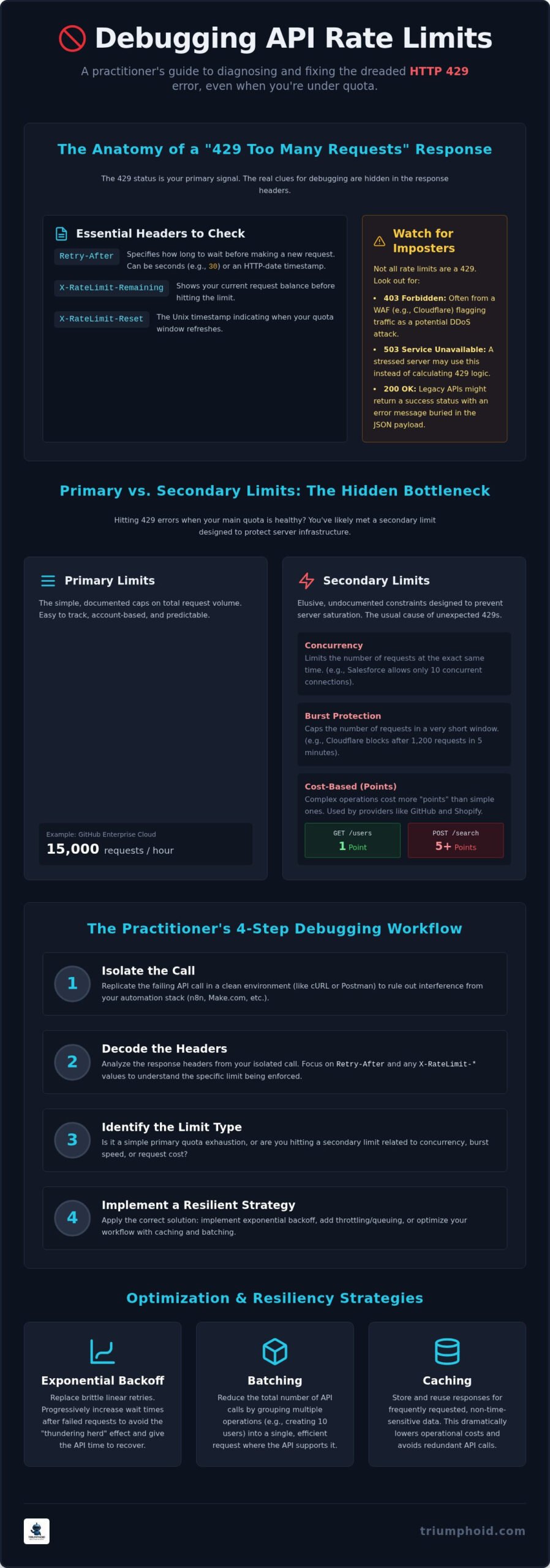
You’ll find the most useful diagnostic data in the response headers. While the industry is moving toward standardized IETF headers, most providers still use the ‘X-RateLimit’ prefix. X-RateLimit-Limit defines your total quota, while X-RateLimit-Remaining shows your current balance. If you hit zero, the server enforces a ‘hard’ limit, rejecting all subsequent calls. ‘Soft’ limits are rarer; they usually appear as warnings in headers once you cross a certain percentage of your quota, like 80%, without actually blocking traffic.
Don’t assume every throttle will be a 429. If a Web Application Firewall (WAF) like Cloudflare sits in front of the API, you might see a 403 Forbidden instead. Cloudflare’s API, for example, enforces a limit of 1,200 requests per 5-minute window. If you exceed this, the WAF might interpret your traffic as a DDoS attempt and block you entirely at the edge. This distinction is critical because a 403 from a WAF often requires a cooling-off period before the server will even look at your credentials again.
Essential Headers for Real-Time Debugging
Parsing the Retry-After header is step one. It’s either an integer representing seconds or a full HTTP-date timestamp. Your code must handle both formats to determine the exact wait time before the next attempt. X-RateLimit-Reset provides the Unix timestamp of when your quota refreshes. To get granular, look for X-RateLimit-Resource; this header isolates specific endpoint bottlenecks so you don’t accidentally throttle your entire application when only one specific search endpoint is saturated.
When the API Lies: Handling Non-Standard Responses
Not every API follows the rules. Some legacy systems return a 200 OK status while burying a “Rate Limit Exceeded” message inside the JSON payload. This is a nightmare for iPaaS tools like Make.com or n8n that rely on status codes for error routing. You might also see a 503 Service Unavailable, which acts as a proxy for rate limiting when the server is too stressed to process the 429 logic. Before rewriting your entire retry strategy, use Triumphoid’s API Rate Limit Checker to validate provider claims against real-world performance.
Identifying Primary vs. Secondary Rate Limits
Your daily quota is healthy. You’ve used less than 10% of your 5,000-request hourly limit, yet your logs are suddenly bleeding 429 errors. This is the hallmark of a secondary limit. While RFC 6585 formalizes the 429 status code as the standard for “Too Many Requests,” it doesn’t dictate the internal logic a provider uses to decide when to pull the trigger. Most developers stop at primary limits; seasoned practitioners look for the hidden constraints that govern concurrency and burst speed.
Primary limits are the obvious, documented caps on total volume. For example, GitHub Enterprise Cloud apps allow 15,000 requests per hour. These are typically account-based and easy to track. Secondary limits, however, are designed to prevent infrastructure saturation. These often target concurrency; the number of requests processed at the exact same millisecond; or specific high-resource endpoints. If you’re authenticated but still getting blocked, check if the provider is using IP-based throttling as a fail-safe against your specific NAT gateway or proxy server.
Cost-based limiting is the modern evolution of this logic. Services like Shopify or GitHub’s secondary system use “points” instead of raw request counts. A simple GET might cost 1 point, while a complex POST or a GraphQL query with deep nesting could cost 5 or more. Before restructuring your entire architecture, use the B2B API Rate Limit Checker to verify if your issues stem from these account-wide caps or specific IP-based burst protection.
The Hidden Danger of Concurrency Limits
Parallelism is often the silent workflow killer. You might have a massive daily quota, but if you attempt to run 20 threads in a Make.com scenario against an API that only allows 10 concurrent connections, you’ll hit a wall immediately. Salesforce, for instance, limits long-running requests to just 10 concurrent slots. Debugging REST API rate limits in these environments requires you to calculate your “Max Parallelism” factor. This is the maximum number of simultaneous requests your stack can handle before the server’s burst protection logic kicks in to preserve its own stability.
Token-Bucket vs. Leaky-Bucket Algorithms
Visualizing the underlying algorithm helps you predict failure patterns. A “Token Bucket” allows for temporary bursts; you accumulate tokens during idle time and can spend them all at once until the bucket is empty. This is great for occasional spikes but leads to a hard crash if your sustained rate exceeds the refill speed. Conversely, the “Leaky Bucket” algorithm smooths out request spikes by enforcing a constant, steady drip of outgoing traffic. If you try to pour too much in at once, the excess simply overflows. Understanding this distinction tells you whether to implement a “wait and retry” strategy or a more permanent “throttle at the source” approach.
The Practitioner’s 4-Step Debugging Workflow
Stop staring at the error logs in your iPaaS dashboard. When you are debugging REST API rate limits, the noise of your production environment often obscures the root cause. You need a methodical sequence to strip away variables until the culprit is exposed. This workflow moves from high-level environment isolation to granular payload analysis, ensuring you don’t waste time optimizing the wrong part of your stack. Identifying whether the block originates from the API server, a middleware proxy, or your own workflow engine is the first priority when facing a 429 Too Many Requests error.
If the error persists after basic checks, you must move to identity rotation. Testing the same request with a different API key or from a different exit IP confirms whether the throttle is account-wide or infrastructure-based. This is a common issue for developers using shared cloud runners in n8n or Make.com, where multiple users might share a single IP address that the API provider has flagged. Finally, use log aggregation to correlate 429 timestamps with upstream trigger volume. This data allows you to see if the failures align with specific webhook bursts or scheduled cron jobs that exceed your “token bucket” capacity.
Step 1: Environment Isolation
Move the failing request out of your automation tool and into a clean terminal session using cURL or a dedicated tool like Postman. This bypasses the overhead of your workflow engine and any hidden concurrency limits your iPaaS might impose. If the request succeeds in cURL but fails in your workflow, the issue isn’t the API provider; it is your execution environment. You should also check for middleware interferences from services like Cloudflare or Kong. These services often inject their own rate limiting logic before the request even reaches the target server. The ‘User-Agent’ string is a critical diagnostic variable because many API gateways use it to apply specific throttling profiles to different types of clients.
Step 2: Header and Payload Inspection
Once isolated, start stripping the request to its bare essentials to create a minimal reproducible example (MRE). Remove non-essential headers and reduce the body payload to see if the error is actually a “Payload Too Large” issue disguised as a 429. Some APIs change your limit tier based on headers like ‘X-GitHub-Api-Version’ or specific authentication scopes. You might also discover hidden cost multipliers in the request body. For instance, a search query requesting 100 results might cost significantly more “points” than one requesting 10. By systematically adding headers back one by one, you can pinpoint the exact metadata triggering the block. For a faster diagnostic, you can use the B2B API Rate Limit Checker to compare your current headers against known provider thresholds.
DownloadFeedback & RecreateDelete
Implementing Resilient Backoff and Throttling Strategies
Linear retries are a rookie mistake that can turn a temporary throttle into a permanent ban. If your workflow logic simply tells a failed request to “wait 5 seconds and try again,” you aren’t resolving the bottleneck; you’re just rescheduling a synchronized assault on the API gateway. This is known as the “thundering herd” problem. When 50 concurrent threads hit a rate limit and all retry at the exact same millisecond, they trigger the server’s burst protection again, creating a feedback loop of 429 errors. Debugging REST API rate limits in high-scale stacks requires a transition from static delays to dynamic, mathematical backoff models.
The most effective way to handle persistent throttling is the Circuit Breaker pattern. Instead of blindly retrying and consuming compute credits, a circuit breaker monitors the failure rate. If the API returns a 429 consistently over a short window, the “circuit” opens, and all subsequent calls are failed immediately without hitting the network. This gives the remote server a true cooling-off period and prevents your iPaaS from burning through its own task quotas. Before you spend hours manually coding these complex loops, use Triumphoid’s B2B API Rate Limit Checker to identify the exact reset windows you need to target for your backoff logic.
Exponential Backoff with Jitter Logic
The gold standard for resilient systems is exponential backoff. The formula is straightforward: base * 2^attempt + jitter. By doubling the wait time with each successive failure, you give the API’s token bucket ample time to refill. However, the secret sauce is the jitter. Without randomness, your distributed workers remain synchronized in their retry attempts. “Full Jitter” is the superior approach, where you pick a random value between 0 and the maximum exponential wait time. This ensures that your requests are spread evenly across the timeline, effectively smoothing out the traffic spikes that trigger secondary limits. In low-code environments like Make.com, you can implement this using a combination of Sleep modules and a variable that increments on every error path.
Queue Management and Request Throttling
Sometimes the best way to handle a 429 is to never hit it in the first place. Implementing a local buffer or queue allows you to absorb bursts of incoming webhooks without immediately passing that pressure to the third-party API. In n8n, the “Rate Limiter” node is an essential tool for hard-capping outbound velocity to match documented provider quotas. You should also consider “Priority Queues.” Critical, user-facing API calls should have a dedicated path with aggressive retries, while background data syncs can be relegated to a slower, more conservative lane. This prevents a massive background sync from starving your mission-critical operations of their required API throughput.
Optimizing API Consumption in Enterprise Workflows
Once you’ve mastered the art of debugging REST API rate limits, the next logical step is to ensure you never hit them in the first place. High-scale automation isn’t just about handling errors; it’s about reducing your footprint through efficient architecture. Batching is your first line of defense. If a provider offers bulk endpoints, use them. Sending one POST request containing 50 records is significantly more efficient than firing off 50 individual calls, especially when navigating the point-based cost structures used by platforms like Shopify or GitHub.
Caching is another massive lever for efficiency. If your n8n workflow or Make.com scenario requests the same static data multiple times an hour, you’re burning credits on redundant information. Implement a caching layer using Redis or internal iPaaS data stores to hold that data for a set TTL (Time to Live). This simple change can reduce your outbound request volume by 30% or more in data-heavy environments. Efficiency is profit. Every request you don’t send is a request you don’t have to pay for or debug later.
Stop polling. If you’re still using “Watch” modules that check for updates every five minutes, you’re gambling with your rate limit. Migrate to event-driven webhooks wherever possible. This architectural shift ensures your workflows only consume API capacity when there is actual work to be done. To stay ahead of potential crashes, set up monitoring that parses X-RateLimit-Remaining headers and triggers an alert when your quota drops below 20%. This gives you a window to manually throttle background tasks before they impact your primary production stack.
Efficient Data Mapping to Reduce Calls
Payload size matters more than you think. Use sparse fieldsets, such as appending ?fields=id,status,email to your GET requests, to reduce the processing cost and network overhead on the server side. Filtering at the source is equally vital. Don’t fetch 1,000 records only to filter for “Active” status within your iPaaS; use the API’s native query parameters to fetch only what you need. For a deeper dive into these techniques, explore our comprehensive guide on Data Mapping Best Practices.
Strategic iPaaS Configuration
Your automation tool’s settings can be your greatest ally or your worst enemy. In Make.com, configuring the ‘Max number of cycles’ is essential for staying within concurrency bounds during massive data migrations. If this is set too high, you’ll trigger secondary burst protection almost instantly. For practitioners running self-hosted n8n instances, optimizing execution settings for memory management prevents the engine from stalling under heavy load. If you’re ready to move from reactive troubleshooting to proactive scaling, check your current API limits with our free tool and start building a more resilient stack today.
Scaling Beyond the 429 Barrier
Mastering the technical nuances of rate limit headers and elusive secondary burst logic transforms a fragile integration into a hardened production system. You now have a battle-tested workflow to isolate bottlenecks, implement mathematical backoff with jitter, and significantly reduce your request footprint through strategic batching. Debugging REST API rate limits is no longer a maddening guessing game of “wait and see” but a precise exercise in observability and architectural discipline.
High-growth ops teams rely on this level of precision to maintain uptime and control costs across complex n8n and Make.com stacks. Our zero-login technical toolkit and expert-verified workflow templates provide the immediate utility you need to bypass documentation gaps and resolve 429 errors for good. Optimize your workflow with our API Rate Limit Checker today and stop burning through your task quotas on avoidable failures. You’ve navigated the complexities; now go build a stack that actually scales.
Frequently Asked Questions
What is the difference between rate limiting and throttling?
Rate limiting is the high-level policy, while throttling is the actual enforcement mechanism. Rate limiting defines the maximum number of requests a user can make within a specific timeframe, such as 5,000 per hour. Throttling is the server-side action of slowing down or rejecting those requests to ensure system stability. You might have a high rate limit but still experience throttling if you attempt to send too many requests in a single second.
How do I bypass a 429 Too Many Requests error?
You cannot bypass a 429 error without violating most API Terms of Service; you must resolve the underlying volume issue. The solution involves implementing a resilient retry strategy using exponential backoff and jitter. By respecting the Retry-After header and spreading your requests over a longer period, you allow the server’s token bucket to refill. Optimizing your code to use batching or caching will also prevent the error from triggering in the first place.
Why do I get rate limited even when I’m not making many requests?
You’re likely hitting a secondary limit or a concurrency cap. Providers like GitHub or Salesforce use these to prevent infrastructure saturation during sudden spikes. Even if your hourly quota is healthy, sending 20 requests in the same millisecond will trigger burst protection. This is a frequent hurdle when debugging REST API rate limits in high-scale automation stacks like Make.com where parallel execution is the default behavior.
What is a ‘secondary rate limit’ and how do I debug it?
Secondary limits protect the server’s internal resources during bursts. Unlike primary limits that track total hourly volume, secondary limits focus on concurrency or the specific computational “cost” of requests. To debug them, isolate your call in a clean cURL environment and look for non-standard headers like X-RateLimit-Resource. This helps you identify if the block is specific to one expensive endpoint or an account-wide burst protection trigger.
Can I request a higher rate limit from an API provider?
Yes, most enterprise API providers allow for limit increases through tier upgrades or custom enterprise contracts. However, providers usually expect you to demonstrate that you’ve already optimized your consumption. Before reaching out to support, ensure you’ve implemented webhooks to replace polling and utilized batch endpoints. Showing that your architecture is efficient makes it much easier to negotiate for additional capacity to support your growth.
Does using multiple API keys help avoid rate limits?
Rotating API keys is a high-risk strategy that usually fails. Modern API gateways track consumption at the organization or IP level rather than just the individual key. If a provider detects you are using multiple credentials to circumvent documented quotas, they may implement an IP-wide ban or suspend your account. Focus on optimizing your request architecture and respecting the server’s signals instead of attempting to evade security protocols.
How do I implement exponential backoff in n8n or Make.com?
In Make.com, use an error handler route with a Sleep module that calculates the delay using a formula like base_delay * pow(2, attempt_count). In n8n, the “Rate Limiter” node is your best tool for hard-capping outbound velocity. For more complex logic, a Code node can calculate the required wait time based on the current attempt and pass that value to a Wait node to ensure your retries are spaced mathematically.
What are the most common headers to check for rate limit status?
Check for Retry-After, X-RateLimit-Remaining, and X-RateLimit-Reset. The Retry-After header is the most critical; it tells you exactly how many seconds to wait before the server will accept another request. X-RateLimit-Remaining shows your current balance, while X-RateLimit-Reset provides the Unix timestamp of when your quota refreshes. Monitoring these headers is the first step in debugging REST API rate limits and building a predictable integration.