Workflow Automation in 2026: Our Examples, Tools and Implementation Guide

Last Updated on August 27, 2026 by Triumphoid Team
Direct answer: Workflow automation is the use of software to move tasks, data and approvals through a defined business process without manual handoffs. A workflow usually starts with a trigger, follows rules or conditions, performs actions across one or more tools, and alerts people only when human review is needed. Common examples include lead routing, invoice approval, employee onboarding, support ticket escalation, CRM updates, document approvals and email follow-ups.
Workflow automation is the use of software to move tasks, data, approvals and notifications through a business process without manual handoffs. It helps teams reduce repetitive work, avoid errors, speed up operations and make work more consistent across tools and departments.
In 2026, workflow automation is no longer just “send an email when a form is submitted.” Modern automation can connect apps, route approvals, update CRMs, enrich leads, process invoices, onboard employees, escalate support tickets, sync data, generate reports and use AI to classify, summarize or draft work before a human reviews it.
That sounds efficient because it is. It can also become a spectacular mess if a company automates a broken process, ignores exceptions, connects too many tools too quickly or lets AI make decisions that should have stayed with a person. Workflow automation works best when the process is mapped, the rules are clear, the data is clean and failure paths are defined before launch.
This guide explains what workflow automation is, how it works, how it differs from task automation, RPA and BPM, which tools are used, where AI fits, what should not be automated, and how to build automated workflows that actually improve the business instead of simply moving chaos faster.
What Is Workflow Automation?
Workflow automation is the process of using software, rules, triggers, integrations and sometimes AI to automate a sequence of business activities. Instead of relying on people to manually move information from one tool to another, the workflow does it automatically.
A workflow can be simple or complex. A simple workflow might send a confirmation email after someone fills out a form. A more advanced workflow might qualify the lead, enrich the company profile, assign the contact to a sales rep, create a CRM task, send a Slack alert and trigger a follow-up sequence.
The goal is not to remove people from work entirely. The goal is to remove unnecessary manual handoffs so people can focus on decisions, creativity, customer conversations, problem solving and exceptions.
Good workflow automation answers these questions:
- What starts the process?
- Which steps happen automatically?
- Which rules decide the next action?
- Which tools need to exchange data?
- Where is human approval required?
- What happens if something fails?
- How will the workflow be measured?
How Workflow Automation Works
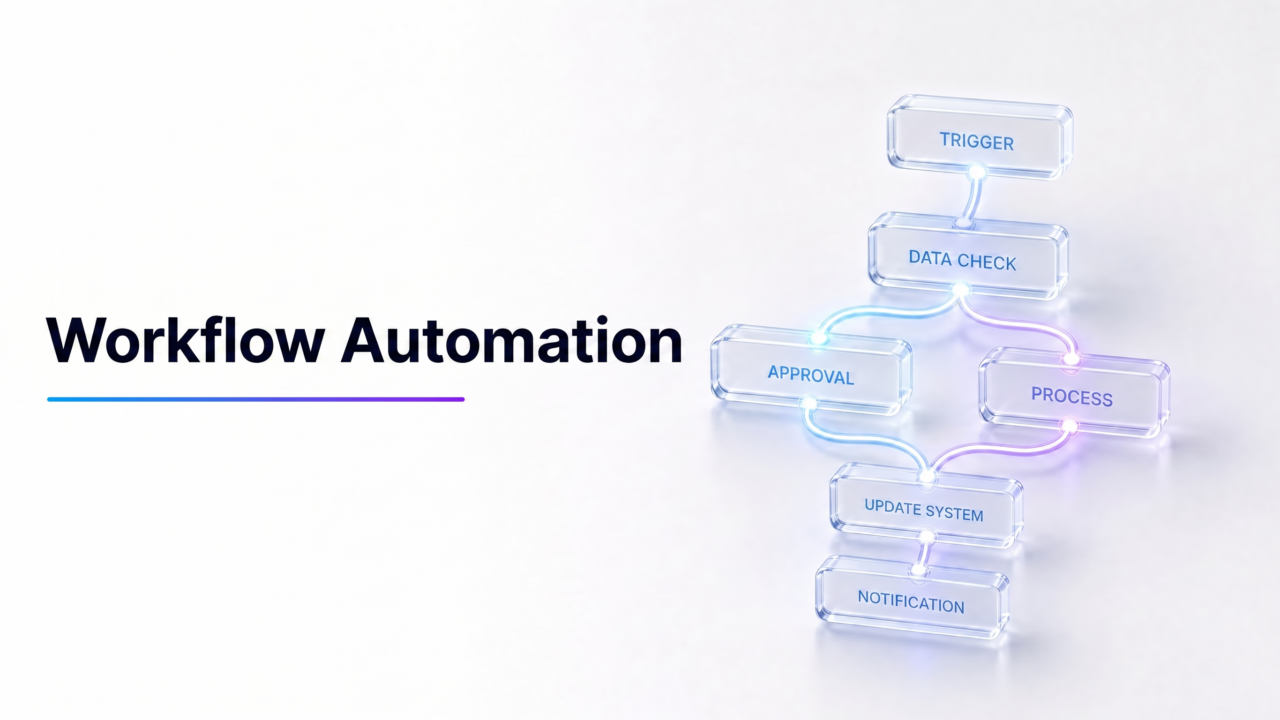
Most automated workflows are built around a simple structure: trigger, condition, action, integration, notification and exception handling.
| Component | What it does | Example |
|---|---|---|
| Trigger | Starts the workflow. | A form is submitted, invoice received, ticket created or deal stage changed. |
| Condition | Decides what should happen next. | If lead score is above 80, assign to sales; if below 80, send to nurture. |
| Action | Performs a task automatically. | Create a CRM task, send an email, update a spreadsheet or generate a document. |
| Data mapping | Moves fields between systems. | Map “company name” from a form into the CRM account field. |
| Approval | Adds human review where needed. | Manager approves a purchase request before payment. |
| Notification | Alerts the right person or team. | Send a Slack message when a high-value lead arrives. |
| Integration | Connects apps, APIs or databases. | Connect HubSpot, Gmail, Slack, Asana and Google Sheets. |
| Log | Records what happened. | Store timestamp, workflow step, owner and result. |
| Exception path | Handles errors or unusual cases. | If email is missing, send the record to a manual review queue. |
The difference between a reliable workflow and a fragile one is often the exception path. Anyone can automate the happy path. The real work is deciding what happens when data is missing, an API fails, a user enters nonsense, a manager does not approve, or an AI summary looks suspiciously confident.
Workflow Automation vs Task Automation vs RPA vs BPM
Workflow automation is often confused with task automation, robotic process automation and business process management. They overlap, but they are not the same thing.
| Term | Meaning | Example |
|---|---|---|
| Task automation | Automates one isolated action. | Send a confirmation email after a form submission. |
| Workflow automation | Automates a sequence of tasks across people, systems and rules. | New lead → enrich data → score lead → assign rep → notify sales → update CRM. |
| Business process automation | Automates a broader end-to-end business process. | Quote-to-cash, employee onboarding or procurement approval. |
| RPA | Uses bots to mimic human actions in software interfaces. | Copy invoice data from an email into an ERP where no API exists. |
| BPM | Designs, manages, monitors and improves business processes. | Model and optimize a procurement process across departments. |
| Workflow orchestration | Coordinates steps across systems, APIs, people and sometimes AI agents. | Route approvals across CRM, Slack, finance software, e-signature and document storage. |
Task automation saves time on a single action. Workflow automation improves the flow of work across steps. BPM improves the process design. RPA helps when old systems cannot integrate properly. Orchestration coordinates many moving parts. In a mature company, all of these may exist together.
Examples of Workflow Automation by Department
Workflow automation can be used in almost every business function, but the best use cases usually have repeated steps, clear rules, structured data and measurable outcomes.
| Department | Workflow automation example | Business benefit |
|---|---|---|
| Sales | Lead routing, lead scoring, CRM updates, follow-up reminders. | Faster response time and cleaner pipeline. |
| Marketing | Email nurture flows, campaign approvals, content calendars, webinar follow-ups. | More consistent campaign execution. |
| Customer support | Ticket assignment, escalation, SLA alerts, customer updates. | Faster support and fewer missed tickets. |
| Finance | Invoice approval, payment reminders, expense review, purchase requests. | Lower manual effort and fewer processing errors. |
| HR | Employee onboarding, document collection, training reminders, performance review routing. | Smoother employee experience and less admin work. |
| Operations | Inventory alerts, order routing, vendor notifications, quality checks. | More reliable execution across teams. |
| IT | Access requests, incident routing, password reset flows, asset management. | Better governance and faster resolution. |
| Legal | Contract review routing, approval workflows, document version tracking. | More controlled review and auditability. |
| Project management | Status updates, task assignment, deadline reminders, approval gates. | Less manual coordination. |
| Executive reporting | Weekly KPI collection, dashboard updates, automated summaries. | Better visibility without manual report chasing. |
Detailed Workflow Automation Templates
Generic examples are useful, but workflow automation becomes easier to understand when you see the trigger, rules, actions and metrics together.
Lead routing workflow
Trigger: Website form submitted

Condition: Company size is above 50 employees

Action: Enrich company data

Action: Score lead based on industry, role, company size and page visited

Condition: Score above threshold

Action: Assign to sales rep

Action: Create CRM task

Action: Send Slack notification

Exception: Missing phone or email → send to research queue

Metrics: response time, lead-to-SQL rate, sales acceptance rate, conversion rate
This workflow is useful because lead speed matters. A good automation can reduce the time between form submission and sales follow-up while keeping the CRM cleaner.
Invoice approval workflow
Trigger: Invoice received by email or uploaded to finance system

Action: Extract vendor, invoice number, amount and due date

Condition: Amount under $500

Action: Route to manager approval

Condition: Amount over $500

Action: Route to finance and department head

Action: Update accounting system after approval

Action: Notify vendor when approved

Exception: Missing PO number → send to finance review queue

Metrics: approval time, error rate, late-payment rate, exception rate
This workflow reduces finance back-and-forth and creates a clearer audit trail. The important part is not only automation, but also approval control.
Customer support escalation workflow
Trigger: New support ticket created

Action: Classify topic and urgency

Condition: VIP customer or high-severity issue

Action: Assign to senior support agent

Action: Notify support lead

Condition: SLA time approaching

Action: Send escalation alert

Exception: Sentiment negative or legal language detected → route to human review

Metrics: first response time, resolution time, SLA compliance, CSAT
This kind of workflow helps support teams avoid missed escalations while keeping sensitive cases under human control.
Employee onboarding workflow
Trigger: New hire marked as accepted in HR system

Action: Create employee profile

Action: Send welcome email

Action: Request tax, payroll and ID documents

Action: Create IT access request

Action: Assign onboarding checklist

Action: Schedule first-week meetings

Exception: Missing signed contract → pause access provisioning

Metrics: onboarding completion time, missing-document rate, IT access delay
Employee onboarding is a strong automation candidate because it involves repeated steps, many departments and obvious deadline risk.
Benefits of Workflow Automation
The benefits of workflow automation are not limited to saving time. Good automation improves consistency, visibility, accountability and decision quality.
| Benefit | What it means in practice |
|---|---|
| Less manual work | Employees spend less time copying, pasting, chasing approvals and updating tools. |
| Fewer errors | Data moves through predefined fields and rules instead of manual re-entry. |
| Faster cycle times | Processes move immediately after triggers instead of waiting for someone to notice. |
| Better accountability | Each step has an owner, timestamp and status. |
| Improved customer experience | Leads, tickets and requests receive faster responses. |
| Standardized processes | Teams follow the same rules instead of improvising every time. |
| Better visibility | Managers can see bottlenecks, delays and exceptions. |
| Lower operating cost | Repetitive work can be handled with software instead of manual labor. |
| Higher employee satisfaction | People spend less time on boring admin work and more time on useful work. |
| Better data quality | Automation can enforce required fields, formatting and validation rules. |
The biggest benefit is usually not one dramatic saving. It is the compounding effect of removing small delays and repeated mistakes from daily operations.
What Workflow Automation Tools Do
Workflow automation tools help teams design, run and monitor automated processes. The exact features depend on the platform, but most serious tools share the same core capabilities.
- Visual workflow builder.
- Triggers and actions.
- Conditional logic.
- App integrations.
- API connections.
- Data mapping between fields.
- Approval routing.
- Notifications.
- Templates.
- Role permissions.
- Error handling.
- Workflow logs.
- Reporting and analytics.
- AI-assisted workflow building or AI steps.
The best tool depends on the business. A small team may need Zapier or Make. A technical team may prefer n8n. A Microsoft-heavy enterprise may use Power Automate. A large company with complex systems may need Workato or another enterprise orchestration platform. A legacy back-office process may need RPA. A support team may already have workflow automation inside its helpdesk.
Best Workflow Automation Tool Categories
There is no single best workflow automation tool for every company. Start with the category, then compare platforms.
| Tool category | Examples | Best for |
|---|---|---|
| No-code automation | Zapier, Make | Small business app-to-app automation and fast setup. |
| Open-source / technical automation | n8n | Technical teams wanting more control, customization and self-hosting options. |
| Enterprise automation | Workato, Microsoft Power Automate | Larger teams that need governance, integrations and enterprise controls. |
| Project/work management automation | monday.com, Asana, ClickUp, Airtable | Tasks, approvals, calendars, operations and team workflows. |
| CRM automation | HubSpot, Salesforce | Lead routing, lifecycle stages, sales tasks, deal updates and customer journeys. |
| RPA | UiPath, Automation Anywhere | Legacy systems and repetitive screen-based tasks where APIs are unavailable. |
| IT/service workflows | ServiceNow, Jira Service Management | Tickets, access requests, ITSM, incident response and approvals. |
| AI workflow tools | ChatGPT, Claude, Gumloop, Zapier AI, n8n AI workflows | AI-assisted classification, summarization, drafting, routing and research. |
Do not choose a workflow automation tool only because it has the most integrations. Choose the tool that matches your process complexity, technical skill level, governance needs, budget and failure tolerance.
AI Workflow Automation: What Changed in 2026?
AI changed workflow automation by making it possible to automate work that involves language, documents, images, emails, tickets and messy unstructured data. Traditional automation is excellent when the rules are clear. AI-assisted automation is useful when the workflow needs classification, summarization, extraction, drafting or judgment support.
For example, a traditional workflow can send a ticket to the support team when a form is submitted. An AI-assisted workflow can read the ticket, summarize the problem, classify urgency, suggest a reply, detect missing information and route it to the right team for human review.
| Traditional workflow automation | AI-assisted workflow automation |
|---|---|
| Follows fixed rules. | Can classify, summarize, draft or interpret content. |
| Works best with structured data. | Can handle unstructured emails, tickets, PDFs and notes. |
| Needs predefined paths. | Can suggest routing or extract intent from text. |
| Low risk when simple and predictable. | Higher risk if outputs are not reviewed. |
| Example: send invoice reminder. | Example: read invoice email, extract fields and flag anomalies. |
| Example: assign lead by country. | Example: score lead based on website behavior and company description. |
AI is powerful, but it should not be treated as a flawless operations manager. AI workflow automation needs validation, permissions, logs, fallback paths, human approval and clear rules about what the AI may and may not do.
Good AI workflow automation use cases
- Summarizing customer support tickets.
- Classifying inbound leads.
- Extracting invoice fields from emails or PDFs.
- Drafting internal status updates.
- Routing requests based on message intent.
- Generating first-draft replies for human review.
- Turning meeting notes into tasks.
- Detecting missing fields in forms.
- Summarizing weekly KPI reports.
- Creating research briefs from approved sources.
Riskier AI workflow automation use cases
- Approving financial transactions without review.
- Changing customer account status automatically.
- Making HR or legal decisions.
- Granting system access without human approval.
- Sending sensitive customer replies without review.
- Using private or regulated data in unapproved AI tools.
- Letting AI agents execute destructive actions without rollback.
The practical rule is simple: use AI to prepare, classify, summarize and suggest. Keep humans responsible for sensitive decisions.
What Should Not Be Automated?
Workflow automation is useful, but not every process deserves automation. Some processes should be fixed, simplified or redesigned before software gets involved.
Avoid automating:
- Broken processes that nobody has mapped properly.
- Rare edge cases that do not justify automation cost.
- Decisions requiring legal, compliance or ethical judgment.
- Sensitive HR actions without human review.
- High-value finance approvals without controls.
- Security access changes without audit logs.
- Customer complaints requiring empathy and context.
- Processes with dirty, inconsistent or missing data.
- Workflows where failure has high cost and no rollback.
- Automations nobody owns after launch.
Automation does not make a bad process good. It makes a bad process faster. That is not the same thing, although it is an excellent way to create a highly efficient disaster.
How to Build an Automated Workflow
Building an automated workflow starts before choosing software. The first step is understanding the process. If the team cannot explain the current process, it is not ready to automate it.
- Map the current process. List each step, owner, input, output, handoff and delay.
- Identify the trigger. Decide what starts the workflow: form submission, new ticket, invoice received, deal updated or file uploaded.
- Remove unnecessary steps. Do not automate steps that should not exist.
- Choose the automation type. Decide whether the process needs no-code automation, API integration, RPA, BPM, AI assistance or a native tool workflow.
- Define rules and conditions. Specify what happens for different cases.
- Add approval points. Keep human review where risk, money, access or customer impact is involved.
- Map data fields. Make sure the right data moves into the right fields in each system.
- Define exception paths. Decide what happens when data is missing, tools fail or a case does not match the rules.
- Test with real examples. Use normal cases, edge cases and bad data.
- Launch with monitoring. Watch workflow runs, failures, delays and unexpected outcomes.
- Measure performance. Compare time, cost, errors and output quality before and after automation.
- Improve continuously. Update rules, templates and integrations as the business changes.
The best automation projects start small. Automate one painful workflow, measure the result, then expand. A company does not need to automate everything in one dramatic transformation project. That is usually how consultants get yachts and operations teams get headaches.
Workflow Automation Metrics and ROI
Workflow automation should be measured. Otherwise, the team may only know that something feels faster, which is charming but not a business case.
| Metric | What it measures |
|---|---|
| Cycle time | How long the workflow takes from start to finish. |
| Handoff time | Delay between people, teams or systems. |
| Error rate | Mistakes before and after automation. |
| Manual touches | How many human actions remain. |
| Automation success rate | Percentage of workflows completed without failure. |
| Exception rate | How often workflows need human intervention. |
| Cost per process | Labor and tool cost per completed workflow. |
| SLA compliance | Whether deadlines are met more consistently. |
| Employee time saved | Hours returned to higher-value work. |
| Customer response time | How quickly customers, leads or internal users receive a response. |
| Adoption rate | Whether teams actually use the workflow. |
| Data quality improvement | Reduction in missing, duplicate or inconsistent records. |
A simple ROI model can start with time saved:
Monthly time saved = manual time per task × number of tasks per month − automation review time

Monthly labor value saved = monthly time saved × average hourly cost

Net automation value = labor value saved + error reduction + faster revenue impact − tool and maintenance cost
Not every benefit is purely financial. Faster lead response, better customer experience, cleaner data and lower employee frustration can also be valuable. Still, if a workflow cannot be measured at all, it probably needs a clearer goal.
Common Workflow Automation Mistakes
Most workflow automation failures are not caused by bad tools. They are caused by bad process design, unclear ownership or poor testing.
Automating a bad process
If the current process is confusing, redundant or politically weird, automation will not fix it. Map and simplify the process first.
Choosing tools before mapping workflows
Tool-first automation often creates expensive workarounds. Process-first automation creates better requirements.
Ignoring exceptions
Real workflows are full of missing fields, duplicate records, rejected approvals and edge cases. If the workflow only handles perfect input, it will break in normal use.
No owner for failed automations
Every automated workflow needs an owner. Someone must know when it fails, how to fix it and when to turn it off.
No documentation
If only one person understands the workflow, the company has not automated a process. It has created a tiny kingdom with a single monarch.
No audit trail
Approval workflows, finance processes, access requests and customer-impacting automations should create logs. If nobody can see what happened, troubleshooting becomes guesswork.
Connecting too many tools too quickly
Complex integrations increase failure points. Start with the few systems that matter most.
Not cleaning data first
Automation depends on data quality. Dirty data creates dirty workflows, just more consistently.
No rollback plan
If an automation updates 2,000 CRM records incorrectly, someone should know how to undo it. Hope is not a rollback strategy.
How to Choose Workflow Automation Software
The right workflow automation software depends on your team’s technical ability, systems, workflow complexity and governance needs.
Before choosing a platform, ask:
- Which workflows do we need to automate first?
- Which apps and systems must connect?
- Do we need no-code, low-code, API-first or RPA?
- Do we need AI steps such as summarization or classification?
- Who will build and maintain workflows?
- How will permissions and approvals be handled?
- Does the tool provide logs and error alerts?
- Can workflows be tested before going live?
- How does pricing scale with users, tasks or runs?
- What happens if the automation fails?
- Can the workflow support human review?
- Does the platform meet security and compliance requirements?
A good platform should make common workflows easy without hiding the operational details that matter: permissions, field mapping, failure handling, logs and ownership.
Workflow Automation for Small Businesses
Small businesses can benefit from workflow automation quickly because many daily processes are still handled manually. The best early automations are simple, low-risk and repetitive.
Good small-business workflow automation ideas include:
- Send website leads to a CRM and notify the owner.
- Create a task when a quote request arrives.
- Send appointment reminders.
- Move paid invoices into a finance folder.
- Send review requests after service completion.
- Update a spreadsheet when an order is placed.
- Notify the team when inventory is low.
- Send onboarding emails to new clients.
- Create support tickets from form submissions.
- Generate weekly summary reports.
Small teams should avoid overengineering. The best first automation is usually the one that removes a daily irritation and can be explained in one sentence.
Workflow Automation Governance Checklist
As automation becomes more important, governance matters. This is especially true when workflows touch customer data, financial approvals, access permissions, legal documents or AI tools.
- Assign an owner for every workflow.
- Document the trigger, actions, conditions and exception paths.
- Use clear naming conventions.
- Limit permissions to the people who need access.
- Test with real examples before launch.
- Keep a change log.
- Review workflows after major tool or process changes.
- Monitor failure alerts.
- Use human approval for sensitive steps.
- Create a rollback process for destructive actions.
- Review AI outputs before customer-facing or high-risk actions.
- Audit workflows regularly for unused or outdated automations.
Governance is not bureaucracy for its own sake. It is how companies prevent small automations from becoming invisible infrastructure nobody understands until something breaks.
Final Verdict: Workflow Automation Is Process Design First, Software Second
Workflow automation can save time, reduce errors, improve customer experience and make operations more consistent. But the tool is not the strategy. The strategy is designing a repeatable process where triggers, rules, actions, approvals, integrations and exception handling move work reliably across people and systems.
In 2026, AI makes workflow automation more powerful by helping classify, summarize, extract and draft. But AI also raises the stakes. Automated workflows need validation, logs, human review and fallback paths, especially when they affect customers, money, security, compliance or sensitive decisions.
The best place to start is not with the flashiest tool. Start with the workflow that wastes time every week, causes avoidable errors or slows down customers. Map it. Remove unnecessary steps. Automate the predictable parts. Keep humans in the loop where judgment matters. Measure the result. Then repeat.
That is workflow automation at its best: not replacing work, but making work flow.
Workflow Automation FAQ
What is workflow automation?
Workflow automation is the use of software to move tasks, data, approvals and notifications through a defined business process without manual handoffs. It usually starts with a trigger, follows rules or conditions, performs actions and alerts people only when human review is needed.
What is an example of workflow automation?
A common workflow automation example is lead routing. When a website form is submitted, the workflow enriches the company data, scores the lead, assigns it to a sales rep, creates a CRM task and sends a team notification automatically.
What is the difference between workflow automation and task automation?
Task automation automates one isolated action, such as sending an email. Workflow automation automates a sequence of related steps across people, systems and rules, such as routing a lead, updating the CRM, notifying sales and triggering follow-up.
What is the difference between workflow automation and RPA?
Workflow automation usually connects apps, APIs and rules to move work through a process. RPA, or robotic process automation, uses software bots to mimic human actions in user interfaces, often when older systems do not provide good integrations or APIs.
What tools are used for workflow automation?
Common workflow automation tools include Zapier, Make, n8n, Microsoft Power Automate, Workato, HubSpot, Salesforce, monday.com, Asana, ClickUp, ServiceNow, Jira Service Management, UiPath and Automation Anywhere. The right tool depends on the workflow, systems, technical skill level and governance needs.
Can small businesses use workflow automation?
Yes. Small businesses can use workflow automation for lead capture, appointment reminders, invoice tracking, customer follow-ups, review requests, CRM updates, support tickets and weekly reports. The best first automation is usually simple, repetitive and low risk.
How does AI improve workflow automation?
AI improves workflow automation by handling unstructured work such as summarizing emails, classifying tickets, extracting fields from documents, drafting replies, scoring leads and routing requests based on intent. AI outputs should be reviewed when the workflow is sensitive or customer-facing.
What should not be automated?
Companies should avoid automating broken processes, rare edge cases, sensitive HR decisions, legal or compliance judgments, high-value finance approvals, security access changes without audit logs, customer complaints requiring empathy and workflows with dirty data or no rollback plan.
How do you measure workflow automation ROI?
Workflow automation ROI can be measured through cycle time, manual touches, error rate, employee time saved, cost per process, SLA compliance, customer response time, automation success rate, exception rate and tool cost. The best measurement compares performance before and after automation.
How do you start automating workflows?
Start by mapping one repetitive process, identifying the trigger, removing unnecessary steps, defining rules, choosing the right tool, adding approval points, testing with real examples and measuring the result. Start small before automating complex or sensitive workflows.
Useful References
- Zapier workflow automation
- Make automation platform
- n8n AI workflow automation platform
- Microsoft Power Automate
- Workato enterprise automation
- UiPath robotic process automation
- ServiceNow workflows
- Jira Service Management
- Workflow automation efficiency using n8n: small-scale case study
- Study on LLM agentic workflows in the n8n ecosystem