Stripe Subscription Upgrades: How to Sync Prorated Charges to HubSpot?


Last Updated on August 13, 2026 by Triumphoid Team
TL;DR — Stripe Upgrade → HubSpot Revenue Sync
- Listen to
invoice.payment_succeeded, notcustomer.subscription.updated. The subscription event fires before payment is confirmed. The invoice event fires after money has changed hands and gives you the invoice object to verify what was charged. - Never use the invoice total as the new MRR. The invoice total is the prorated charge for the upgrade — a fraction of a month. MRR comes from the subscription’s current price after the upgrade:
subscription.items.data[0].price.unit_amount / 100. - Calculate the MRR delta explicitly from the subscription’s previous and current plan prices, not from invoice arithmetic. Stripe’s
customer.subscription.updatedevent includesprevious_attributes— store this when it fires so the subsequent invoice handler has access to the before state. - In HubSpot, write to custom MRR properties (
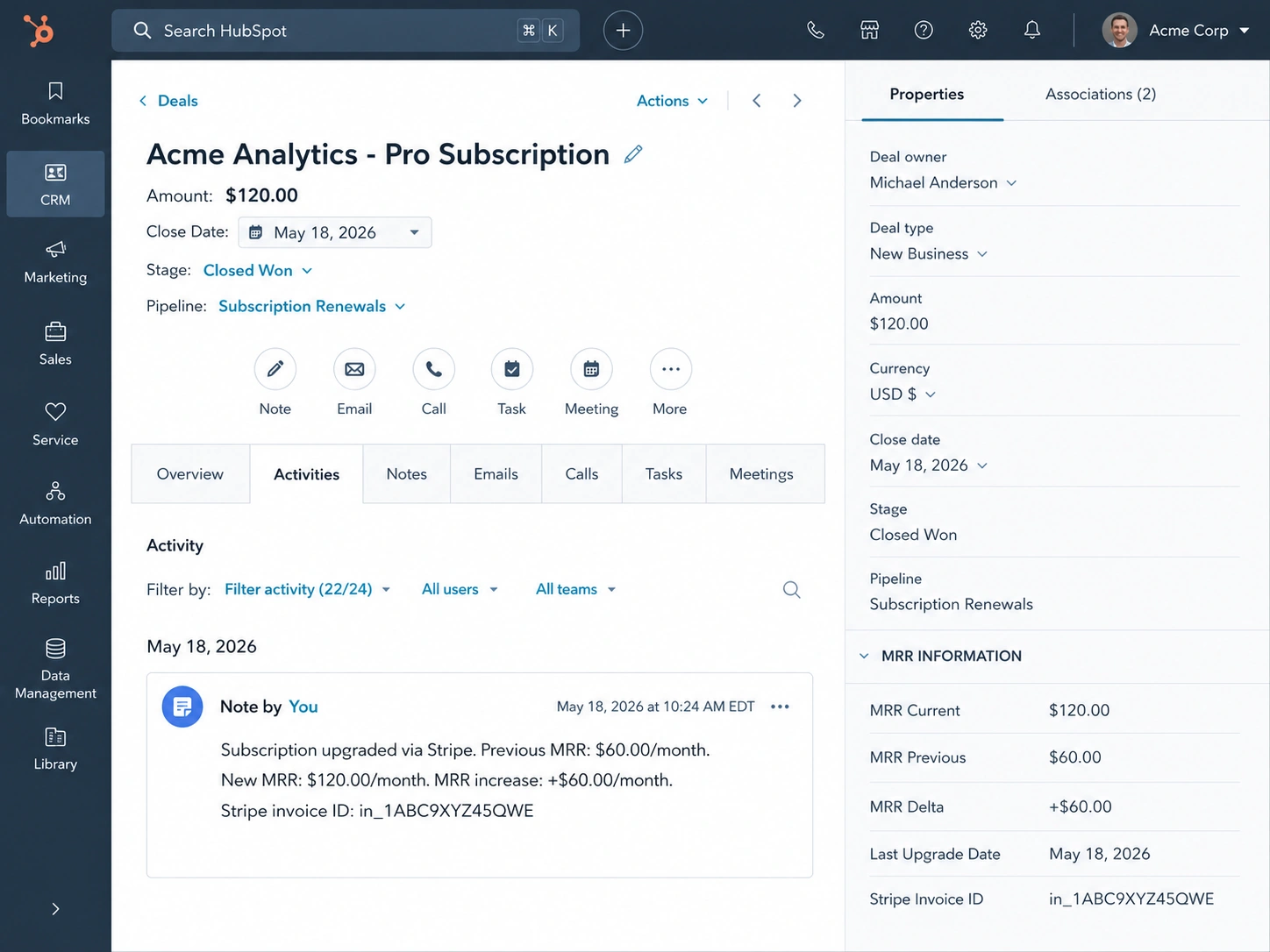
mrr_current,mrr_previous,last_upgrade_date,upgrade_mrr_delta) rather than updatingamountdirectly. Create a note with the Stripe invoice ID and the MRR change for audit trail. The deal’samountfield can then reflect current MRR without historical data being overwritten.
⚠ What Needs to Be in Place First
This pattern assumes: Stripe customers are linked to HubSpot contacts via a stored stripe_customer_id metadata field on the HubSpot contact, HubSpot deals are associated with those contacts and represent active subscriptions, and your webhook endpoint already handles HMAC verification (covered separately). Without the Stripe customer → HubSpot contact link, finding the right deal to update requires an additional lookup step that can fail if the mapping is missing.
When a customer upgrades their Stripe subscription mid-cycle, two things happen that need to be reflected accurately in HubSpot: the customer’s MRR goes up by the difference between the old and new plan, and Stripe charges a prorated amount that covers only the remaining days in the current billing period. The common mistake is syncing the prorated charge as the new deal amount. A $25 proration on a $50/month upgrade doesn’t mean the customer is now worth $25/month — it means they paid for half a month of the $50 difference. The deal amount in HubSpot should reflect the new MRR ($100/month in this example), derived from the subscription’s current price, not from the invoice total.
I manage Stripe-to-HubSpot revenue sync for three SaaS clients. Before we built this correctly, 8 deals across the portfolio had corrupted MRR data from upgrade events over a three-month period — 6 of those because a prorated invoice amount had been written to the deal as if it were a monthly MRR figure, and 2 because the deal amount was updated without preserving the previous value anywhere. The ARR reports were wrong, the upgrade attribution was wrong, and untangling it required manual reconciliation against Stripe. This post covers the webhook event, the math, and the HubSpot write pattern that prevents all three of those issues.
How Stripe Structures a Proration
Understanding what Stripe actually charges on an upgrade is necessary before you can extract the right numbers. Take a customer upgrading from a $60/month plan to a $120/month plan on day 18 of a 30-day billing cycle.
Stripe computes the proration like this:
Stripe proration math — $60/month → $120/month on day 18 of 30
Days remaining in cycle  = 30 - 18 = 12 days
Days in full cycle       = 30 days
Proration fraction       = 12 / 30 = 0.40

Credit for unused old plan  = $60.00 × 0.40 = $24.00  (negative line item)
Charge for new plan time    = $120.00 × 0.40 = $48.00  (positive line item)

Net invoice total           = $48.00 - $24.00 = $24.00

# ❌ Wrong: Store $24 as the new MRR in HubSpot
# ✅ Correct: MRR increased by $60/month. New MRR is $120/month.

# The prorated charge ($24) tells you WHAT WAS BILLED this cycle.
# The subscription's current price tells you MRR.
The invoice Stripe generates has two proration line items with proration: true: a negative credit for unused time on the old plan and a positive charge for the new plan time. Both items exist on the same invoice. The invoice total is the net. None of those figures represent MRR — they represent billing arithmetic for a partial period.
Why invoice.payment_succeeded Is the Right Webhook Event
Stripe fires several events in sequence during an upgrade. The order is typically: customer.subscription.updated → invoice.created → invoice.finalized → invoice.payment_succeeded. Each serves a different purpose.
customer.subscription.updated fires the moment the subscription changes — before Stripe has generated or collected the invoice. If you update HubSpot here, you’re updating based on a subscription state that hasn’t been paid for yet. If the payment fails (expired card, insufficient funds), the subscription may revert and you’ve written incorrect data to HubSpot.
invoice.payment_succeeded fires only after payment clears. The invoice object attached to the event contains the line items, the subscription ID, and the Stripe customer ID. It’s the definitive signal that money changed hands and the upgrade is confirmed. This is where the HubSpot write belongs.
There’s a practical problem with using only invoice.payment_succeeded: the invoice event doesn’t include the previous subscription price. The invoice tells you what was charged today; it doesn’t tell you what the customer was paying before. To calculate the MRR delta, you need to know both the old and new plan prices. Stripe’s customer.subscription.updated event does include previous_attributes — a snapshot of the fields that changed.
The solution is to listen to both events, in the right way: store the subscription’s previous price when customer.subscription.updated fires, then use that stored data when invoice.payment_succeeded fires to compute the MRR delta accurately.
Webhook handler — both events, correct sequencing
import stripe
import json
from flask import Flask, request
from datetime import datetime

app = Flask(__name__)

# Temporary store for subscription state transitions
# In production: use Redis or a database table, not an in-process dict
pending_upgrades = {}

@app.route("/webhooks/stripe", methods=["POST"])
def stripe_webhook():
    payload = request.get_data()
    sig_header = request.headers.get("Stripe-Signature")

    try:
        event = stripe.Webhook.construct_event(
            payload, sig_header, STRIPE_WEBHOOK_SECRET
        )
    except stripe.error.SignatureVerificationError:
        return "Unauthorized", 401

    if event["type"] == "customer.subscription.updated":
        handle_subscription_updated(event["data"])

    elif event["type"] == "invoice.payment_succeeded":
        handle_invoice_paid(event["data"]["object"])

    return "OK", 200


def handle_subscription_updated(data: dict):
    """
    Store previous plan price so invoice handler can compute MRR delta.
    Only store upgrade events (amount increased).
    """
    subscription = data["object"]
    previous = data.get("previous_attributes", {})

    if "items" not in previous:
        return  # Plan didn't change — nothing to store

    sub_id = subscription["id"]
    current_items = subscription["items"]["data"]
    prev_items = previous.get("items", {}).get("data", [])

    if not prev_items:
        return

    old_unit_amount = prev_items[0]["price"]["unit_amount"]
    new_unit_amount = current_items[0]["price"]["unit_amount"]

    if new_unit_amount <= old_unit_amount:
        return  # Downgrade or no change — handle separately if needed

    # Store the transition keyed by subscription ID
    pending_upgrades[sub_id] = {
        "old_plan_id":      prev_items[0]["price"]["id"],
        "old_unit_amount":  old_unit_amount,   # In cents
        "old_interval":     prev_items[0]["price"]["recurring"]["interval"],
        "new_plan_id":      current_items[0]["price"]["id"],
        "new_unit_amount":  new_unit_amount,
        "new_interval":     current_items[0]["price"]["recurring"]["interval"],
        "customer_id":      subscription["customer"],
        "stored_at":        datetime.utcnow().isoformat(),
    }


def handle_invoice_paid(invoice: dict):
    """
    Confirmed payment received. Compute real MRR and update HubSpot.
    """
    # Only process invoices with proration line items
    has_proration = any(
        line.get("proration") for line in invoice["lines"]["data"]
    )
    if not has_proration:
        return

    sub_id = invoice.get("subscription")
    if not sub_id or sub_id not in pending_upgrades:
        return  # No pending upgrade stored for this subscription

    upgrade_data = pending_upgrades.pop(sub_id)  # Remove from store
    process_upgrade_sync(invoice, upgrade_data)
Calculating Actual MRR from the Subscription
With both event payloads available, calculating MRR is straightforward. The key distinction is between plan interval normalization: a $1,200/year annual plan has the same MRR ($100/month) as a $100/month monthly plan, but Stripe stores both as their respective unit_amount values in cents. Any MRR calculation needs to normalize to a monthly figure.
MRR calculation — normalize by billing interval
def unit_amount_to_monthly_mrr(unit_amount_cents: int, interval: str) -> float:
    """
    Convert Stripe price unit_amount (in cents) to monthly MRR (in dollars).

    Stripe intervals: "day", "week", "month", "year"
    For simplicity this covers month/year — add day/week if your plans use them.
    """
    amount_dollars = unit_amount_cents / 100

    if interval == "month":
        return amount_dollars
    elif interval == "year":
        return amount_dollars / 12
    elif interval == "week":
        return amount_dollars * 52 / 12
    elif interval == "day":
        return amount_dollars * 365 / 12
    else:
        raise ValueError(f"Unknown billing interval: {interval}")


def process_upgrade_sync(invoice: dict, upgrade_data: dict):
    old_mrr = unit_amount_to_monthly_mrr(
        upgrade_data["old_unit_amount"],
        upgrade_data["old_interval"]
    )
    new_mrr = unit_amount_to_monthly_mrr(
        upgrade_data["new_unit_amount"],
        upgrade_data["new_interval"]
    )
    mrr_delta = new_mrr - old_mrr

    # Verify against the invoice proration math (sanity check only — don't use
    # invoice amounts to derive MRR)
    proration_lines = [l for l in invoice["lines"]["data"] if l.get("proration")]
    net_proration_cents = sum(l["amount"] for l in proration_lines)
    net_proration_dollars = net_proration_cents / 100

    # Expected proration from cycle timing
    period = proration_lines[0]["period"]
    days_remaining = (period["end"] - invoice["created"]) / 86400
    days_in_cycle = (period["end"] - period["start"]) / 86400
    expected_proration = mrr_delta * (days_remaining / days_in_cycle)

    # If actual vs expected differ by more than $1, log for investigation
    if abs(net_proration_dollars - expected_proration) > 1.00:
        print(
            f"WARNING: Proration mismatch on {invoice['id']}. "
            f"Expected ${expected_proration:.2f}, "
            f"got ${net_proration_dollars:.2f}. "
            f"May indicate multi-item subscription or coupon."
        )

    # Proceed with the MRR-based update regardless
    update_hubspot_deal(
        customer_id=upgrade_data["customer_id"],
        old_mrr=old_mrr,
        new_mrr=new_mrr,
        mrr_delta=mrr_delta,
        invoice_id=invoice["id"],
        upgrade_date=datetime.utcfromtimestamp(invoice["created"]).isoformat()
    )
The proration sanity check is worth keeping even if you don’t act on it. In practice I’ve seen it fire when a customer has a coupon that reduces the base price — the invoice arithmetic changes but the subscription price doesn’t, so the proration doesn’t match the expected calculation. When the mismatch log fires, it’s a signal that there’s something worth investigating manually rather than an error to halt on.
The Data Gap Stripe Doesn’t Make Easy
Stripe doesn’t include previous plan data on invoice.payment_succeeded. The invoice tells you what was billed; it doesn’t tell you what changed from. To know the old plan price, you either have to listen to customer.subscription.updated first and store the previous state yourself, or make a second API call to retrieve the subscription’s price history — which Stripe doesn’t expose directly and requires reconstructing from event logs. This forces every developer building upgrade-sync logic to maintain their own state machine for subscription transitions, even though Stripe already computed and stored exactly this information to generate the invoice in the first place.
The pattern of storing state from customer.subscription.updated and consuming it in invoice.payment_succeeded works, but it introduces a failure mode: if the subscription update event is missed (webhook delivery failure, handler error, deployment during the window), the invoice handler finds no stored data and skips the sync. For production systems, the pending upgrade store should be persistent (Redis with a 24-hour TTL, or a database table) rather than in-process, and the invoice handler should have a fallback: if no stored transition is found, retrieve the current subscription from Stripe via API and compare against whatever MRR value is currently in HubSpot.
Updating HubSpot Without Overwriting History
HubSpot’s standard deal amount property is a single current value with no built-in history. Updating it directly replaces whatever was there. For revenue reporting, losing the previous MRR value loses your ability to calculate net MRR expansion, track upgrade cohorts, or audit when and how a deal’s value changed.
The approach that preserves history without fighting HubSpot’s data model: use custom deal properties for MRR tracking, update the native amount field as a reflection of current MRR (so it’s always current for standard reporting), and create a HubSpot Note on the deal for every upgrade event that permanently records what changed, when, and why. Notes are immutable in HubSpot — creating one rather than updating a property gives you an append-only audit log.
The custom properties to create in HubSpot (Settings → Properties → Deal properties → Create):
HubSpot deal update — custom MRR properties + audit note
import requests as req

HUBSPOT_TOKEN = "your-hubspot-private-app-token"
HS_BASE = "https://api.hubapi.com"

HEADERS = {
    "Authorization": f"Bearer {HUBSPOT_TOKEN}",
    "Content-Type": "application/json",
}

# Custom HubSpot properties (create these in HubSpot Settings → Properties):
# mrr_current       (Number)  — current monthly recurring revenue
# mrr_previous      (Number)  — MRR before the most recent upgrade
# mrr_delta         (Number)  — MRR increase from most recent upgrade
# last_upgrade_date (Date)    — date of most recent upgrade
# stripe_invoice_id (Single-line text) — Stripe invoice ID of last upgrade

def find_deal_by_stripe_customer(customer_id: str) -> dict | None:
    """
    Find HubSpot deal via contact's stripe_customer_id metadata.
    Assumes contacts have a custom property 'stripe_customer_id'.
    """
    # Search contacts by Stripe customer ID
    contact_search = req.post(
        f"{HS_BASE}/crm/v3/objects/contacts/search",
        headers=HEADERS,
        json={
            "filterGroups": [{
                "filters": [{
                    "propertyName": "stripe_customer_id",
                    "operator": "EQ",
                    "value": customer_id
                }]
            }],
            "properties": ["stripe_customer_id", "associatedcompanyid"],
            "limit": 1
        }
    )
    contact_search.raise_for_status()
    results = contact_search.json().get("results", [])
    if not results:
        return None

    contact_id = results[0]["id"]

    # Get associated deals
    deals_resp = req.get(
        f"{HS_BASE}/crm/v3/objects/contacts/{contact_id}/associations/deals",
        headers=HEADERS,
    )
    deals_resp.raise_for_status()
    deal_ids = [r["id"] for r in deals_resp.json().get("results", [])]

    if not deal_ids:
        return None

    # Return most recently updated deal (assumes one active deal per customer)
    deal_resp = req.get(
        f"{HS_BASE}/crm/v3/objects/deals/{deal_ids[0]}",
        headers=HEADERS,
        params={"properties": "mrr_current,amount,dealname"}
    )
    deal_resp.raise_for_status()
    return deal_resp.json()


def update_hubspot_deal(
    customer_id: str,
    old_mrr: float,
    new_mrr: float,
    mrr_delta: float,
    invoice_id: str,
    upgrade_date: str,
):
    deal = find_deal_by_stripe_customer(customer_id)
    if not deal:
        print(f"No HubSpot deal found for Stripe customer {customer_id}")
        return

    deal_id = deal["id"]

    # Step 1: Update deal properties
    # amount = new MRR (keeps standard reporting current)
    # Custom properties preserve history
    update_resp = req.patch(
        f"{HS_BASE}/crm/v3/objects/deals/{deal_id}",
        headers=HEADERS,
        json={
            "properties": {
                "amount":             str(round(new_mrr, 2)),
                "mrr_current":        str(round(new_mrr, 2)),
                "mrr_previous":       str(round(old_mrr, 2)),
                "mrr_delta":          str(round(mrr_delta, 2)),
                "last_upgrade_date":  upgrade_date[:10],  # YYYY-MM-DD
                "stripe_invoice_id":  invoice_id,
            }
        }
    )
    update_resp.raise_for_status()
    print(f"Updated deal {deal_id}: MRR ${old_mrr:.2f} → ${new_mrr:.2f}")

    # Step 2: Create an immutable audit note on the deal
    note_body = (
        f"Subscription upgraded via Stripe.\n\n"
        f"Previous MRR: ${old_mrr:.2f}/month\n"
        f"New MRR: ${new_mrr:.2f}/month\n"
        f"MRR increase: +${mrr_delta:.2f}/month\n"
        f"Effective date: {upgrade_date[:10]}\n"
        f"Stripe invoice: {invoice_id}"
    )

    import time
    note_resp = req.post(
        f"{HS_BASE}/crm/v3/objects/notes",
        headers=HEADERS,
        json={
            "properties": {
                "hs_note_body":  note_body,
                "hs_timestamp":  str(int(time.time() * 1000)),  # Unix ms
            },
            "associations": [{
                "to": {"id": deal_id},
                "types": [{
                    "associationCategory": "HUBSPOT_DEFINED",
                    "associationTypeId": 214   # Note → Deal association
                }]
            }]
        }
    )
    note_resp.raise_for_status()
    print(f"Created audit note on deal {deal_id}")
The note association type ID 214 is HubSpot’s standard Note → Deal association. HubSpot’s association type IDs are consistent across accounts for built-in types — 214 will work without checking. If you’re also associating notes to contacts, the Note → Contact ID is 202.
Handling Edge Cases That Break the Happy Path
Annual plans upgrading to higher annual plans
Annual plan upgrades generate a proration based on remaining days in the annual cycle, not a monthly cycle. The math is the same — mrr_delta × (days_remaining / days_in_cycle) — but days_in_cycle is approximately 365. The invoice amount will be large (covering most of a year’s worth of delta) but the monthly MRR delta is still just the difference between the two annual plan prices divided by 12. The interval normalization in unit_amount_to_monthly_mrr() handles this automatically if both old and new prices have their intervals stored correctly.
Subscriptions with multiple items
If a subscription has multiple price items (a base plan plus per-seat add-ons, for example), the proration invoice will have multiple sets of proration line items — one credit/charge pair per item that changed. The subscription.items.data array will have multiple entries. Summing MRR across all items is the right approach:
Multi-item subscription — sum MRR across all price items
def calculate_total_mrr(subscription_items: list) -> float:
    """
    Sum MRR across all items in a subscription.
    Handles per-seat pricing (quantity > 1) and mixed intervals.
    """
    total_mrr = 0.0

    for item in subscription_items:
        price = item["price"]
        quantity = item.get("quantity", 1)

        item_mrr = unit_amount_to_monthly_mrr(
            unit_amount_cents=price["unit_amount"],
            interval=price["recurring"]["interval"]
        )
        total_mrr += item_mrr * quantity  # Multiply by quantity for per-seat items

    return total_mrr

# In process_upgrade_sync():
# Instead of reading from stored upgrade_data for multi-item subs,
# fetch the current subscription to get the full item list
subscription = stripe.Subscription.retrieve(
    sub_id,
    expand=["items.data.price"]
)
new_mrr = calculate_total_mrr(subscription["items"]["data"])
Upgrades followed by immediate payment failure
If the proration invoice payment fails, Stripe fires invoice.payment_failed instead of invoice.payment_succeeded. The subscription may be placed into a past-due state. Your handler should do nothing in HubSpot until invoice.payment_succeeded fires — which is why listening to the payment succeeded event rather than the subscription update is the correct approach. The pending upgrade data stored from customer.subscription.updated should have a TTL (24–48 hours) to clean up if the payment ultimately fails and the upgrade is reversed.
What This Pattern Gets Right
- MRR reflects the subscription price, not the billing invoice
- History preserved in both custom properties and immutable notes
- Sync only fires after payment is confirmed
- Annual plans normalized correctly to monthly MRR
- Stripe invoice ID in HubSpot enables direct reconciliation
Failure Modes to Monitor
- Missed
subscription.updatedevent means no stored transition data - Multi-item subscriptions where only one item changed
- Coupons that change effective price without changing plan price
- HubSpot API rate limits (100 req/10s) during high-upgrade periods
- Missing Stripe customer → HubSpot contact link on older accounts
Testing Before Production
Stripe’s test mode provides a complete upgrade testing path. Create a test customer, subscribe them to a test plan, then upgrade them mid-cycle using the Stripe dashboard or API in test mode. The webhook events fire in test mode with realistic proration data. Use stripe listen --forward-to localhost:5000/webhooks/stripe from the Stripe CLI to forward test events to your local handler.
For HubSpot testing, use a HubSpot sandbox account (available on paid plans) or create a dedicated test deal that you don’t mind having its properties updated repeatedly. The note creation is additive — each test run adds a note — so a single test deal accumulates the full history of your test runs, which is actually useful for verifying the note format looks correct before touching production data.
Verify two things explicitly in your test run: that the MRR written to HubSpot matches the new plan’s monthly price (not the invoice total), and that the mrr_previous property reflects the old plan’s MRR correctly. If both are wrong, the issue is in event ordering or the stored transition data. If only the delta is wrong, check the interval normalization for annual plans.
ℹ Building the Stripe Customer → HubSpot Deal Link
If you don’t yet have a stripe_customer_id on your HubSpot contacts, the approach is to add it when a customer first subscribes: on customer.subscription.created, find or create the HubSpot contact by email, then write the Stripe customer ID to the contact’s custom property. Every subsequent webhook event — upgrades, renewals, cancellations — can then find the right HubSpot record reliably via that property.
For existing customers without the link, run a one-time backfill: fetch all Stripe customers, search HubSpot for contacts with matching email addresses, and write the Stripe customer ID to the matching contacts. Track the percentage matched — any customers not linked will be missed by the webhook sync until their contact is found and the property is set.
FAQ
Should I update the HubSpot deal’s close date when an upgrade happens?
Only if your revenue reporting treats upgrades as new deal close events — some teams do, some don’t. If your ARR reporting is based on deal close date, leaving the original close date intact means upgrades are attributed to the original close month, which is usually the correct behavior for tracking original conversion. If you want upgrade attribution in a separate report, a custom property like last_upgrade_date (included in the pattern above) is cleaner than overwriting close date. Changing the native close date affects all HubSpot reports that use it; a custom property only affects reports you’ve built to use it.
What if a customer upgrades twice in the same billing cycle?
Each upgrade generates its own proration invoice, so two upgrades produce two invoice.payment_succeeded events. Each one updates the deal with the latest MRR and creates a new audit note. The mrr_previous property after the second upgrade will reflect the first upgrade’s MRR, not the original plan — which is correct. The full history is in the notes. If you need to report on the net change across all upgrades in a period, summing the mrr_delta values from the notes gives you that figure, though reporting on note content requires a custom HubSpot report or exporting notes via the API.
Can this same pattern handle downgrades?
With modifications. Stripe handles downgrades differently by default: rather than charging a proration immediately, Stripe applies a credit to the customer’s balance and applies it on the next billing cycle. This means a downgrade may not generate an invoice.payment_succeeded event at all — it generates a credit note instead. To catch downgrades, you’d listen to customer.subscription.updated for the plan change and to credit_note.created for the credit. The MRR calculation is the same (new plan price minus old plan price, where the delta is negative for a downgrade). The HubSpot write is also the same — update MRR properties and create an audit note — just with a negative delta value.
HubSpot’s API is returning rate limit errors during upgrade syncs. How do I handle this?
HubSpot’s standard private app limit is 100 requests per 10 seconds. A single upgrade sync uses 3 requests: one contact search, one deal fetch, one deal update, and one note creation — 4 total. You’d need to be processing 25+ simultaneous upgrades to hit the limit. If you are hitting it, wrap each HubSpot API call in a retry function with exponential backoff, checking for HTTP 429 status codes. The Retry-After header on a 429 response tells you how many seconds to wait before retrying. More likely than a pure rate limit issue is that you’re making redundant API calls — the contact search and deal fetch can be cached for the duration of a single upgrade event if the same customer triggers multiple events in quick succession.
How do I report on net MRR expansion from upgrades in HubSpot?
The mrr_delta custom property on each deal holds the most recent upgrade’s contribution. For a period-based expansion report, you’d need to filter deals where last_upgrade_date falls within the reporting period and sum their mrr_delta values. This is straightforward in HubSpot’s custom report builder using the deal properties directly. For more complex cohort analysis — expansion by original signup month, by plan tier, or by customer segment — the HubSpot data may not have enough granularity and you’re better off querying Stripe’s data directly or exporting both datasets to a data warehouse where you can join on customer ID.