
Sales operations automation is finally becoming the backbone of modern revenue teams, though the industry still treats the “handover” from marketing to sales as if it’s a trivial step: export a spreadsheet, upload to CRM, notify the SDR manager, job done. Ignore the hype about “seamless alignment” for a minute. The reality is often messier.
Leads sit untouched in CSV files for days. Salesforce and HubSpot imports go wrong because a field name changed. Two versions of the same sheet circulate internally, both claiming to be the “final” one. And the handover – the process everyone swears they have nailed – becomes a quiet sinkhole that consistently drains pipeline velocity.
Let’s face it, B2B teams love their spreadsheets. They’re flexible, familiar, and deceptively powerful. But spreadsheets were never designed to serve as the connective tissue between marketing workflows and CRM operations at scale. When you combine manual processes with speed-sensitive tasks like lead assignment, qualification, and routing, you end up with delays, inconsistencies, and — my personal favorite — the untraceable sales black hole where perfectly good prospects disappear into nothingness.
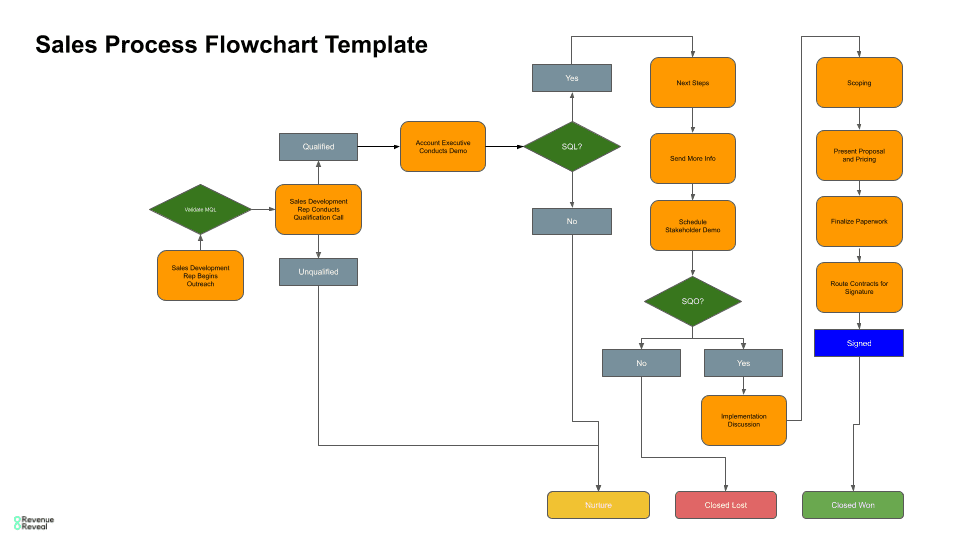
This is precisely why automating the transition from sheet to CRM has become one of the most overlooked yet high-impact areas in sales operations automation. And yes, you can orchestrate the entire handover process — including deduping, validation, enrichment, routing, and syncing — with a workflow layer sitting between your marketing spreadsheet and Salesforce or HubSpot.
To illustrate the transformation visually:
Why the Spreadsheet-to-CRM Gap Still Breaks Revenue Cycles
It’s almost comedic how many revenue leaks start in a spreadsheet. And yet these leaks persist because teams underestimate how destructive manual operations can be.
Picture this: a marketing manager updates the weekly lead sheet. An SDR pulls it into Salesforce. Meanwhile another SDR uploads a slightly older version. Duplicates appear. Assignment logic fails. Salesforce routing rules fire inconsistently because the leads arrived in batches rather than real time. This isn’t incompetence — it’s mechanical friction created by tools that were never meant to sync with each other manually.
The irony? The spreadsheet isn’t the problem. The handover is.
Sales teams need structure. Marketing teams need flexibility. The handover between those worlds requires automation.
The Shift Toward Continuous Lead Syncing
The external pressures in 2025 are accelerating this shift dramatically. Speed matters more. Data accuracy matters more. Buyers move faster than internal teams can keep up. By the time a spreadsheet-based lead import reaches Salesforce or HubSpot, the moment of buyer intent might already be gone.
This is why progressive sales operations teams are moving toward always-on syncing — not weekly imports, not daily batch updates, but real-time or near-real-time ingestion of marketing-generated records.
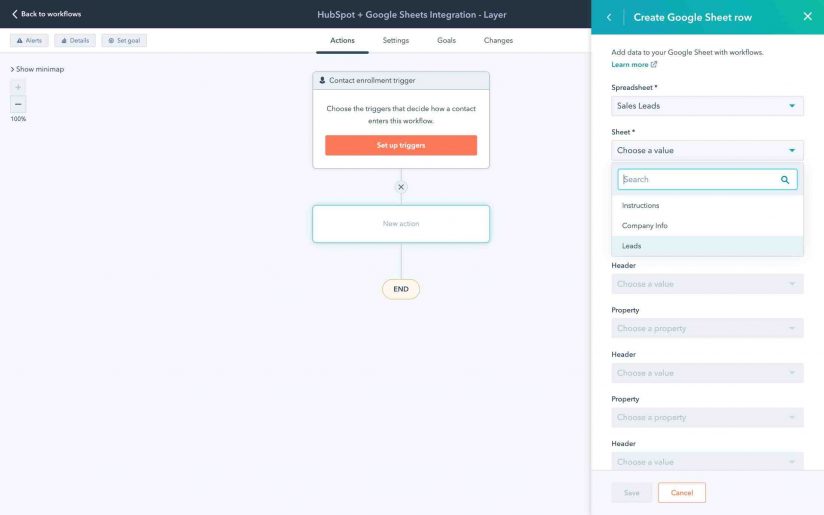
Imagine a workflow that listens to changes in a Google Sheet, validates the row, enriches it with third-party data, checks Salesforce or HubSpot for duplicates, assigns the lead automatically, and logs the entire process with timestamps. Now imagine trying to do that manually. Exactly. It doesn’t happen.
Here’s a simple comparison that highlights the operational difference:
| Mode | 📄 Manual Spreadsheet Import | ⚡ Automated Sheet-to-CRM Sync |
|---|---|---|
| Speed | Hours or days | Seconds |
| Accuracy | Depends on human vigilance | Depends on rules, consistently |
| Duplication risk | Extremely high | Algorithmically reduced |
| Assignment | Delayed or inconsistent | Instant + rule-based |
| Audit trail | None | Full logs + timestamps |
| Scalability | Breaks with volume | Improves with volume |
Once companies finally automate this handover, it’s almost embarrassing how long they tolerated the old process.
The Hidden Costs of Manual Handoffs
Sales leadership usually complains about slow follow-ups. SDRs blame messy data. Marketers complain that leads “disappear” or get marked incorrectly. And revenue ops becomes the punching bag for everyone.
All because the handover process is non-operational.
To be frank, manual handovers create far more than delays:
- Pipeline forecasting becomes inaccurate
- Attribution becomes fragmented
- SLA compliance becomes impossible
- Lead scoring becomes meaningless
- Team morale drops, especially among SDRs
And the worst part? You don’t notice the operational decay right away. It accumulates quietly, like dust in the corners of a warehouse. Until one day you discover you’ve been undercounting viable leads for a quarter.
Automating the Sales Handover With a Workflow Layer
Sales operations automation is about turning chaos into continuity. When spreadsheets are involved, automation becomes existential.

The most stable approach is straightforward: use a workflow platform (Make.com, Workato, Zapier, etc.) as the orchestration layer that watches the marketing sheet and pushes validated records into Salesforce or HubSpot with deterministic logic.
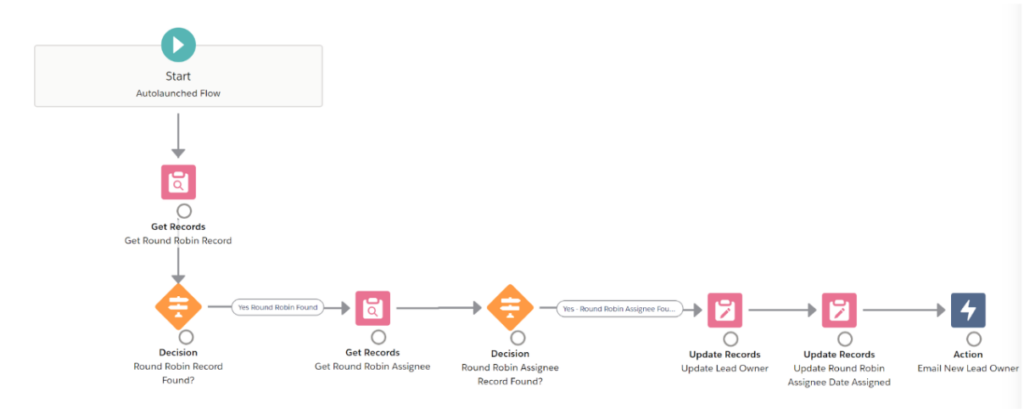
Here’s a visual reference for how this orchestration works at scale:
The flow is simple to explain and deceptively powerful in practice:
- Sheet changes trigger the automation
- Workflow validates inputs
- Duplicates are checked
- Data is cleaned + enriched
- Lead is created or updated in CRM
- Assignment logic fires
- Notifications go out
- Logs are written
No human intervention. No delay. No guessing.
Data Validation: The Gatekeeper That Prevents CRM Chaos
This is where most teams underestimate the complexity. Spreadsheet data is notoriously inconsistent:
- Job titles vary
- Company names differ in punctuation
- Formatted phone numbers appear in 12 different styles
- Website fields contain social media URLs
- Notes contain emojis and special characters
If you push this chaos directly into Salesforce or HubSpot, your reporting dies instantly. Automated validation is the guardrail that ensures every record entering the CRM is usable.
Sales operations automation thrives on predictability. Data validation is how you create that predictability.
Enrichment: Why CRM Records Should Improve, Not Just Sync
Spreadsheets rarely contain enough data for meaningful prioritization. That’s why a good automation injects enrichment into the handover.
Think of enrichment as adding context:
- Industry
- Company size
- Tech stack
- Location
- Buying signals
- Domain verification
An enriched record routes better, scores better, and converts better.
Salesforce and HubSpot don’t create value out of thin air; they amplify whatever data you feed them. Enrichment turns a basic spreadsheet row into an actionable asset.
How Automating the Handover Changes Sales Behavior
One of the most surprising effects of automation is cultural. SDRs begin trusting the CRM more. They stop hoarding spreadsheets. They stop complaining about losing leads. And they start focusing on conversations instead of data cleanup.
When every lead arrives clean, enriched, and instantly assigned, follow-up time drops dramatically. Pipeline velocity increases. Managers stop chasing down missing records. And forecasting becomes less of a mystical ritual and more of an actual operational function.
Sales operations automation doesn’t just improve workflows. It improves human behavior around workflows.
Salesforce vs HubSpot: Different CRMs, Same Automation Principles
Whether you sync to Salesforce or HubSpot, the mechanics remain the same: predictability, validation, cleaning, routing. But the operational nuances differ.
HubSpot is more permissive. It handles imperfect data gracefully, but that makes it easy to pollute. Salesforce is stricter, which forces discipline but punishes mistakes.
A quick breakdown for context:
| CRM | 🔍 What It Handles Well | 😬 What Breaks Easily |
|---|---|---|
| Salesforce | Complex routing, custom logic, enterprise grading | Bad field mappings, missing required fields |
| HubSpot | Rapid ingestion, flexible workflows | Duplicate records, inconsistent naming |
Both systems benefit massively from a well-structured automation layer. In fact, I’d argue the automation layer becomes the true source of reliability, not the CRM.
Error Handling: The Non-Negotiable for Scale
Any team that automates sales operations without building error handling into the process is asking for disaster. A single failed row in a spreadsheet shouldn’t halt the entire process. A missing phone number shouldn’t crash a sync. An unexpected field shouldn’t break routing.
Good error handling catches the issue, logs it, isolates it, and alerts the appropriate owner — without stopping the flow for everyone else.
The worst-case scenario? Silent failure.
Silent automation failure is how teams lose deals.
Real-World Example: When Automation Saves a Quarter
Let me give you a realistic scenario I’ve watched unfold more than once.
Marketing runs a big webinar. Hundreds of leads arrive. The spreadsheet is exported, but no one imports it until 48 hours later. By the time SDRs follow up, interest has evaporated. Conversion rate plummets.
Now imagine the same process automated:
- Leads hit the sheet
- Within seconds workflows sync to CRM
- Enriched, deduped, routed
- SDRs receive notifications instantly
- Follow-up begins while buyer intent is still warm
That’s the difference between a good quarter and a bad one. Sales operations automation doesn’t create leads, but it prevents them from decaying.
The Myth: “Our Team Works Fine Manually”
Every company says this until volume spikes.
Then:
- Overflow begins
- Sheets fork into multiple versions
- Import errors multiply
- CRM inconsistencies grow
- SLAs break
Scaling exposes operational weaknesses brutally. Automation stabilizes the system before those weaknesses cause damage.
A Thought for Revenue Leaders
Automation is not replacing your spreadsheet. It’s elevating it into a controlled, predictable intake system for your CRM. And the more chaotic your handover process is today, the more transformative automation will be.
So here’s the real question sales teams should be asking:
If your marketing-to-sales handover is still powered by spreadsheets and human timing, how many deals are you losing simply because your workflows weren’t fast or accurate enough to capture intent when it mattered most?