Make.com vs Power Automate: Debugging, Licensing and Scale
Compare Make.com and Power Automate for real operations work: debugging, licensing, premium connectors, branching, run history, ownership, and scale risk.

Last Updated on September 27, 2026 by Triumphoid Team
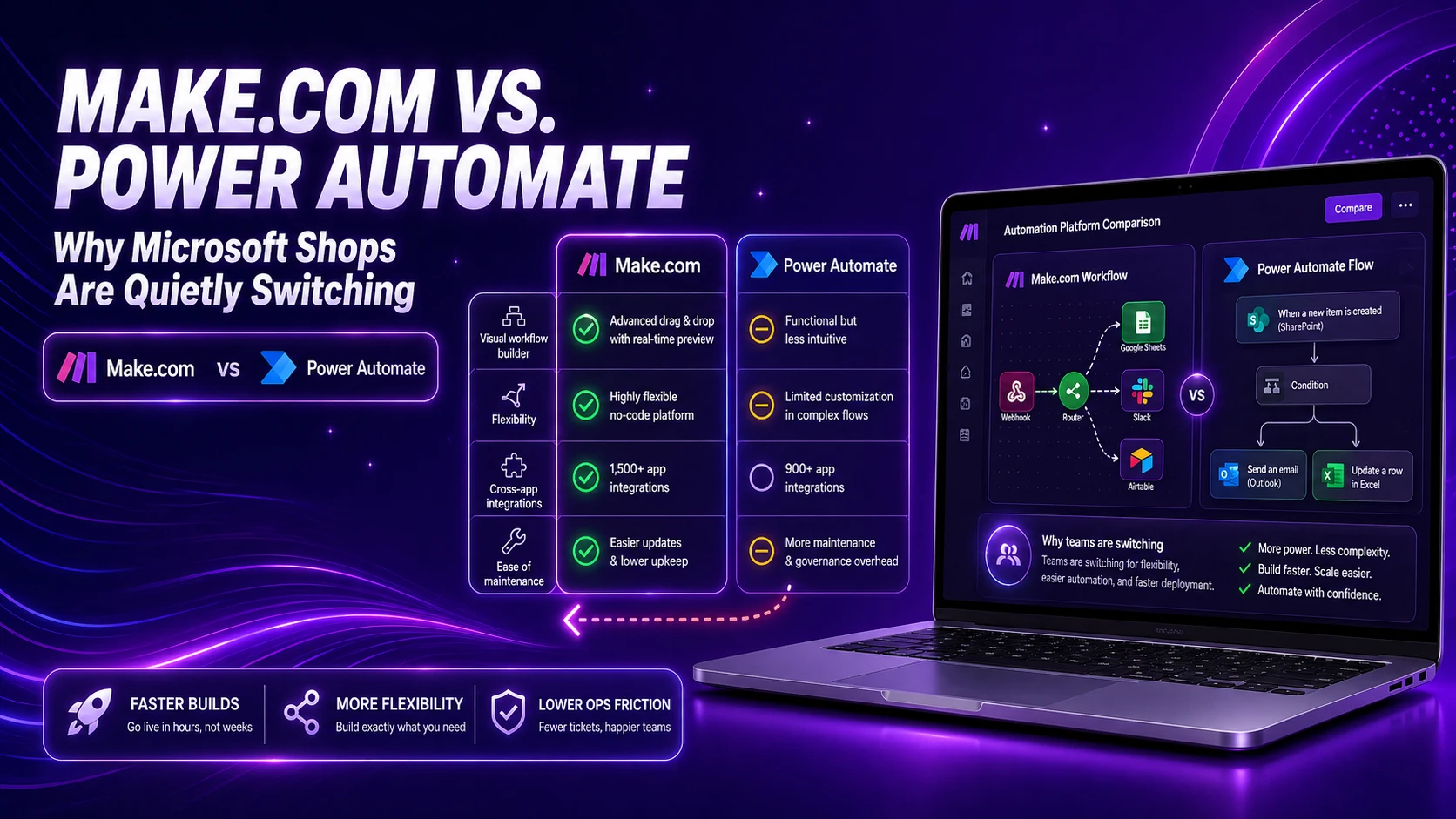
“Native to the stack” used to be a strong argument. If you lived in Microsoft—Outlook, SharePoint, Dynamics—then Microsoft Power Automate felt like the obvious choice.
Until you try to debug a real workflow.
That’s where the conversation changes.
This isn’t about features. It’s about what happens after month three—when flows grow, conditions multiply, and something breaks at 2 a.m. with no clear reason why.
How the Interfaces Reveal Their Intent
Power Automate: Linear Designer, Hidden Complexity


What the screenshot shows:
A typical Power Automate flow with nested conditions and an “Advanced mode” JSON editor. Notice how logic collapses into expressions, and debugging lives inside run history panels.
Make.com: Scenario Graph, Logic as a Map


What the screenshot shows:
A Make.com scenario with routers and filters. Each branch is visible, and execution can be inspected step-by-step directly on the graph.
The difference is immediate:
- Power Automate compresses logic into panels
- Make expands logic into space
That design choice affects everything—especially debugging.
1) Debugging JSON in Power Automate (Where Time Disappears)
Power Automate looks friendly—until you open “Advanced mode.”
Typical Expression You End Up Writing
@and(
  equals(triggerBody()?['country'], 'US'),
  greater(int(triggerBody()?['amount']), 1000)
)
This is not inherently bad. The problem is where it lives:
- buried in a condition block
- partially hidden behind UI toggles
- evaluated only at runtime
When it fails, you don’t get a clean stack trace. You get a run history entry with:
- inputs
- outputs
- and a vague error message
What Debugging Actually Feels Like
| Step | What You Do | What Happens |
|---|---|---|
| Open run history | Inspect failed run | Scroll through nested panels |
| Find condition | Expand JSON | Try to mentally parse logic |
| Re-run flow | Hope it works | It doesn’t |
| Repeat | Again | Again |
It’s not that it’s impossible. It’s that it’s slow and opaque.
Make.com Debugging (Contrast)
// Filter condition (visual)
country = "US"
AND
amount > 1000
You don’t write this as JSON. You configure it visually.
Then you click a run → and you see:
- each module’s input
- each module’s output
- exactly where it failed
| Aspect | Power Automate | Make.com |
|---|---|---|
| Debug visibility | Hidden in panels | Inline on graph |
| Expression clarity | JSON-heavy | Visual filters |
| Error tracing | Indirect | Immediate |
| Iteration speed | Slow | Fast |
Have you ever tried debugging a nested JSON condition at 2 a.m.?
It’s not a technical challenge. It’s a patience test.
2) Visualizing Complex Branching Logic
This is where architecture starts to matter.
Power Automate Branching


What the screenshot shows:
A long vertical flow with nested conditions and switch cases. As complexity grows, the flow becomes harder to scan and reason about.
Power Automate builds downward.
Which means:
- branches stack vertically
- nested logic disappears into collapsible sections
- overall structure becomes hard to grasp
You end up asking:
“Where does this path actually go?”
Make.com Branching


What the screenshot shows:
A router with multiple branches laid out horizontally. Each path is visible, labeled, and independently traceable.
Make uses routers.
So logic becomes:
- spatial
- visible
- navigable
You can literally see:
- where data enters
- how it splits
- where each branch ends
Structural Difference
| Logic Complexity | Power Automate | Make.com |
|---|---|---|
| Simple flows | Fine | Fine |
| Medium branching | Manageable | Clear |
| Complex branching | Hard to follow | Still readable |
| Maintenance over time | Degrades | Stable |
This isn’t about preference.
It’s about whether your team can understand the system six months later.
3) Licensing Complexity (The Part Nobody Explains Clearly)
Let’s talk about the real friction point.
Not UI. Not features.
Licensing.
Power Automate Licensing Reality


What the screenshot shows:
Connector lists with “Premium” labels and licensing tiers. Access depends on plan level, not just usage.
Power Automate divides connectors into:
- Standard
- Premium
And that’s where things get tricky.
You build a flow using:
- SharePoint (standard)
- Outlook (standard)
- then add HTTP or SQL or Salesforce
Suddenly:
- your flow requires Premium
- your pricing changes
- your deployment assumptions break
Typical Licensing Surprise
| Scenario | What You Expect | What Happens |
|---|---|---|
| Build internal flow | Covered by plan | Works |
| Add SQL connector | Still covered | Needs Premium |
| Scale to team | Same cost | Per-user cost increases |
| Production rollout | Predictable | Licensing review required |
This is where many Microsoft shops start reconsidering.
Not because Power Automate is bad—but because pricing becomes non-linear and hard to predict.
Make.com Pricing Model (Contrast)


What the screenshot shows:
Make.com’s usage dashboard showing operations-based billing tied to scenario executions.
Make charges based on:
- operations (steps executed)
- scenario runs
No “premium connector unlock.”
You pay for execution, not access.
Licensing Comparison
| Factor | Power Automate | Make.com |
|---|---|---|
| Pricing model | Per user + connectors | Usage-based |
| Premium connectors | Yes | No |
| Cost predictability | Low | Higher |
| Scaling complexity | High | Moderate |
Why Microsoft Shops Are Switching (Quietly)
It’s not one big reason.
It’s accumulation.
- debugging friction
- visual complexity
- licensing surprises
None of these kill adoption immediately.
But together, they create:
- slower iteration
- higher maintenance cost
- reduced trust in automation
And that’s when teams start testing alternatives.
A Practical Scenario (Where the Difference Becomes Obvious)
Let’s say you build:
Lead intake → validation → routing → CRM → Slack notification
Power Automate Outcome
- multiple nested conditions
- JSON expressions
- hidden logic
- licensing check if connectors change
Make.com Outcome
- router with branches
- visible filters
- step-by-step execution logs
- predictable cost per run
Same functionality.
Very different experience.
A Thought Worth Sitting With
Power Automate isn’t failing.
It’s just optimized for:
- ecosystem integration
- controlled environments
- enterprise governance
Make is optimized for:
- clarity
- speed
- flexibility
Final Remark (Slightly Uncomfortable)
Most teams don’t leave Power Automate because it’s broken.
They leave because:
- it’s slow to debug
- hard to visualize
- and surprisingly expensive to scale
And once you’ve experienced a system where logic is visible, debugging is immediate, and pricing is predictable…
Going back feels a bit like:
debugging JSON in a collapsible panel and pretending it’s fine.
Practitioner take: Power Automate is still the default answer inside many Microsoft tenants, but Make.com wins the moment the buyer cares more about operational readability than vendor adjacency. If the flow has branching, retries, ownership changes, or premium connector exposure, evaluate it as a production system, not as an Office add-on.
Make.com vs Power Automate: the operational fit test
| Decision point | Power Automate is safer when… | Make.com is safer when… |
|---|---|---|
| Tenant gravity | The workflow mostly stays in Microsoft 365, Dynamics, SharePoint, and Teams | The workflow crosses many SaaS tools and APIs outside Microsoft |
| Debugging model | A Microsoft admin can own run history, environments, and licensing context | Ops builders need a visual execution map they can inspect quickly |
| Licensing risk | Premium connector and Process license requirements are already understood | You want pricing to track scenario complexity more transparently |
| Scale failure | Governance is centralized in a Power Platform center of excellence | The team needs lightweight ownership, recovery notes, and replay discipline |
Do not compare screenshots; compare recovery paths
The real SERP intent behind this query is not “which UI is prettier?” It is “which platform will my team still understand when an integration fails?” Build one nasty test case before choosing: a changed schema, a missing required field, a throttled API, and a failed downstream write. If the recovery process is unclear, the platform is already costing you. That is the same governance lens used in enterprise workflow management.
FAQ
Is Power Automate better than Make.com for Microsoft teams?
It can be, especially when the automation stays inside Microsoft 365 and the tenant already has Power Platform governance. For cross-SaaS workflows with visible branching and faster troubleshooting, Make.com is often easier for operations teams to maintain.
What is the biggest hidden cost in Power Automate?
Licensing context. Premium connectors, owner licenses, Process licenses, and user-triggered flows can change the true cost and support model. Price the flow before building the flow.
Reference: Microsoft explains premium connector and Process license behavior in its Power Automate licensing FAQ.