Conquering GraphQL Pagination: Cursor-Based Fetching in n8n Explained


Last Updated on August 15, 2026 by Triumphoid Team
TL;DR — GraphQL Cursor Pagination in n8n
- Cursor-based pagination uses an opaque cursor (usually a base64 string) and a
hasNextPageboolean instead of offset/limit. You passafter: $cursorto get the next page, starting withnullfor the first. - n8n has no native while-loop. Flow-based pagination requires a Merge node loop with conditional branching — it works but is fragile and hard to read. The Code node is the better approach for anything beyond trivial datasets.
- The Code node pattern: a
while (hasNextPage)loop callingthis.helpers.httpRequest()accumulates all results before returning. One node replaces the 10–14 nodes a flow-based approach needs. - Rate limiting matters. Shopify’s GraphQL uses a cost-based throttle — you’ll get throttled after a few fast requests. Build in a delay between pages. GitHub uses a points system with hourly reset.
- Always pass
nullas the cursor for the first page, not an empty string. Most GraphQL APIs treatafter: ""differently fromafter: null, and the behavior is often undefined or broken.
Cursor-based GraphQL pagination is how most production APIs handle large datasets — Shopify, GitHub, Linear, Stripe’s newer endpoints, Notion’s API. The pattern is standardized: each response includes a cursor marking where you stopped and a boolean telling you whether more data exists. Pass that cursor back in your next query and you get the next page. Simple in principle, annoying in n8n because the platform has no native while-loop construct and its GraphQL node doesn’t handle this automatically.
The working solution is a Code node. I spent 2.5 hours building a flow-based loop approach across 14 nodes before rewriting it as a single Code node in 45 minutes. The flow-based version worked, barely, and fell apart the first time the API returned an unexpected response structure. The Code node version has been running daily against a Shopify store with 3,847 products — 39 pages at 100 items per page — for four months without an incident.
This post covers both approaches honestly: the flow-based method if you want to understand the mechanics, and the Code node method if you want something that actually holds up in production.
How Cursor-Based Pagination Works
Most GraphQL APIs that support pagination follow the Relay connection specification. The response structure looks like this:
Relay connection spec — what a paginated GraphQL response looks like
# The query — pass cursor as a variable, null on first page
query GetProducts($cursor: String) {
  products(first: 100, after: $cursor) {
    edges {
      node {
        id
        title
        status
        priceRangeV2 {
          minVariantPrice { amount currencyCode }
        }
      }
      cursor          # Per-edge cursor (rarely needed — use pageInfo.endCursor)
    }
    pageInfo {
      hasNextPage     # true if more pages exist
      endCursor       # cursor to pass as $cursor on the next request
      hasPreviousPage # for backwards pagination (rarely used)
      startCursor     # for backwards pagination
    }
  }
}

# First request: variables = { "cursor": null }
# Response: pageInfo = { "hasNextPage": true, "endCursor": "eyJsYXN0X2lkIjo..." }

# Second request: variables = { "cursor": "eyJsYXN0X2lkIjo..." }
# Response: pageInfo = { "hasNextPage": true, "endCursor": "eyJsYXN0X2lkIjp..." }

# ...continue until hasNextPage is false
The cursor is opaque — it’s a string you should never parse or construct yourself. Its internal format (usually base64-encoded database IDs or composite sort keys) is an implementation detail of the API and can change without notice. Treat it as a bookmark: receive it, store it, pass it back.
The edges wrapper exists for historical reasons related to the Relay framework. Many APIs also expose a simpler nodes shortcut that skips the edge object when you don’t need per-edge metadata. Use nodes if the API supports it — it reduces response payload size and simplifies the JavaScript you write to extract results.
The Flow-Based Approach (And Why I Stopped Using It)
n8n doesn’t have a while-loop node, so simulating cursor pagination in the visual editor requires a specific pattern: a Merge node that waits for input from two sources — the initial trigger and the loop-back from the same iteration — combined with an IF node that decides whether to continue or stop.
The node sequence looks like this:
Flow-based loop — node sequence for cursor pagination
1.  [Manual Trigger]
      ↓
2.  [Set] — Initialize state
      cursor = null
      allItems = []
      hasNextPage = true
      ↓
3.  [Merge (Wait for Both)] ← ←─────────────────────┐
      Input 1: from Step 2 (first pass)               │
      Input 2: from Step 6 (loop-back)                │
      ↓                                               │
4.  [HTTP Request] — GraphQL query                    │
      URL: https://your-api.com/graphql               │
      Body: { query: "...", variables:                 │
              { after: {{$json.cursor}} } }            │
      ↓                                               │
5.  [Set] — Extract pageInfo                          │
      cursor = {{$json.data.products.pageInfo.endCursor}}
      hasNextPage = {{$json.data.products.pageInfo.hasNextPage}}
      newItems = {{$json.data.products.edges}}        │
      ↓                                               │
6.  [IF] — Check hasNextPage                         │
      TRUE → [Merge Data] → loop back to Step 3 ─────┘
      FALSE → [Continue] → downstream processing

# Problems with this approach:
# — Accumulating all items across iterations requires a separate
#   Aggregate node or storing state in a way n8n wasn't designed for
# — The Merge node in "Wait for Both" mode expects specific item counts
# — Error handling across loop iterations is difficult to reason about
# — The visual graph has a backwards arrow that confuses anyone reading it later
The honest problem with n8n’s flow-based loop for pagination isn’t that it doesn’t work — it does, eventually. It’s that the resulting workflow is one of the least readable things I’ve built in n8n. The backwards arrow from the IF node back to the Merge node violates every visual intuition about how a flow should progress. Two months after building it, I couldn’t remember how I’d set the Merge node mode without opening the node and checking. That’s not a workflow you want to hand off to anyone.
The deeper problem is data accumulation. n8n nodes pass items forward one iteration at a time. If you want to collect all paginated results before continuing downstream — which is almost always what you want — you need to aggregate them across loop iterations. This requires either a second Merge node in “Append” mode or storing items in n8n’s workflow static data. Both approaches add complexity that the Code node doesn’t need.
The Code Node Approach (What I Actually Use)
A single Code node with a while loop handles everything the 14-node flow approach was trying to do, and handles it more reliably. The entire pagination logic, error handling, and data accumulation live in one place.
Code node — full cursor pagination for Shopify Admin GraphQL API
// Run mode: Run Once for All Items
// Requires: SHOPIFY_ACCESS_TOKEN in n8n credentials or env vars

const SHOP_DOMAIN = "your-store.myshopify.com";
const ACCESS_TOKEN = $env.SHOPIFY_ACCESS_TOKEN; // or $vars.SHOPIFY_ACCESS_TOKEN
const API_VERSION = "2024-01";
const PAGE_SIZE = 100;              // Shopify max per page
const DELAY_MS = 600;               // ~1.6 req/s — stays under Shopify's cost limit

const QUERY = `
  query GetProducts($cursor: String) {
    products(first: ${PAGE_SIZE}, after: $cursor) {
      nodes {
        id
        title
        status
        vendor
        productType
        priceRangeV2 {
          minVariantPrice { amount currencyCode }
          maxVariantPrice { amount currencyCode }
        }
        totalInventory
        updatedAt
      }
      pageInfo {
        hasNextPage
        endCursor
      }
    }
  }
`;

const allProducts = [];
let cursor = null;       // null = first page
let hasNextPage = true;
let pageCount = 0;

while (hasNextPage) {
  pageCount++;

  const response = await this.helpers.httpRequest({
    method: "POST",
    url: `https://${SHOP_DOMAIN}/admin/api/${API_VERSION}/graphql.json`,
    headers: {
      "X-Shopify-Access-Token": ACCESS_TOKEN,
      "Content-Type": "application/json",
    },
    body: JSON.stringify({
      query: QUERY,
      variables: { cursor },   // null on first pass, cursor string thereafter
    }),
  });

  // Surface GraphQL errors before touching the data
  if (response.errors) {
    throw new Error(
      `GraphQL error on page ${pageCount}: ${JSON.stringify(response.errors)}`
    );
  }

  const { nodes, pageInfo } = response.data.products;

  allProducts.push(...nodes);
  hasNextPage = pageInfo.hasNextPage;
  cursor = pageInfo.endCursor;   // null if no next page — fine to pass back

  console.log(
    `Page ${pageCount}: fetched ${nodes.length} products ` +
    `(total: ${allProducts.length}, hasNextPage: ${hasNextPage})`
  );

  // Respect Shopify's cost-based rate limit between pages
  if (hasNextPage) {
    await new Promise(resolve => setTimeout(resolve, DELAY_MS));
  }
}

console.log(
  `Pagination complete: ${allProducts.length} products across ${pageCount} pages`
);

// Return each product as a separate n8n item for downstream processing
return allProducts.map(product => ({ json: product }));
A few things in this code worth explaining:
Using nodes instead of edges. Shopify’s Admin API supports the shorthand nodes that returns the node objects directly without the edge wrapper. The response is smaller and the JavaScript to extract the data is simpler. Use edges { node { ... } } only if you need the per-edge cursor, which is rare in practice — pageInfo.endCursor is what you actually need for pagination.
The initial cursor is null, not an empty string. Shopify and most other GraphQL APIs treat after: "" as an invalid cursor and return an error. after: null (or omitting the after argument) correctly starts from the beginning. Since JavaScript’s JSON.stringify serializes null correctly in a variables object, this just works — but it’s worth knowing why you pass null rather than "".
Checking response.errors before response.data. GraphQL can return a partial response with data and errors simultaneously (HTTP 200 with errors in the body). Checking for errors first prevents the loop from silently continuing with incomplete data.
Handling Shopify’s Cost-Based Rate Limits
Shopify’s GraphQL API doesn’t rate limit by requests per second. It uses a cost-based system: each query has a calculated cost based on which fields you request and how many items you’re fetching. Your store has a bucket of 1,000 cost units that refills at 50 units per second. A query that costs 100 units leaves you with 900; after 2 seconds of no requests, you’re back to 1,000.
Shopify includes the cost information in the response extensions:
Adaptive rate limiting using Shopify’s cost extensions
// Replace the fixed delay with adaptive delay based on cost data
// Shopify includes cost info in response.extensions

const { nodes, pageInfo } = response.data.products;
const cost = response.extensions?.cost;

allProducts.push(...nodes);
hasNextPage = pageInfo.hasNextPage;
cursor = pageInfo.endCursor;

if (hasNextPage && cost) {
  const { throttleStatus } = cost;
  const available = throttleStatus.currentlyAvailable;
  const restoreRate = throttleStatus.restoreRate;       // units/second
  const requestedCost = cost.requestedQueryCost;

  // If available budget is less than 2x the query cost, wait for refill
  if (available  setTimeout(resolve, waitSeconds * 1000));
  } else {
    // Budget is fine — minimal delay to be a good API citizen
    await new Promise(resolve => setTimeout(resolve, 200));
  }
}
This adaptive approach is more efficient than a fixed 600ms delay. On a first pass with a fully refilled bucket, pages come in quickly. If the bucket gets low — which happens when the workflow runs alongside other API activity — it waits only as long as necessary rather than applying a blanket sleep.
The first time I ran without rate limiting, it hit Shopify’s throttle on page 4 and threw a THROTTLED error that stopped the entire execution. The job had to restart from page 1. Building in the delay or adaptive wait means the workflow finishes slower but never partially — which matters when the downstream process expects a complete dataset.
GitHub’s GraphQL API: A Different Flavor of the Same Pattern
GitHub’s GraphQL API uses the same Relay spec. The differences are the auth header (Authorization: Bearer TOKEN instead of a custom header), the rate limit model (5,000 points per hour based on complexity, not a leaky bucket), and the fact that some GitHub queries need explicit rate limit handling in the response.
GitHub GraphQL pagination — repositories across an organization
// Fetches all repositories for a GitHub org — runs in a Code node

const ORG = $input.first().json.org_name;   // Pass org name as input item
const GITHUB_TOKEN = $env.GITHUB_TOKEN;
const PAGE_SIZE = 100;

const QUERY = `
  query GetRepos($org: String!, $cursor: String) {
    organization(login: $org) {
      repositories(first: ${PAGE_SIZE}, after: $cursor, orderBy: {
        field: UPDATED_AT, direction: DESC
      }) {
        nodes {
          name
          url
          isPrivate
          stargazerCount
          primaryLanguage { name }
          updatedAt
          defaultBranchRef { name }
        }
        pageInfo {
          hasNextPage
          endCursor
        }
      }
      rateLimit {
        cost
        remaining
        resetAt
      }
    }
  }
`;

const allRepos = [];
let cursor = null;
let hasNextPage = true;

while (hasNextPage) {
  const response = await this.helpers.httpRequest({
    method: "POST",
    url: "https://api.github.com/graphql",
    headers: {
      "Authorization": `Bearer ${GITHUB_TOKEN}`,
      "Content-Type": "application/json",
    },
    body: JSON.stringify({ query: QUERY, variables: { org: ORG, cursor } }),
  });

  if (response.errors) {
    throw new Error(`GitHub GraphQL error: ${JSON.stringify(response.errors)}`);
  }

  const { repositories, rateLimit } = response.data.organization;

  allRepos.push(...repositories.nodes);
  hasNextPage = repositories.pageInfo.hasNextPage;
  cursor = repositories.pageInfo.endCursor;

  // Warn if rate limit is getting low
  if (rateLimit.remaining  setTimeout(resolve, 300));
  }
}

return allRepos.map(repo => ({ json: { org: ORG, ...repo } }));
I use this to fetch repository metadata across 12 GitHub organizations as part of a weekly reporting workflow. The total dataset is around 1,200 repositories. At 100 per page, that’s 12 pages per organization — 144 API calls total — well within GitHub’s 5,000-point hourly limit. The 300ms delay between pages is conservative for this use case but costs about 40 seconds of extra runtime across the full run, which a weekly job doesn’t need to optimize against.
My Shopify Product Sync: What the Numbers Look Like
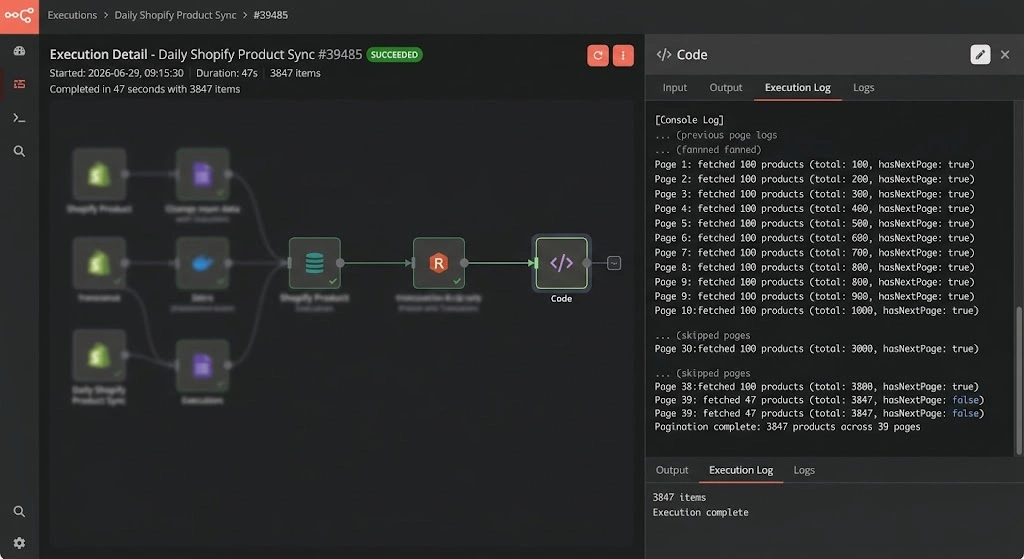
The workflow that prompted this post runs on a daily schedule against a Shopify store that has 3,847 active products. At 100 products per page, the Code node makes 39 API calls. With the adaptive rate limiting, the full run completes in about 47 seconds. The downstream nodes then do price comparison, inventory threshold checks, and push updates to a Notion database.
Common Failure Modes
Passing an empty string as the initial cursor
Always start with cursor = null. Passing cursor = "" causes most APIs to return an invalid cursor error on the first page. The issue is subtle because the second-page cursor looks like a valid string, so the code structure seems right — the only problem is the very first request. If you’re getting cursor errors only on page 1, this is almost certainly why.
Not checking for GraphQL errors in a 200 response
GraphQL servers return HTTP 200 even when the query fails. The error appears in a top-level errors array rather than in the HTTP status code. Without the explicit if (response.errors) check, the loop will try to access response.data.products on an error response, get undefined, and throw a confusing JavaScript error rather than the descriptive GraphQL error message that explains what actually went wrong.
Requesting too many fields and hitting query cost limits
Shopify’s query cost is proportional to the fields requested and the number of items per page. Requesting nested connections inside your main query (like variants and their metafields inside each product) multiplies the cost fast. A product query requesting variants (up to 2,000 per product) at 100 products per page can easily hit the maximum query cost limit. If you need nested data, either reduce the page size or use a separate query for the nested data with its own pagination loop.
Losing the cursor when n8n’s Code node times out
n8n’s Code node has an execution timeout — the default is 600 seconds for self-hosted instances. A very large dataset with a conservative delay could theoretically hit this. If it does, the workflow fails partway through and you lose all accumulated data. For datasets large enough to risk a timeout, either increase the Code node timeout in n8n’s settings or implement a checkpoint pattern: store the cursor in a database at the end of each page, and add restart logic that reads the last stored cursor rather than starting from null.
Code Node Approach — When It’s Right
- Large datasets (100+ pages) where flow complexity becomes unmanageable
- Adaptive rate limiting needed based on API response headers
- Data accumulation across pages before downstream processing
- APIs where error handling varies per page (partial failures)
- Workflows that need to be maintained by someone other than the original builder
Flow-Based Approach — When It Has a Case
- Small, known-size datasets (under 5–10 pages) that won’t grow
- Teams with strict no-code policies who can’t use Code nodes
- Demos or prototypes where maintenance isn’t a concern
- When you need intermediate items visible in n8n’s execution view per page
- APIs where each page’s result needs separate downstream processing
API-Specific Quirks Worth Knowing
Shopify Storefront API vs Admin API. The Storefront API uses a different authentication header (X-Shopify-Storefront-Access-Token) and has different rate limits than the Admin API. The query structure and Relay spec usage are the same, but the available fields and cost calculations differ. The Storefront API is more permissive about public data but has stricter limits on private fields.
Linear’s GraphQL API. Linear uses a slightly non-standard connection spec where pageInfo includes a hasPreviousPage that’s always false (they only support forward pagination). The cursor format is different from Shopify’s, but the pattern is identical: after: $cursor, check hasNextPage, use endCursor.
APIs that use first/last vs limit. APIs following the Relay spec use first: N for forward pagination and last: N for backward. Some older or non-Relay GraphQL APIs use limit and offset even with cursor-based pagination, which is a hybrid approach. Check your API’s schema — the argument names tell you which convention they follow.
ℹ Setting Up the Code Node in n8n
Add a Code node and set Mode to “Run Once for All Items.” This runs the node once and lets you return multiple items from a single execution — which is what you want when returning all paginated results as individual items.
Credentials: store your API tokens in n8n’s Credentials manager and reference them via $env.VARIABLE_NAME, or pass them as input from a previous Set node if you need dynamic credential selection across stores.
For the console logs to appear in the execution view, make sure you’re on n8n 0.214.0 or later — earlier versions had inconsistent Code node log output in the UI even when the logs were technically being written.
FAQ
Can I use n8n’s built-in HTTP Request node instead of this.helpers.httpRequest() in the Code node?
Not within a loop inside a Code node — the HTTP Request node is a separate n8n node, not a function you call from JavaScript. Inside a Code node, this.helpers.httpRequest() is the correct way to make HTTP calls. It uses the same underlying Axios-based HTTP client that the HTTP Request node uses, so behavior (redirects, SSL, timeouts) is consistent. The difference is that this.helpers.httpRequest() is called from JavaScript, which lets you put it inside a while loop.
How do I pass the paginated results to downstream nodes as individual items?
Return them as an array of objects with a json key: return allProducts.map(p => ({ json: p })). Each element becomes a separate n8n item that downstream nodes process individually. If you want all results as a single item (for example, to pass to a Shopify bulk update node that expects an array), return return [{ json: { products: allProducts } }] instead.
What if the API doesn’t follow the Relay spec and uses a different pagination format?
The while loop pattern works regardless of spec — you just adjust the response fields you check. For offset-based APIs that still use a “next page” indicator: replace cursor with an integer offset and increment it by page size each iteration. For APIs that return a next_page_url or Link header: use that URL directly as the next request target and loop until the header is absent. The structure (allItems = [], while loop, accumulate, return) stays the same; the condition and cursor extraction change.
My workflow times out before pagination finishes. What can I do?
Three options. Increase the Code node timeout in your n8n instance settings (self-hosted: EXECUTIONS_TIMEOUT environment variable). Reduce the delay between pages if you have rate limit headroom to spare. Or restructure the workflow to paginate in batches — store the last cursor in a database (Postgres, Airtable, Notion) at the end of each run and pick up from that cursor on the next scheduled execution. The third approach is the most resilient for genuinely large datasets because it survives restarts, deploys, and timeout increases that you haven’t made yet.
Does this pattern work with n8n’s AI Agent node for tool calls?
Yes, with a structural adjustment. If you’re building an AI agent that can query a GraphQL API, wrap the pagination Code node logic in a tool definition that the agent can call with parameters (org name, date range, status filter). The agent calls the tool, the tool runs the full paginated fetch, and returns the complete dataset as the tool result. The agent doesn’t need to know about pagination — it just gets back all the data. This is a cleaner separation than trying to make the agent aware of cursor state across multiple tool calls.
Can I paginate backwards using the startCursor and hasPreviousPage fields?
The Relay spec supports backward pagination via last: N, before: $cursor using startCursor and hasPreviousPage. In practice, backward pagination is rarely useful for data sync workflows — you want all the data from the beginning. Where backward pagination is useful: fetching the most recent N items from the end of a large ordered list without traversing the entire set. Some Shopify queries support this; GitHub’s does for some connections. The Code node structure is a mirror of the forward case: start from the end, paginate backwards, check hasPreviousPage, use startCursor as the before variable.