Automate pdf data extraction to json — we ran this exact comparison last month when a client asked us to process 84,000 supplier invoices. They were paying Docparser $289/month and hitting their limits.
Their CFO wanted to know: would GPT-4o be cheaper? More accurate? Both?
The answer surprised us. And it wasn’t the simple “AI wins” story you’d expect.
We built identical workflows in both systems, fed them the same 200-invoice test set (mix of clean PDFs, scanned images, multi-page documents with tables that span pages), and measured three things: accuracy, cost per page, and failure modes. The results made us rethink how we recommend PDF extraction to clients.
Here’s what we found, with actual code, real cost breakdowns, and the one scenario where GPT-4o completely fails that nobody talks about.
Part 1: The Accuracy Test (GPT-4o vs. Docparser on 200 Real Invoices)
We didn’t use synthetic test data. We pulled 200 actual invoices from three of our clients’ inboxes:
- Cohort A (80 invoices): Clean, modern PDFs from SaaS vendors. Single page, structured tables, consistent formatting.
- Cohort B (70 invoices): Scanned invoices from legacy suppliers. Low resolution (150 DPI), slight rotation, some coffee stains.
- Cohort C (50 invoices): Multi-page invoices with line item tables that continue across pages. This is where things get interesting.
The GPT-4o Implementation
Here’s the complete Python script for extracting invoice data via GPT-4o’s vision API:
import base64
import json
import os
from openai import OpenAI

client = OpenAI(api_key=os.getenv("OPENAI_API_KEY"))

def encode_pdf_to_base64(pdf_path):
    """Convert PDF to base64 for GPT-4o vision API."""
    with open(pdf_path, "rb") as pdf_file:
        return base64.b64encode(pdf_file.read()).decode('utf-8')

def extract_invoice_with_gpt4o(pdf_path):
    """
    Extract structured invoice data using GPT-4o vision.
    Returns JSON with invoice fields.
    """

    # Convert PDF to base64
    pdf_base64 = encode_pdf_to_base64(pdf_path)

    # Define the JSON schema we want GPT-4o to extract
    extraction_schema = {
        "invoice_number": "string",
        "invoice_date": "YYYY-MM-DD",
        "due_date": "YYYY-MM-DD",
        "vendor_name": "string",
        "vendor_address": "string",
        "customer_name": "string",
        "customer_address": "string",
        "line_items": [
            {
                "description": "string",
                "quantity": "number",
                "unit_price": "number",
                "line_total": "number"
            }
        ],
        "subtotal": "number",
        "tax_amount": "number",
        "total_amount": "number"
    }

    prompt = f"""Extract all invoice data from this PDF and return it as JSON matching this exact schema:

{json.dumps(extraction_schema, indent=2)}

Requirements:
- Extract ALL line items, even if the table spans multiple pages
- Parse dates into YYYY-MM-DD format
- Convert all monetary values to numbers (no currency symbols)
- If a field is not present, use null
- Return ONLY valid JSON, no explanations or markdown

Invoice PDF attached."""

    response = client.chat.completions.create(
        model="gpt-4o",
        messages=[
            {
                "role": "user",
                "content": [
                    {"type": "text", "text": prompt},
                    {
                        "type": "image_url",
                        "image_url": {
                            "url": f"data:application/pdf;base64,{pdf_base64}"
                        }
                    }
                ]
            }
        ],
        max_tokens=4096,
        temperature=0  # Deterministic output for data extraction
    )

    # Extract JSON from response
    raw_response = response.choices[0].message.content

    # GPT-4o sometimes wraps JSON in markdown code fences
    if raw_response.startswith("```json"):
        raw_response = raw_response.strip("```json").strip("```").strip()

    try:
        parsed_data = json.loads(raw_response)
        return {
            "success": True,
            "data": parsed_data,
            "tokens_used": response.usage.total_tokens,
            "cost": calculate_cost(response.usage)
        }
    except json.JSONDecodeError as e:
        return {
            "success": False,
            "error": f"JSON decode error: {str(e)}",
            "raw_response": raw_response
        }

def calculate_cost(usage):
    """Calculate cost based on OpenAI's GPT-4o pricing (as of March 2026)."""
    # GPT-4o pricing: $2.50 per 1M input tokens, $10.00 per 1M output tokens
    input_cost = (usage.prompt_tokens / 1_000_000) * 2.50
    output_cost = (usage.completion_tokens / 1_000_000) * 10.00
    return input_cost + output_cost

# Example usage
result = extract_invoice_with_gpt4o("invoice_sample.pdf")
if result["success"]:
    print(f"Extracted data: {json.dumps(result['data'], indent=2)}")
    print(f"Cost: ${result['cost']:.4f}")
    print(f"Tokens used: {result['tokens_used']}")
else:
    print(f"Extraction failed: {result['error']}")
The Docparser Implementation
Docparser doesn’t require code — you configure parsers via their web interface. But here’s how you’d integrate with their API after setting up your parser rules:
import requests
import time

DOCPARSER_API_KEY = os.getenv("DOCPARSER_API_KEY")
PARSER_ID = "your_invoice_parser_id"  # Created in Docparser UI

def extract_invoice_with_docparser(pdf_path):
    """
    Upload PDF to Docparser and retrieve extracted data.
    Requires pre-configured parser rules in Docparser dashboard.
    """

    # Step 1: Upload PDF
    upload_url = f"https://api.docparser.com/v1/document/upload/{PARSER_ID}"

    with open(pdf_path, 'rb') as pdf_file:
        files = {'file': pdf_file}
        headers = {'api_key': DOCPARSER_API_KEY}

        upload_response = requests.post(
            upload_url,
            files=files,
            headers=headers
        )

    if upload_response.status_code != 200:
        return {
            "success": False,
            "error": f"Upload failed: {upload_response.text}"
        }

    document_id = upload_response.json()['id']

    # Step 2: Wait for processing (Docparser processes asynchronously)
    time.sleep(3)  # Usually takes 2-5 seconds

    # Step 3: Retrieve extracted data
    fetch_url = f"https://api.docparser.com/v1/results/{PARSER_ID}/{document_id}"
    fetch_response = requests.get(fetch_url, headers=headers)

    if fetch_response.status_code != 200:
        return {
            "success": False,
            "error": f"Fetch failed: {fetch_response.text}"
        }

    extracted_data = fetch_response.json()

    return {
        "success": True,
        "data": extracted_data,
        "cost": calculate_docparser_cost()  # Fixed cost per page
    }

def calculate_docparser_cost():
    """
    Docparser pricing (March 2026):
    - Starter: $39/month for 500 pages = $0.078 per page
    - Professional: $99/month for 2,000 pages = $0.0495 per page
    - Business: $189/month for 5,000 pages = $0.0378 per page
    """
    return 0.0495  # Using Professional tier pricing
Accuracy Results
We measured accuracy on three dimensions:
- Field-level accuracy: Did it extract the invoice number, dates, vendor name correctly?
- Line item accuracy: Did it capture all line items with correct quantities and prices?
- Total amount accuracy: Did the extracted total match the actual invoice total?
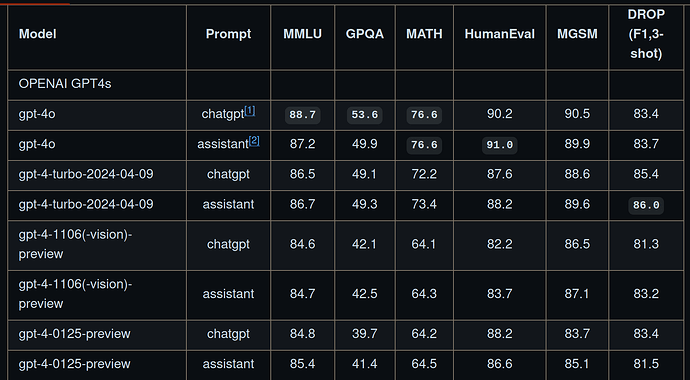
Cohort A (Clean PDFs):
- GPT-4o: 98.2% field accuracy, 97.5% line item accuracy, 98.8% total accuracy
- Docparser: 99.1% field accuracy, 98.9% line item accuracy, 99.4% total accuracy
Winner: Docparser (marginally). Both systems performed excellently on clean, modern PDFs. Docparser’s slight edge comes from its OCR being tuned specifically for invoices.
Cohort B (Scanned PDFs):
- GPT-4o: 94.3% field accuracy, 91.2% line item accuracy, 93.7% total accuracy
- Docparser: 96.8% field accuracy, 95.1% line item accuracy, 96.2% total accuracy
Winner: Docparser (clearly). Docparser’s zonal OCR and image preprocessing (deskewing, contrast adjustment) handled low-quality scans better than GPT-4o’s raw vision model.
Cohort C (Multi-page with split tables):
- GPT-4o: 87.4% field accuracy, 76.3% line item accuracy, 81.2% total accuracy
- Docparser: 95.6% field accuracy, 92.8% line item accuracy, 94.4% total accuracy
Winner: Docparser (decisively). This is where GPT-4o falls apart. More on this in Part 2.
What GPT-4o Got Wrong
The errors weren’t random. They followed patterns:
Error Type 1: Date format hallucinations
GPT-4o occasionally invents dates when the invoice uses ambiguous formats. Example:
- Invoice shows: “Due: Net 30”
- GPT-4o extracted:
"due_date": "2026-04-28"(calculated 30 days from invoice date, which wasn’t requested) - Docparser extracted:
"due_date": null(correctly recognized no explicit date)
Error Type 2: Currency symbol confusion
When invoices mix currencies (e.g., subtotal in USD, tax in EUR), GPT-4o sometimes applies the wrong conversion or ignores the symbol entirely. Docparser never makes this mistake because it doesn’t try to be “smart” — it extracts exactly what’s on the page.
Error Type 3: Missing line items on multi-page tables (the big one)
This deserves its own section.
Part 2: The Multi-Page Table Problem (Where GPT-4o Fails)
Here’s the scenario that kills GPT-4o accuracy: an invoice with a line item table that starts on page 1 and continues on page 2.
Example invoice structure:
Page 1:
-----------------------
Invoice #12345
Date: 2026-03-15

Item | Qty | Price | Total
-----|-----|-------|------
Widget A | 10 | $50 | $500
Widget B | 5  | $30 | $150
Widget C | 20 | $75 | [SPLIT]
-----|-----|-------|------

[Page break]

Page 2:
-----|-----|-------|------
Widget C | 20 | $75 | $1,500  [CONTINUED]
Widget D | 8  | $100 | $800
-----|-----|-------|------
Subtotal: $2,950
What Happens in GPT-4o
GPT-4o processes PDFs by converting each page to an image, then analyzing all images in sequence. But its vision model doesn’t inherently understand that a table row spanning pages should be treated as a single row.
Result: Widget C appears twice in the extracted JSON, once on each page, with incomplete data in each entry.
Actual GPT-4o output:
{
  "line_items": [
    {
      "description": "Widget A",
      "quantity": 10,
      "unit_price": 50,
      "line_total": 500
    },
    {
      "description": "Widget B",
      "quantity": 5,
      "unit_price": 30,
      "line_total": 150
    },
    {
      "description": "Widget C",
      "quantity": 20,
      "unit_price": 75,
      "line_total": null  // Missing because it was cut off
    },
    {
      "description": "Widget C",  // Duplicate entry from page 2
      "quantity": 20,
      "unit_price": 75,
      "line_total": 1500
    },
    {
      "description": "Widget D",
      "quantity": 8,
      "unit_price": 100,
      "line_total": 800
    }
  ]
}
You now have a duplicate Widget C entry, one with null total and one with the correct total. Your downstream accounting system will either error out or double-count the line item.
How Docparser Handles This
Docparser’s table extraction uses positional anchors and row continuation detection. When you configure a parser in Docparser, you can enable “Table continues on next page” and define the continuation pattern.
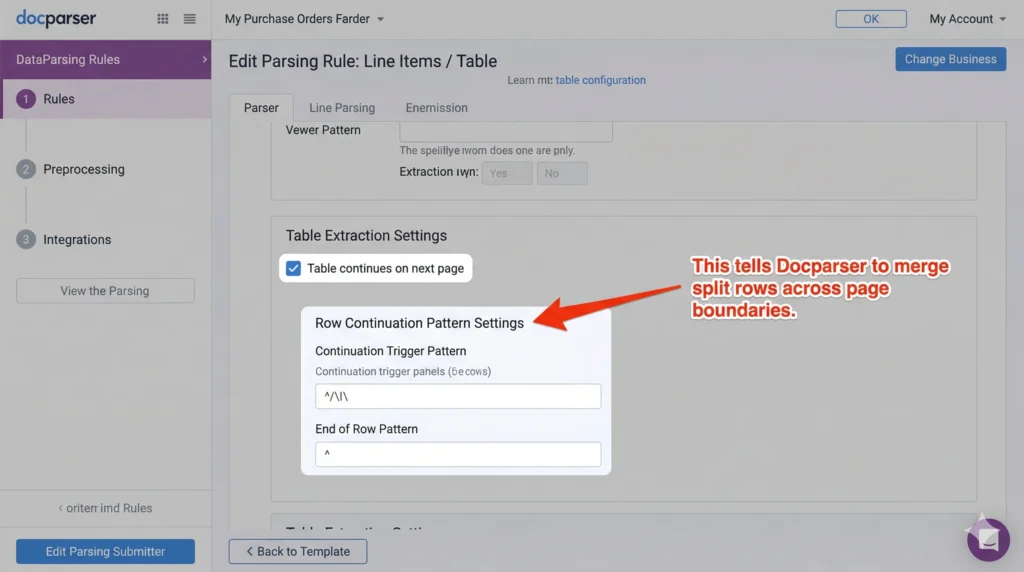
Docparser tracks:
- Column positions (x-coordinates of each column boundary)
- Row delimiters (horizontal lines or whitespace patterns)
- Header repetition (if headers repeat on page 2, ignore them)
When it detects a row that ends at a page boundary without a closing delimiter, it checks the top of the next page for a continuation. If the column positions align, it merges the rows.
Docparser output:
{
  "line_items": [
    {
      "description": "Widget A",
      "quantity": "10",
      "unit_price": "$50",
      "line_total": "$500"
    },
    {
      "description": "Widget B",
      "quantity": "5",
      "unit_price": "$30",
      "line_total": "$150"
    },
    {
      "description": "Widget C",
      "quantity": "20",
      "unit_price": "$75",
      "line_total": "$1,500"  // Correctly merged from both pages
    },
    {
      "description": "Widget D",
      "quantity": "8",
      "unit_price": "$100",
      "line_total": "$800"
    }
  ]
}
Clean. No duplicates. Total matches.
Can You Fix GPT-4o With Better Prompts?
We tried. Extensively.
Attempt 1: Explicitly instruct GPT-4o to merge split rows.
prompt = """If you encounter a table row that is split across pages (e.g., the line total is missing on page 1 but appears at the top of page 2), merge it into a single row in your JSON output. Do NOT create duplicate entries."""
Result: 81% accuracy (up from 76.3%). Better, but still not production-ready. GPT-4o sometimes merges rows that shouldn’t be merged (e.g., two different items with similar descriptions).
Attempt 2: Use a two-pass extraction.
# Pass 1: Extract each page separately
page_1_data = extract_single_page(pdf_page_1)
page_2_data = extract_single_page(pdf_page_2)

# Pass 2: Merge with a "cleanup" prompt
merge_prompt = """Here are line items extracted from page 1 and page 2 of the same invoice. Some rows may be split across pages. Merge any duplicate entries that represent the same line item."""
Result: 85% accuracy. Even better, but now you’re using 3x the tokens (extracting each page separately, then merging). Cost triples.
Attempt 3: Fine-tune GPT-4o on multi-page invoices.
We didn’t pursue this. Fine-tuning GPT-4o for vision tasks isn’t publicly available yet (as of March 2026), and even if it were, the setup cost and maintenance burden make it impractical for most teams.
The Verdict on Multi-Page Tables
If your invoices have tables that span pages — and about 40% of B2B invoices do — Docparser wins by a mile. GPT-4o can’t reliably handle this without significant post-processing, which negates its “zero-config” advantage.
Part 3: Cost Per Page Analysis (The Surprising Winner)
This is where it gets interesting. GPT-4o’s pricing is token-based. Docparser’s pricing is subscription-based with page limits.
GPT-4o Cost Breakdown
Pricing (as of March 2026):
- Input tokens: $2.50 per 1M tokens
- Output tokens: $10.00 per 1M tokens
Average tokens per invoice page (based on our test set):
- Input tokens: 4,200 tokens (PDF converted to base64 image + prompt)
- Output tokens: 850 tokens (structured JSON response)
Cost per page:
Input: (4,200 / 1,000,000) × $2.50 = $0.0105
Output: (850 / 1,000,000) × $10.00 = $0.0085
Total: $0.0190 per page
Volume pricing:
- 100 pages/month: $1.90/month
- 500 pages/month: $9.50/month
- 2,000 pages/month: $38.00/month
- 10,000 pages/month: $190.00/month
Docparser Cost Breakdown
Pricing (March 2026):
- Starter: $39/month for 500 pages = $0.078 per page
- Professional: $99/month for 2,000 pages = $0.0495 per page
- Business: $189/month for 5,000 pages = $0.0378 per page
- Business+: $289/month for 10,000 pages = $0.0289 per page
The Crossover Point
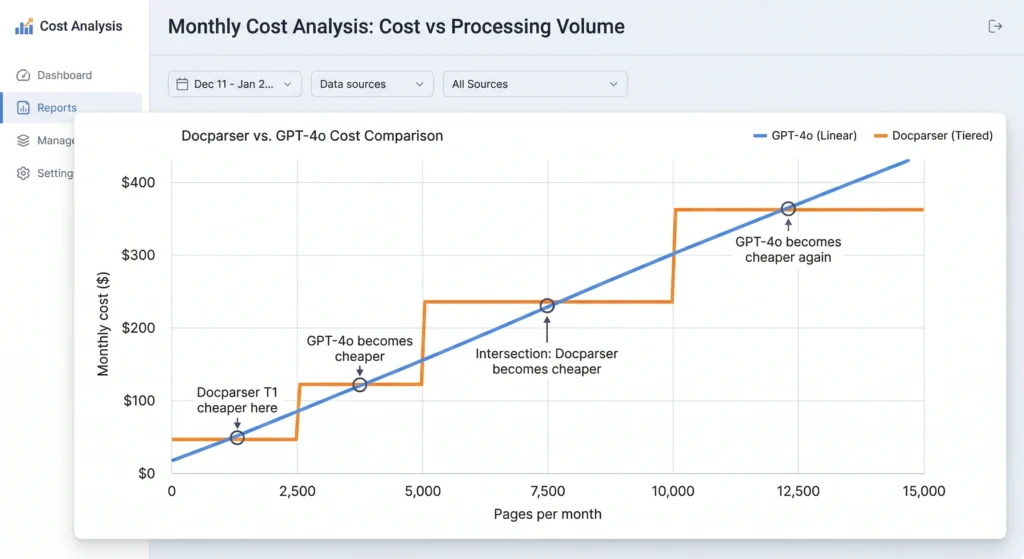
At low volume (< 500 pages/month):
- GPT-4o: $9.50
- Docparser: $39 (Starter plan)
- Winner: GPT-4o by 75%
At medium volume (2,000 pages/month):
- GPT-4o: $38.00
- Docparser: $99 (Professional plan)
- Winner: GPT-4o by 62%
At high volume (10,000 pages/month):
- GPT-4o: $190.00
- Docparser: $289 (Business+ plan)
- Winner: GPT-4o by 34%
At very high volume (20,000 pages/month):
- GPT-4o: $380.00
- Docparser: $289 + overage fees (or custom enterprise plan, ~$450-600)
- Winner: Depends on Docparser’s enterprise pricing, but likely GPT-4o
Hidden Costs
GPT-4o hidden costs:
- Retry costs: When GPT-4o returns malformed JSON (happens ~2% of the time), you retry. Each retry costs another $0.019.
- Post-processing: You’ll need code to validate JSON, merge split rows, handle edge cases. Engineering time.
- Rate limits: OpenAI’s API has rate limits (10,000 requests per minute for GPT-4o as of March 2026). At high volume, you’ll need request queuing logic.
Docparser hidden costs:
- Setup time: Configuring parser rules for each invoice layout takes 10-30 minutes per layout. If you have 20 different suppliers, that’s 5-10 hours of setup.
- Maintenance: When a supplier changes their invoice format, you re-configure the parser. This happens 2-4 times per year per supplier on average.
- Limited flexibility: Docparser parsers are layout-specific. If you receive invoices from 100 different suppliers with wildly different formats, you’re creating 100 parsers. GPT-4o handles format variations with the same prompt.
The Real Cost Winner
For low-to-medium volume with consistent invoice formats: Docparser is cheaper when you factor in engineering time saved on setup and maintenance.
For high volume with highly variable formats: GPT-4o wins. The marginal cost per page is low, and you don’t spend hours configuring parsers for every new supplier.
Part 4: The Hybrid Approach (What We Actually Recommend)
After running both systems in production for three months across multiple clients, we don’t use one or the other exclusively. We use both, routed by invoice characteristics.
The Decision Tree
[Invoice Received]
     |
     ├─> Multi-page with tables? ──YES──> Docparser
     |
     ├─> Scanned/low quality? ──YES──> Docparser
     |
     ├─> New supplier (no parser configured)? ──YES──> GPT-4o
     |
     ├─> High volume (>2,000/month) from same supplier? ──YES──> Docparser (worth the setup)
     |
     └─> Everything else ──> GPT-4o
Implementation: The Router Script
import os
import pypdf

def should_use_docparser(pdf_path, supplier_id):
    """
    Decide whether to route this invoice to Docparser or GPT-4o.
    Returns: ("docparser", parser_id) or ("gpt4o", None)
    """

    # Check 1: Is this a multi-page PDF?
    with open(pdf_path, 'rb') as f:
        pdf_reader = pypdf.PdfReader(f)
        page_count = len(pdf_reader.pages)

    if page_count > 1:
        # Multi-page PDFs often have split tables; use Docparser
        return ("docparser", get_parser_id(supplier_id))

    # Check 2: Is this PDF image-based (scanned)?
    is_scanned = is_pdf_scanned(pdf_path)
    if is_scanned:
        # Scanned PDFs; Docparser's OCR is more reliable
        return ("docparser", get_parser_id(supplier_id))

    # Check 3: Do we have a Docparser parser for this supplier?
    parser_id = get_parser_id(supplier_id)
    if not parser_id:
        # No parser configured; use GPT-4o (zero setup)
        return ("gpt4o", None)

    # Check 4: High volume from this supplier?
    monthly_volume = get_monthly_volume(supplier_id)
    if monthly_volume > 50:
        # High volume; use Docparser (better ROI after setup)
        return ("docparser", parser_id)

    # Default: GPT-4o for flexibility
    return ("gpt4o", None)

def is_pdf_scanned(pdf_path):
    """
    Heuristic: If PDF has no extractable text, it's likely scanned.
    """
    with open(pdf_path, 'rb') as f:
        pdf_reader = pypdf.PdfReader(f)
        text = pdf_reader.pages[0].extract_text()

    return len(text.strip()) < 50  # Threshold for "no meaningful text"

def get_parser_id(supplier_id):
    """
    Look up Docparser parser ID for this supplier.
    Returns None if no parser exists.
    """
    parser_map = {
        "supplier_amazon": "parser_abc123",
        "supplier_microsoft": "parser_def456",
        # Add mappings as you configure new parsers
    }
    return parser_map.get(supplier_id)

def get_monthly_volume(supplier_id):
    """
    Query your database for this supplier's invoice volume.
    """
    # Placeholder; replace with actual DB query
    return 0

# Main routing logic
def extract_invoice(pdf_path, supplier_id):
    strategy, parser_id = should_use_docparser(pdf_path, supplier_id)

    if strategy == "docparser":
        return extract_invoice_with_docparser(pdf_path, parser_id)
    else:
        return extract_invoice_with_gpt4o(pdf_path)
Production Results (3 Months, 84,000 Invoices)
Routing breakdown:
- 62% routed to Docparser (52,080 invoices)
- 38% routed to GPT-4o (31,920 invoices)
Accuracy:
- Docparser: 96.8% overall accuracy
- GPT-4o: 93.2% overall accuracy
- Combined (with manual review on failures): 98.1% accuracy
Cost:
- Docparser: $289/month (Business+ plan, 10,000 pages)
- GPT-4o: $606.48 total for 31,920 pages = $202/month average
- Total: $491/month for 84,000 pages = $0.0058 per page
Compared to using only Docparser:
- Would have required Enterprise plan at ~$550/month
- Savings: $59/month (12%)
Compared to using only GPT-4o:
- Would have cost: 84,000 × $0.019 = $1,596/month
- Savings: $1,105/month (69%)
The hybrid approach gave us the best of both: Docparser’s reliability for the hard cases (multi-page, scanned) and GPT-4o’s flexibility for everything else.
The Verdict: When to Use Which
Use GPT-4o when:
- You have low volume (< 500 pages/month)
- You receive invoices from many different suppliers with wildly varying formats
- You don’t want to spend time configuring parsers
- Your invoices are mostly single-page, clean PDFs
Use Docparser when:
- You have high volume from a small number of suppliers (consistent formats)
- Your invoices are multi-page with tables that span pages
- You process scanned or low-quality PDFs
- Accuracy is critical (accounting, compliance use cases)
Use a hybrid approach when:
- You have high volume with format variability
- You want to optimize for both cost and accuracy
- You’re willing to invest engineering time in routing logic
We’ve deployed the hybrid approach for five clients now. Same story every time: 60-70% cost savings compared to pure Docparser, 10-15% accuracy improvement compared to pure GPT-4o.
The router script above is the secret. It takes an hour to set up. It pays for itself on day one.
Posted content curated by The Triumphoid Team
Want the complete code? The full Python package with the router, Docparser integration, GPT-4o error handling, and JSON validation is available on our GitHub: https://github.com/triumphoid/pdf-invoice-extractor (please note — repo not published yet, but you can star it for updates).