25 Best AI Project Ideas for Students with Source Code: Beginner to Advanced (2026)

Last Updated on August 2, 2026 by Triumphoid Team
Quick answer
The best AI projects for students in 2026 are projects that combine a real problem, measurable results, clean source code and a working demo. Beginners should start with spam detection, sentiment analysis or house-price prediction. Intermediate students can build object detection, resume parsing or text summarisation tools. Advanced students should consider RAG systems, AI agents, MCP assistants, multimodal applications and LLM fine-tuning.
Do not simply copy a notebook. Train or configure the model, evaluate it against a baseline, document its limitations and deploy a small application people can test.
Certificates show that you completed a course. A functioning AI project shows that you can clean data, select an approach, write code, evaluate results, debug failures and deliver something usable.
That distinction matters. A technically modest spam classifier with a clear README, reproducible evaluation and live demo is usually more convincing than an ambitious “autonomous AI super-agent” that consists of three copied files and a heroic amount of optimism.
This guide presents 25 artificial intelligence project ideas organised by difficulty. Every project includes:
- A practical use case
- Recommended tools
- A suitable dataset
- Estimated completion time
- An evaluation metric
- A portfolio upgrade
- Minimal starter source code
The snippets are deliberately small. They provide a working foundation rather than pretending that a seven-line example is a production system.
Best AI Projects for Students at a Glance
| # | AI project | Level | Main technology | Estimated time | GPU required? |
|---|---|---|---|---|---|
| 1 | Email spam classifier | Beginner | Scikit-learn, TF-IDF | 4–6 hours | No |
| 2 | Sentiment analysis tool | Beginner | NLTK, VADER | 3–5 hours | No |
| 3 | House-price predictor | Beginner | Pandas, Scikit-learn | 4–8 hours | No |
| 4 | Movie recommendation system | Beginner | Pandas, cosine similarity | 6–10 hours | No |
| 5 | Handwritten digit recogniser | Beginner | TensorFlow, CNN | 5–8 hours | Optional |
| 6 | Flower image classifier | Beginner | MobileNet, transfer learning | 8–12 hours | Helpful |
| 7 | Campus FAQ chatbot | Beginner | Python, Flask or Streamlit | 4–8 hours | No |
| 8 | Fake-news classifier | Beginner | TF-IDF, linear classifier | 6–10 hours | No |
| 9 | Resume parser | Intermediate | spaCy, regex | 8–14 hours | No |
| 10 | Real-time object detector | Intermediate | Ultralytics YOLO, OpenCV | 8–16 hours | Helpful |
| 11 | Fraud-detection system | Intermediate | Random Forest, anomaly detection | 8–14 hours | No |
| 12 | Speech-emotion recogniser | Intermediate | Librosa, Scikit-learn | 10–18 hours | Optional |
| 13 | Student-performance risk model | Intermediate | Gradient boosting | 8–14 hours | No |
| 14 | Stock-trend classifier | Intermediate | Time-series features | 8–16 hours | No |
| 15 | Text summarisation app | Intermediate | Hugging Face Transformers | 6–12 hours | Optional |
| 16 | AI keyword-clustering tool | Intermediate | Embeddings, K-means | 8–14 hours | No |
| 17 | Semantic support chatbot | Intermediate | Sentence Transformers | 10–18 hours | No |
| 18 | RAG course-material assistant | Advanced | Embeddings, vector search, LLM | 2–5 days | Optional |
| 19 | Multi-agent research workflow | Advanced | CrewAI or LangGraph | 2–5 days | No |
| 20 | LLM fine-tuning with QLoRA | Advanced | Unsloth, PEFT | 3–7 days | Yes |
| 21 | AI code-review agent | Advanced | Git, LLM, LangGraph | 2–5 days | Optional |
| 22 | Multimodal lab assistant | Advanced | Vision-language model | 2–5 days | Helpful |
| 23 | MCP-powered campus assistant | Advanced | FastMCP, Python | 2–5 days | No |
| 24 | Inventory forecasting agent | Advanced | Forecasting, agent tools | 3–6 days | No |
| 25 | Knowledge-graph extractor | Advanced | Neo4j, NLP, LLM | 3–7 days | Optional |
Which AI Project Should You Choose?
Use these five filters.
1. Match the project to your present skill level
Choose a project that is slightly harder than your current work, not one that requires six unfamiliar frameworks at once.
A Python beginner should not start by fine-tuning a multimodal model inside a distributed agent architecture. That is less a learning plan and more a controlled demolition.
2. Choose a problem you can explain
You should be able to describe:
- Who has the problem
- What data the system receives
- What the model predicts or produces
- How success is measured
- What can go wrong
3. Prefer projects with accessible data
Good student datasets are documented, legally usable and small enough to process without expensive infrastructure.
The UCI SMS Spam Collection is suitable for text classification, while MovieLens provides established recommendation-system datasets.
4. Select a measurable outcome
Classification projects need metrics such as precision, recall and F1 score. Regression projects need MAE or RMSE. Recommendation systems need ranking metrics. Generative projects need groundedness, answer accuracy and human evaluation.
“Looks good to me” is not a metric. It is how bugs acquire tenure.
5. Make sure it can become a demo
A notebook proves that the model ran once. A small web interface proves that another person can use it.
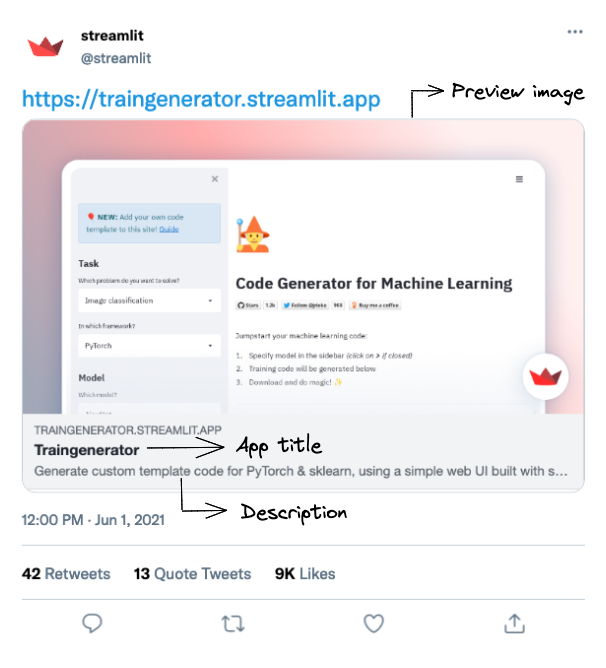
Streamlit can turn Python scripts into shareable applications, and its Community Cloud supports deploying apps from a repository.
Beginner AI Project Ideas
1. Email Spam Classifier with Python
An email spam classifier predicts whether a message is legitimate or unwanted.
This is one of the best introductory AI projects because it covers the complete supervised-learning workflow:
- Load labelled data.
- Clean text.
- Convert words into numerical features.
- Train a classifier.
- Evaluate false positives and false negatives.
- Predict new messages.
Scikit-learn documents TfidfVectorizer for transforming text into numerical features and MultinomialNB as a classic classifier for word-count-style data.
Tools: Python, Pandas, Scikit-learn
Dataset: UCI SMS Spam Collection
Best metric: Precision, recall and F1 score
Estimated time: 4–6 hours
Portfolio value: Good first NLP project
Starter source code
import pandas as pd
from sklearn.model_selection import train_test_split
from sklearn.pipeline import Pipeline
from sklearn.feature_extraction.text import TfidfVectorizer
from sklearn.naive_bayes import MultinomialNB
from sklearn.metrics import classification_report

data = pd.read_csv(
    "SMSSpamCollection",
    sep="\t",
    names=["label", "message"]
)

X_train, X_test, y_train, y_test = train_test_split(
    data["message"],
    data["label"],
    test_size=0.2,
    random_state=42,
    stratify=data["label"],
)

model = Pipeline([
    ("tfidf", TfidfVectorizer(stop_words="english")),
    ("classifier", MultinomialNB()),
])

model.fit(X_train, y_train)
predictions = model.predict(X_test)

print(classification_report(y_test, predictions))
print(model.predict(["Congratulations! Claim your prize now."]))
Make it portfolio-ready
Add:
- A text box for testing messages
- A probability or confidence score
- A confusion matrix
- An explanation of false positives
- A comparison between Naive Bayes and logistic regression
2. Sentiment Analysis Tool
A sentiment analyser labels reviews, comments or social posts as positive, negative or neutral.
The easiest version uses VADER, a rule-based sentiment tool included with NLTK. A stronger version fine-tunes or runs a transformer-based sequence-classification model. Hugging Face defines text classification as assigning a label to a piece of text and provides sentiment analysis as a standard use case.
Tools: Python, NLTK, Pandas
Dataset: Product reviews, movie reviews or your own labelled comments
Best metric: Macro F1 score
Estimated time: 3–5 hours
Portfolio value: Useful for NLP, marketing and customer-experience roles
Starter source code
import nltk
from nltk.sentiment import SentimentIntensityAnalyzer

nltk.download("vader_lexicon")
analyser = SentimentIntensityAnalyzer()

def classify_sentiment(text: str) -> dict:
    scores = analyser.polarity_scores(text)

    if scores["compound"] >= 0.05:
        label = "positive"
    elif scores["compound"] <= -0.05:
        label = "negative"
    else:
        label = "neutral"

    return {"label": label, "scores": scores}

print(classify_sentiment("The interface is excellent, but login is slow."))
Make it portfolio-ready
Compare sentiment across:
- Product categories
- Dates
- Brands
- App versions
- Customer-support topics
Include examples where sarcasm, mixed sentiment or domain-specific language causes mistakes.
3. House-Price Prediction Model
A house-price predictor estimates a numerical property value using variables such as floor area, rooms, location, age and condition.
This project introduces regression, missing-value handling, categorical variables and error analysis.
Tools: Python, Pandas, Scikit-learn
Dataset: Ames Housing or another public property dataset
Best metric: Mean absolute error
Estimated time: 4–8 hours
Portfolio value: Strong introduction to tabular machine learning
Starter source code
import pandas as pd
from sklearn.model_selection import train_test_split
from sklearn.compose import ColumnTransformer
from sklearn.preprocessing import OneHotEncoder
from sklearn.impute import SimpleImputer
from sklearn.pipeline import Pipeline
from sklearn.ensemble import RandomForestRegressor
from sklearn.metrics import mean_absolute_error

data = pd.read_csv("housing.csv")

target = "price"
X = data.drop(columns=[target])
y = data[target]

numeric = X.select_dtypes(include="number").columns
categorical = X.select_dtypes(exclude="number").columns

preprocess = ColumnTransformer([
    ("num", SimpleImputer(strategy="median"), numeric),
    ("cat", Pipeline([
        ("imputer", SimpleImputer(strategy="most_frequent")),
        ("encoder", OneHotEncoder(handle_unknown="ignore")),
    ]), categorical),
])

model = Pipeline([
    ("preprocess", preprocess),
    ("regressor", RandomForestRegressor(
        n_estimators=300,
        random_state=42
    )),
])

X_train, X_test, y_train, y_test = train_test_split(
    X, y, test_size=0.2, random_state=42
)

model.fit(X_train, y_train)
predictions = model.predict(X_test)

print("MAE:", mean_absolute_error(y_test, predictions))
Make it portfolio-ready
Include:
- A baseline using the median price
- Feature-importance analysis
- Separate error results for cheap and expensive homes
- An interactive prediction form
- A warning that the model is educational, not a professional valuation
4. Movie Recommendation System
A recommendation system suggests films based on titles, genres, ratings or user behaviour.
MovieLens datasets contain ratings and tagging activity and are widely used for recommendation-system experiments.
Begin with content-based recommendations using genres. Later, implement collaborative filtering using user-item ratings.
Tools: Python, Pandas, Scikit-learn
Dataset: MovieLens latest-small
Best metric: Precision@K, recall@K or hit rate
Estimated time: 6–10 hours
Portfolio value: Easy to demonstrate and discuss in interviews
Starter source code
import pandas as pd
from sklearn.feature_extraction.text import TfidfVectorizer
from sklearn.metrics.pairwise import cosine_similarity

movies = pd.read_csv("movies.csv")
movies["genres_text"] = movies["genres"].str.replace("|", " ", regex=False)

vectors = TfidfVectorizer().fit_transform(movies["genres_text"])
similarity = cosine_similarity(vectors)

def recommend(title: str, count: int = 5) -> list[str]:
    matches = movies.index[
        movies["title"].str.contains(title, case=False, regex=False)
    ]

    if len(matches) == 0:
        return []

    index = matches[0]
    ranked = similarity[index].argsort()[::-1][1:count + 1]
    return movies.iloc[ranked]["title"].tolist()

print(recommend("Toy Story"))
Make it portfolio-ready
Add:
- User ratings
- “Because you liked…” explanations
- Filters for year and genre
- Diversity controls
- A comparison between content-based and collaborative methods
5. Handwritten Digit Recognition with a CNN
This project trains a neural network to recognise handwritten digits from zero to nine.
It introduces image tensors, convolutional layers, pooling, training epochs and classification accuracy. TensorFlow provides official examples for CNN-based image classification and loading MNIST into Keras.
Tools: Python, TensorFlow, Keras
Dataset: MNIST
Best metric: Test accuracy and per-digit recall
Estimated time: 5–8 hours
GPU required: No, although one speeds up training
Starter source code
import tensorflow as tf
from tensorflow.keras import layers, models

(x_train, y_train), (x_test, y_test) = (
    tf.keras.datasets.mnist.load_data()
)

x_train = x_train.astype("float32") / 255.0
x_test = x_test.astype("float32") / 255.0

x_train = x_train[..., None]
x_test = x_test[..., None]

model = models.Sequential([
    layers.Input(shape=(28, 28, 1)),
    layers.Conv2D(32, 3, activation="relu"),
    layers.MaxPooling2D(),
    layers.Conv2D(64, 3, activation="relu"),
    layers.Flatten(),
    layers.Dense(64, activation="relu"),
    layers.Dense(10, activation="softmax"),
])

model.compile(
    optimizer="adam",
    loss="sparse_categorical_crossentropy",
    metrics=["accuracy"],
)

model.fit(x_train, y_train, epochs=5, validation_split=0.1)
print(model.evaluate(x_test, y_test))
Make it portfolio-ready
Build a drawing canvas that lets users write a number with a mouse or finger and see the model’s prediction.
Also show:
- Prediction probability
- Misclassified examples
- Confusion matrix
- Effect of adding rotation and noise
6. Flower Image Classifier with Transfer Learning
A flower classifier identifies a flower category from an uploaded image.
Instead of training a large network from scratch, use a model already trained on a broad image dataset and fine-tune its final layers. TensorFlow’s transfer-learning guide demonstrates freezing a pretrained base, adding a task-specific head and optionally fine-tuning later.
Tools: TensorFlow, MobileNetV2, Streamlit
Dataset: TensorFlow Flowers or a custom collection
Best metric: Macro F1 and per-class recall
Estimated time: 8–12 hours
GPU required: Helpful but not mandatory
Starter source code
import tensorflow as tf
from tensorflow.keras import layers

image_size = (224, 224)

train_data = tf.keras.utils.image_dataset_from_directory(
    "flowers",
    validation_split=0.2,
    subset="training",
    seed=42,
    image_size=image_size,
)

validation_data = tf.keras.utils.image_dataset_from_directory(
    "flowers",
    validation_split=0.2,
    subset="validation",
    seed=42,
    image_size=image_size,
)

base = tf.keras.applications.MobileNetV2(
    input_shape=(224, 224, 3),
    include_top=False,
    weights="imagenet",
)

base.trainable = False

model = tf.keras.Sequential([
    layers.Rescaling(1.0 / 127.5, offset=-1),
    base,
    layers.GlobalAveragePooling2D(),
    layers.Dropout(0.2),
    layers.Dense(len(train_data.class_names), activation="softmax"),
])

model.compile(
    optimizer="adam",
    loss="sparse_categorical_crossentropy",
    metrics=["accuracy"],
)

model.fit(train_data, validation_data=validation_data, epochs=5)
Make it portfolio-ready
Collect your own photographs and test whether lighting, distance and background affect performance.
That turns a standard tutorial into an actual experiment.
7. Campus FAQ Chatbot
Build a small chatbot that answers common questions about classes, library hours, examinations or student services.
Start with deterministic intent matching. This teaches conversation flow without introducing API costs or unpredictable model output.
Tools: Python, JSON, Flask or Streamlit
Dataset: A custom intents file
Best metric: Intent accuracy and answer coverage
Estimated time: 4–8 hours
Portfolio value: Good first chatbot project
Starter source code
import re

knowledge = {
    "library": "The library is open from 08:00 to 20:00 on weekdays.",
    "exam": "The examination timetable is published in the student portal.",
    "wifi": "Connect to CAMPUS-WIFI using your student account.",
    "fees": "Tuition and payment details are available in the finance portal.",
}

def answer(question: str) -> str:
    cleaned = re.sub(r"[^a-z0-9 ]", "", question.lower())

    for keyword, response in knowledge.items():
        if keyword in cleaned:
            return response

    return "I do not have that answer yet. Please contact student services."

print(answer("When is the library open?"))
Make it portfolio-ready
Store unanswered questions and use them to expand the knowledge base.
Add:
- Multiple phrases per intent
- A confidence threshold
- Feedback buttons
- Escalation to a human contact
- An admin page for editing answers
8. Fake-News Classification Experiment
A fake-news classifier predicts whether an article resembles examples labelled as reliable or unreliable.
Treat this as a text-classification experiment, not an automatic truth machine. Models frequently learn publisher names, writing style or dataset artefacts instead of verifying factual claims.
Tools: Python, Scikit-learn, TF-IDF
Dataset: A documented public misinformation dataset
Best metric: Macro F1, plus cross-source testing
Estimated time: 6–10 hours
Portfolio value: Useful when limitations are handled properly
Starter source code
import pandas as pd
from sklearn.model_selection import train_test_split
from sklearn.pipeline import Pipeline
from sklearn.feature_extraction.text import TfidfVectorizer
from sklearn.linear_model import PassiveAggressiveClassifier
from sklearn.metrics import classification_report

data = pd.read_csv("news.csv").dropna(subset=["text", "label"])

X_train, X_test, y_train, y_test = train_test_split(
    data["text"],
    data["label"],
    test_size=0.2,
    random_state=42,
    stratify=data["label"],
)

model = Pipeline([
    ("tfidf", TfidfVectorizer(
        stop_words="english",
        max_df=0.8,
        min_df=3
    )),
    ("classifier", PassiveAggressiveClassifier(
        random_state=42
    )),
])

model.fit(X_train, y_train)
print(classification_report(y_test, model.predict(X_test)))
Make it portfolio-ready
Run a second evaluation after removing:
- Publisher names
- URLs
- Author names
- Repeated boilerplate
If performance collapses, the model was probably detecting the source rather than misinformation.
Intermediate AI Project Ideas
9. Resume Parser with spaCy
A resume parser converts unstructured CV text into structured fields such as:
- Name
- Phone number
- Skills
- Education
- Job titles
- Employers
- Dates
This project combines PDF extraction, regular expressions, named-entity recognition and data normalisation.
Tools: Python, spaCy, PyMuPDF, regex
Dataset: Synthetic or permissioned resumes
Best metric: Field-level precision, recall and F1
Estimated time: 8–14 hours
Starter source code
import re
import spacy

nlp = spacy.load("en_core_web_sm")

SKILLS = {
    "python", "sql", "tensorflow", "pytorch",
    "docker", "aws", "javascript", "pandas"
}

def parse_resume(text: str) -> dict:
    doc = nlp(text)

    emails = re.findall(
        r"[\w.+-]+@[\w-]+\.[\w.-]+",
        text
    )

    detected_skills = sorted({
        token.text.lower()
        for token in doc
        if token.text.lower() in SKILLS
    })

    people = [
        entity.text
        for entity in doc.ents
        if entity.label_ == "PERSON"
    ]

    return {
        "name_candidates": people[:3],
        "emails": emails,
        "skills": detected_skills,
    }

print(parse_resume(open("resume.txt", encoding="utf-8").read()))
Make it portfolio-ready
Create an annotation set of 30–50 synthetic resumes and report extraction accuracy for each field.
Do not upload real applicants’ private resumes to third-party services without permission.
10. Real-Time Object Detection with Ultralytics YOLO
This project detects and labels objects in images, video files or a webcam stream.
Current Ultralytics documentation uses YOLO26 models for prediction, training, validation and export. Its Python interface accepts images, directories, video, URLs and camera streams.
Tools: Python, Ultralytics, OpenCV
Dataset: COCO for pretrained inference or a custom labelled dataset
Best metric: mAP50-95, precision, recall and inference speed
Estimated time: 8–16 hours
GPU required: Helpful for training
Starter source code
from ultralytics import YOLO

model = YOLO("yolo26n.pt")

# Use 0 for the default webcam.
results = model.predict(
    source=0,
    show=True,
    conf=0.4,
    stream=True,
)

for result in results:
    print(result.boxes)
Ultralytics identifies bounding boxes, class labels and confidence scores and can export models to formats such as ONNX and TensorRT.
Make it portfolio-ready
Choose a narrow custom problem:
- Recycling-item detection
- Parking-space occupancy
- Laboratory-equipment detection
- Plant-disease region detection
- Safety-equipment detection
Report performance on images that differ from the training environment.
11. Credit-Card Fraud Detection System
Fraud detection is an imbalanced classification problem: genuine transactions heavily outnumber fraudulent ones.
This makes ordinary accuracy misleading. A model that predicts “not fraud” every time can appear accurate while being completely useless.
Tools: Python, Pandas, Scikit-learn
Dataset: An anonymised transaction dataset
Best metric: Precision-recall AUC, recall at a chosen precision
Estimated time: 8–14 hours
Starter source code
import pandas as pd
from sklearn.model_selection import train_test_split
from sklearn.ensemble import RandomForestClassifier
from sklearn.metrics import classification_report, average_precision_score

data = pd.read_csv("transactions.csv")

X = data.drop(columns=["is_fraud"])
y = data["is_fraud"]

X_train, X_test, y_train, y_test = train_test_split(
    X,
    y,
    test_size=0.2,
    stratify=y,
    random_state=42,
)

model = RandomForestClassifier(
    n_estimators=400,
    class_weight="balanced",
    random_state=42,
    n_jobs=-1,
)

model.fit(X_train, y_train)

probabilities = model.predict_proba(X_test)[:, 1]
predictions = probabilities >= 0.35

print(classification_report(y_test, predictions))
print("PR AUC:", average_precision_score(y_test, probabilities))
Make it portfolio-ready
Add:
- Threshold selection
- Cost of false positives
- Time-based train/test splitting
- Model-drift monitoring
- Feature explanations
Use synthetic or properly anonymised data. Never publish real payment details.
12. Speech-Emotion Recognition
A speech-emotion model predicts categories such as happy, sad, neutral or angry from audio.
Common audio features include mel-frequency cepstral coefficients, chroma and spectral measurements.
Tools: Python, Librosa, NumPy, Scikit-learn
Dataset: RAVDESS, TESS or another licensed speech dataset
Best metric: Macro F1 and per-speaker evaluation
Estimated time: 10–18 hours
Starter source code
import librosa
import numpy as np
from sklearn.neural_network import MLPClassifier

def extract_features(path: str) -> np.ndarray:
    audio, sample_rate = librosa.load(
        path,
        sr=16_000,
        duration=4
    )

    mfcc = librosa.feature.mfcc(
        y=audio,
        sr=sample_rate,
        n_mfcc=40
    )

    return np.mean(mfcc, axis=1)

X_train = np.load("speech_features.npy")
y_train = np.load("emotion_labels.npy")

model = MLPClassifier(
    hidden_layer_sizes=(128, 64),
    max_iter=500,
    random_state=42,
)

model.fit(X_train, y_train)

sample = extract_features("sample.wav").reshape(1, -1)
print(model.predict(sample))
Make it portfolio-ready
Split training and testing by speaker, not randomly by audio file. Otherwise, the model may learn people’s voices rather than emotion.
Also document that vocal emotion is culturally and individually variable and should not be treated as a reliable psychological diagnosis.
13. Student-Performance Risk Predictor
This project estimates whether a student may need academic support using attendance, assignment completion and previous performance.
It teaches tabular classification while remaining directly relevant to students and educational institutions.
Tools: Python, Scikit-learn, SHAP
Dataset: An anonymised or synthetic academic dataset
Best metric: Recall, calibration and subgroup error analysis
Estimated time: 8–14 hours
Starter source code
import pandas as pd
from sklearn.model_selection import train_test_split
from sklearn.ensemble import HistGradientBoostingClassifier
from sklearn.metrics import classification_report

data = pd.read_csv("student_performance.csv")

features = [
    "attendance_rate",
    "assignments_completed",
    "previous_grade",
    "study_hours",
]

X = data[features]
y = data["needs_support"]

X_train, X_test, y_train, y_test = train_test_split(
    X,
    y,
    test_size=0.2,
    stratify=y,
    random_state=42,
)

model = HistGradientBoostingClassifier(random_state=42)
model.fit(X_train, y_train)

print(classification_report(y_test, model.predict(X_test)))
Make it portfolio-ready
Frame the output as “may benefit from support,” not “will fail.”
Include:
- Calibration plot
- Feature explanations
- Fairness analysis
- A human-review step
- A prohibition against automatic punitive decisions
14. Stock-Trend Classification Experiment
Instead of claiming to predict the exact future price, build a model that classifies whether the next period closes higher or lower than the current one.
This is still difficult. Financial markets are noisy, change over time and punish careless data leakage with almost artistic efficiency.
Tools: Python, Pandas, Scikit-learn
Dataset: Historical market data
Best metric: Walk-forward accuracy, precision and simulated return after costs
Estimated time: 8–16 hours
Starter source code
import pandas as pd
from sklearn.ensemble import RandomForestClassifier
from sklearn.metrics import classification_report

prices = pd.read_csv(
    "prices.csv",
    parse_dates=["date"]
).sort_values("date")

prices["return_1d"] = prices["close"].pct_change()
prices["return_5d"] = prices["close"].pct_change(5)
prices["volatility_10d"] = (
    prices["return_1d"].rolling(10).std()
)
prices["target"] = (
    prices["close"].shift(-1) > prices["close"]
).astype(int)

data = prices.dropna().copy()
features = ["return_1d", "return_5d", "volatility_10d"]

split = int(len(data) * 0.8)
train = data.iloc[:split]
test = data.iloc[split:]

model = RandomForestClassifier(
    n_estimators=300,
    max_depth=5,
    random_state=42
)

model.fit(train[features], train["target"])
print(classification_report(
    test["target"],
    model.predict(test[features])
))
Make it portfolio-ready
Use walk-forward evaluation and include:
- Transaction costs
- Slippage
- A buy-and-hold baseline
- Maximum drawdown
- Separate bull and bear periods
State clearly that the project is educational and not financial advice.
15. Text Summarisation Application
A text summariser converts a long article, report or transcript into a shorter version.
Transformer-based summarisation may be extractive or abstractive. Hugging Face defines summarisation as producing a shorter text that retains important information and provides task-specific examples for transformer models.
Tools: Python, Hugging Face Transformers, Streamlit
Dataset: News articles, public reports or lecture transcripts
Best metric: ROUGE plus human factuality checks
Estimated time: 6–12 hours
Starter source code
from transformers import pipeline

summariser = pipeline(
    "summarization",
    model="google-t5/t5-small"
)

text = open("article.txt", encoding="utf-8").read()

result = summariser(
    text[:4_000],
    max_length=160,
    min_length=45,
    do_sample=False,
)

print(result[0]["summary_text"])
Make it portfolio-ready
Add:
- Document upload
- Summary length control
- Bullet-point mode
- Source-sentence highlighting
- A factual-consistency warning
- Chunking for long documents
Do not evaluate the system solely by how fluent the summary sounds. A beautifully phrased factual error remains an error, only better dressed.
16. AI Keyword-Clustering Tool
This project groups semantically related search terms into topic clusters.
Traditional clustering uses lexical similarity. A more useful 2026 version converts keywords into embeddings and then clusters them based on meaning.
Tools: Python, Sentence Transformers, Scikit-learn
Dataset: A CSV containing keywords
Best metric: Silhouette score plus manual cluster-quality review
Estimated time: 8–14 hours
Portfolio value: Strong for SEO, content and marketing technology roles
Starter source code
import pandas as pd
from sentence_transformers import SentenceTransformer
from sklearn.cluster import KMeans

data = pd.read_csv("keywords.csv")
keywords = data["keyword"].dropna().tolist()

encoder = SentenceTransformer("all-MiniLM-L6-v2")
embeddings = encoder.encode(
    keywords,
    normalize_embeddings=True
)

clusterer = KMeans(
    n_clusters=8,
    random_state=42,
    n_init="auto"
)

labels = clusterer.fit_predict(embeddings)

result = pd.DataFrame({
    "keyword": keywords,
    "cluster": labels,
})

print(result.sort_values("cluster"))
Make it portfolio-ready
Add:
- Automatic cluster labels
- Search-intent classification
- Minimum cluster size
- Duplicate removal
- CSV export
- A two-dimensional visualisation
For a more serious version, compare embedding clusters against TF-IDF clusters and explain where each approach fails.
17. Semantic Customer-Support Chatbot
Unlike a keyword chatbot, this tool finds the most semantically relevant answer from a support knowledge base.
It is a useful stepping stone between rule-based chatbots and full RAG systems.
Tools: Python, Sentence Transformers, NumPy
Dataset: A custom FAQ file
Best metric: Top-1 and top-3 retrieval accuracy
Estimated time: 10–18 hours
Starter source code
import numpy as np
from sentence_transformers import SentenceTransformer

faq = [
    {
        "question": "How do I reset my password?",
        "answer": "Open Settings, select Security and choose Reset Password."
    },
    {
        "question": "How do I cancel my subscription?",
        "answer": "Open Billing and select Cancel Subscription."
    },
    {
        "question": "Where can I download invoices?",
        "answer": "Invoices are available from the Billing history page."
    },
]

encoder = SentenceTransformer("all-MiniLM-L6-v2")

questions = [item["question"] for item in faq]
vectors = encoder.encode(
    questions,
    normalize_embeddings=True
)

def answer(query: str) -> dict:
    query_vector = encoder.encode(
        [query],
        normalize_embeddings=True
    )[0]

    scores = vectors @ query_vector
    index = int(np.argmax(scores))

    return {
        "answer": faq[index]["answer"],
        "similarity": float(scores[index]),
    }

print(answer("I need a copy of last month's receipt"))
Make it portfolio-ready
Add a confidence threshold. When similarity is too low, the system should admit that it cannot answer instead of inventing a cheerful lie.
Advanced AI Project Ideas
18. RAG Course-Material Question-and-Answer System
Retrieval-augmented generation, or RAG, retrieves relevant passages from an external collection before asking a language model to answer.
A good student project can index:
- Lecture notes
- Course handbooks
- Research papers
- Textbooks with suitable rights
- Public university policies
LangChain’s current retrieval documentation demonstrates semantic search over PDF content and a minimal RAG workflow built from document loaders, embeddings and vector storage.
Tools: Python, FAISS or another vector store, embeddings, an LLM
Best metric: Retrieval recall, grounded-answer accuracy and citation accuracy
Estimated time: 2–5 days
Starter source code
import faiss
import numpy as np
from sentence_transformers import SentenceTransformer

chunks = [
    "Gradient descent updates parameters in the direction that reduces loss.",
    "A convolutional layer applies learnable filters across an image.",
    "Overfitting occurs when a model memorises training patterns that do not generalise.",
]

encoder = SentenceTransformer("all-MiniLM-L6-v2")

vectors = encoder.encode(
    chunks,
    normalize_embeddings=True
).astype("float32")

index = faiss.IndexFlatIP(vectors.shape[1])
index.add(vectors)

def retrieve(question: str, top_k: int = 2) -> list[str]:
    query = encoder.encode(
        [question],
        normalize_embeddings=True
    ).astype("float32")

    _, indices = index.search(query, top_k)
    return [chunks[i] for i in indices[0]]

question = "Why does a model perform badly on new data?"
context = retrieve(question)

prompt = f"""
Answer using only the supplied context.
If the context is insufficient, say so.

Context:
{context}

Question:
{question}
"""

print(prompt)
The final prompt can be sent to a local or hosted language model.
Make it portfolio-ready
Add:
- PDF ingestion
- Page-level citations
- Chunk-size experiments
- Hybrid keyword and vector retrieval
- A “not found” response
- Evaluation questions with known answers
- A retrieved-context viewer
The quality of a RAG system depends at least as much on retrieval and evaluation as on the language model.
19. Multi-Agent Research Workflow
A multi-agent workflow assigns different roles to separate agents, such as:
- Researcher
- Evidence checker
- Analyst
- Writer
- Editor
CrewAI supports agents, crews and flows, while LangGraph provides graph-based orchestration, state, persistence and deterministic or agentic steps.
Tools: CrewAI or LangGraph, Python, search or document tools
Best metric: Factual accuracy, source coverage, execution cost and failure rate
Estimated time: 2–5 days
Starter source code
from crewai import Agent, Task, Crew

researcher = Agent(
    role="Researcher",
    goal="Collect verifiable evidence about {topic}",
    backstory="You prefer primary sources and record every citation.",
)

analyst = Agent(
    role="Analyst",
    goal="Identify patterns, disagreements and limitations",
    backstory="You challenge weak evidence and unsupported claims.",
)

writer = Agent(
    role="Writer",
    goal="Produce a clear, source-grounded report",
    backstory="You never present an assumption as a verified fact.",
)

research_task = Task(
    description="Research {topic} and produce structured notes.",
    expected_output="Evidence table with citations.",
    agent=researcher,
)

analysis_task = Task(
    description="Analyse the evidence and flag unsupported conclusions.",
    expected_output="Findings, conflicts and limitations.",
    agent=analyst,
)

writing_task = Task(
    description="Write the final report using approved evidence.",
    expected_output="A concise source-grounded report.",
    agent=writer,
)

crew = Crew(
    agents=[researcher, analyst, writer],
    tasks=[research_task, analysis_task, writing_task],
)

print(crew.kickoff(inputs={"topic": "AI use in higher education"}))
Make it portfolio-ready
Measure whether the multi-agent version actually outperforms:
- One model call
- A fixed three-step workflow
- A human-created outline
More agents do not automatically produce more intelligence. Sometimes they merely hold a longer meeting.
20. Fine-Tune a Small Language Model with QLoRA
Fine-tuning adapts an existing language model to a task, style or domain.
QLoRA keeps the base model quantised while training smaller low-rank adapter weights. The original QLoRA method backpropagates through a frozen 4-bit quantised model into LoRA adapters, substantially reducing memory requirements compared with full fine-tuning.
Unsloth provides tooling and guides for LoRA and QLoRA workflows, although model-specific requirements and GPU memory should be checked before training.
Tools: Unsloth, Transformers, TRL, PEFT
Dataset: A carefully reviewed instruction dataset
Best metric: Task accuracy, held-out loss and human preference
Estimated time: 3–7 days
GPU required: Yes
Starter source code
from unsloth import FastLanguageModel

max_length = 2048

model, tokenizer = FastLanguageModel.from_pretrained(
    model_name="unsloth/Qwen3.5-4B",
    max_seq_length=max_length,
    load_in_4bit=True,
)

model = FastLanguageModel.get_peft_model(
    model,
    r=16,
    lora_alpha=16,
    lora_dropout=0,
    target_modules=[
        "q_proj",
        "k_proj",
        "v_proj",
        "o_proj",
        "gate_proj",
        "up_proj",
        "down_proj",
    ],
    use_gradient_checkpointing="unsloth",
)

print("Model prepared for parameter-efficient fine-tuning.")
Training configuration differs by model, library version and dataset format, so pin dependency versions and begin from the current official notebook for the selected model.
Make it portfolio-ready
Include:
- Dataset card
- Data-cleaning method
- Baseline model results
- Held-out test set
- Before-and-after examples
- Safety evaluation
- Adapter size
- Training time and hardware
- Cases where fine-tuning made performance worse
Fine-tuning is not automatically better than prompting or RAG. Your project should explain why training was justified.
21. AI Code-Review Agent
An AI code-review agent reads a Git diff and returns structured feedback about:
- Bugs
- Security issues
- Missing tests
- Type errors
- Performance problems
- Readability
LangGraph is suitable when the workflow requires explicit stages such as file filtering, review, validation and human approval. Its documentation emphasises durable execution, state and human-in-the-loop control.
Tools: Python, Git, LangGraph, a code-capable model
Best metric: Valid issue precision and developer acceptance rate
Estimated time: 2–5 days
Starter source code
import subprocess
from pathlib import Path

def get_diff() -> str:
    result = subprocess.run(
        ["git", "diff", "HEAD~1", "HEAD"],
        capture_output=True,
        text=True,
        check=True,
    )
    return result.stdout

def build_review_prompt(diff: str) -> str:
    return f"""
Review this Git diff.

Return:
1. Definite bugs
2. Security concerns
3. Missing tests
4. Maintainability issues

Do not comment on unchanged code.
Do not invent files or behaviour.

DIFF:
{diff}
"""

diff = get_diff()

if len(diff) > 30_000:
    raise ValueError("Diff is too large; review files separately.")

prompt = build_review_prompt(diff)
Path("review_prompt.txt").write_text(prompt, encoding="utf-8")
Send the prompt to your chosen model and require structured JSON output.
Make it portfolio-ready
Build a benchmark from known faulty pull requests. Track:
- True issues found
- False alarms
- Duplicate comments
- Missed bugs
- Cost per review
- Latency
- Percentage of comments accepted by a developer
Never give the agent permission to merge or modify production code without human review.
22. Multimodal Laboratory Assistant
A multimodal assistant accepts an image and text question together.

Possible student use cases include:
- Explaining a circuit diagram
- Extracting labels from a chart
- Describing laboratory equipment
- Reading handwritten calculations
- Comparing a specimen image with reference material
Hugging Face’s current multimodal tooling supports image-and-text chat formats through processors and image-text-to-text pipelines.
Tools: Transformers, a vision-language model, Streamlit
Best metric: Task accuracy and hallucination rate
Estimated time: 2–5 days
GPU required: Helpful for local models
Starter source code
from transformers import pipeline

assistant = pipeline(
    "image-text-to-text",
    model="HuggingFaceTB/SmolVLM-256M-Instruct",
)

messages = [{
    "role": "user",
    "content": [
        {
            "type": "image",
            "url": "circuit_diagram.png",
        },
        {
            "type": "text",
            "text": (
                "Identify the visible components. "
                "Do not infer values that cannot be read."
            ),
        },
    ],
}]

result = assistant(
    text=messages,
    max_new_tokens=160,
    return_full_text=False,
)

print(result)
Make it portfolio-ready
Create a labelled evaluation set and distinguish:
- Correct observations
- Unsupported inferences
- Missed details
- OCR failures
- Safety-critical mistakes
Do not present the tool as a substitute for laboratory supervision, medical interpretation or equipment safety procedures.
23. MCP-Powered Campus Assistant
The Model Context Protocol allows an AI client to discover and call tools exposed by a compatible server.
A campus assistant could offer tools for:
- Looking up courses
- Checking room availability
- Reading public deadlines
- Searching policies
- Calculating grade requirements
- Finding staff contact information
FastMCP provides a Python framework for building MCP servers, clients and tools. Its quickstart shows that ordinary Python functions can be registered with the @mcp.tool decorator and served through local or HTTP transports.
Tools: Python, FastMCP, SQLite or public APIs
Best metric: Tool-selection accuracy and successful-task rate
Estimated time: 2–5 days
Starter source code
from fastmcp import FastMCP

mcp = FastMCP("Campus Assistant")

COURSES = {
    "AI101": {
        "title": "Introduction to Artificial Intelligence",
        "credits": 6,
    },
    "DS202": {
        "title": "Applied Data Science",
        "credits": 6,
    },
}

@mcp.tool
def find_course(code: str) -> dict:
    """Return public course information for a course code."""
    normalised = code.strip().upper()

    if normalised not in COURSES:
        return {"found": False, "code": normalised}

    return {
        "found": True,
        "code": normalised,
        **COURSES[normalised],
    }

@mcp.tool
def calculate_average(grades: list[float]) -> float:
    """Calculate the arithmetic mean of numeric grades."""
    if not grades:
        raise ValueError("At least one grade is required.")

    return round(sum(grades) / len(grades), 2)

if __name__ == "__main__":
    mcp.run()
Make it portfolio-ready
Add:
- Tool authentication
- Input validation
- Rate limits
- Audit logs
- Read-only database credentials
- Clear separation between public and private student data
Keep the first version read-only. Letting a student project modify enrolment records would be a memorable demonstration, though not in the way the portfolio intended.
24. AI Inventory Forecasting Agent
This project predicts near-term product demand and recommends reorder quantities.
It combines:
- Time-series features
- Safety-stock rules
- Supplier lead times
- Forecast uncertainty
- Tool-based agent decisions
Tools: Python, Pandas, Scikit-learn, Streamlit
Dataset: Synthetic retail sales and inventory records
Best metric: MAE or weighted absolute percentage error
Estimated time: 3–6 days
Starter source code
import pandas as pd
from sklearn.ensemble import RandomForestRegressor

sales = pd.read_csv(
    "daily_sales.csv",
    parse_dates=["date"]
).sort_values(["sku", "date"])

for lag in [1, 7, 14, 28]:
    sales[f"lag_{lag}"] = (
        sales.groupby("sku")["units_sold"].shift(lag)
    )

sales["rolling_7"] = (
    sales.groupby("sku")["units_sold"]
    .shift(1)
    .rolling(7)
    .mean()
    .reset_index(level=0, drop=True)
)

training = sales.dropna().copy()

features = [
    "lag_1",
    "lag_7",
    "lag_14",
    "lag_28",
    "rolling_7",
]

model = RandomForestRegressor(
    n_estimators=300,
    random_state=42
)

model.fit(training[features], training["units_sold"])

def reorder_quantity(
    forecast_daily: float,
    stock_on_hand: int,
    lead_time_days: int,
    safety_stock: int,
) -> int:
    required = (
        forecast_daily * lead_time_days
        + safety_stock
        - stock_on_hand
    )
    return max(0, round(required))
Make it portfolio-ready
Add an agent that can:
- Read the forecast.
- Check current inventory.
- Apply a reorder policy.
- Explain the calculation.
- Request human approval.
Evaluate the forecasting model separately from the reorder logic. Otherwise, it becomes difficult to identify which part caused an expensive recommendation.
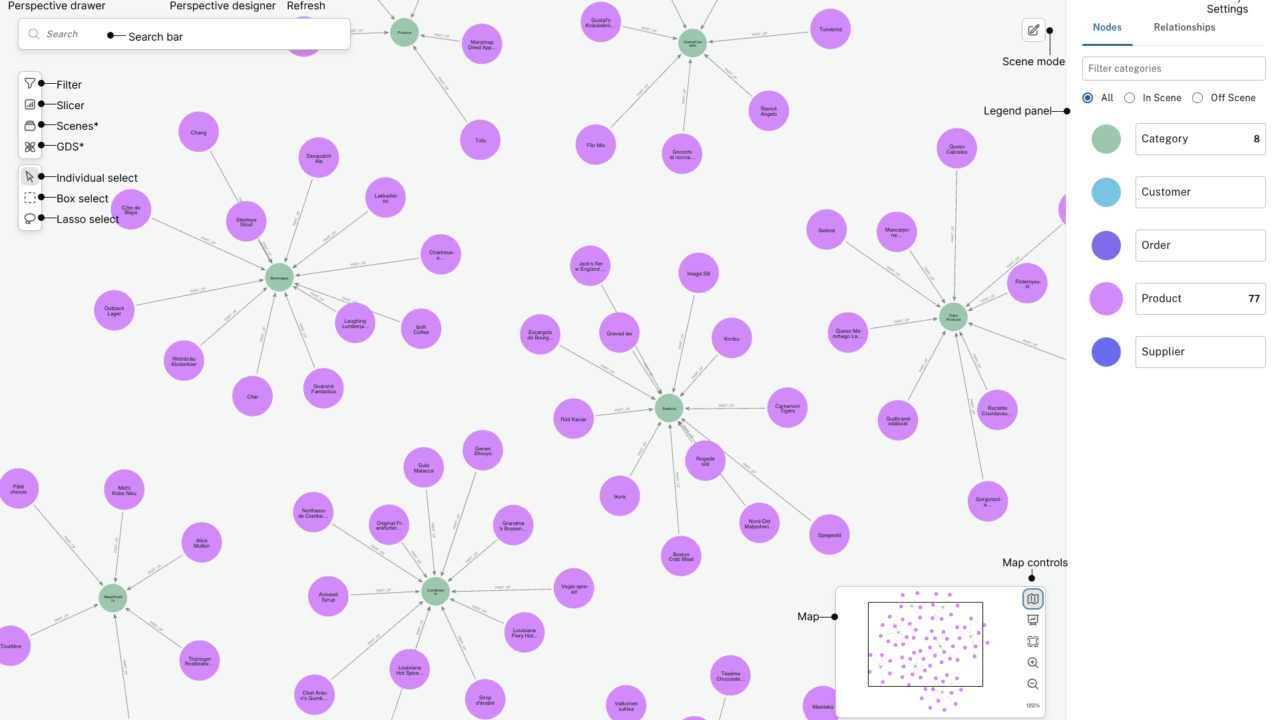
25. Knowledge-Graph Extraction with Neo4j
A knowledge graph stores entities as nodes and relationships as edges.
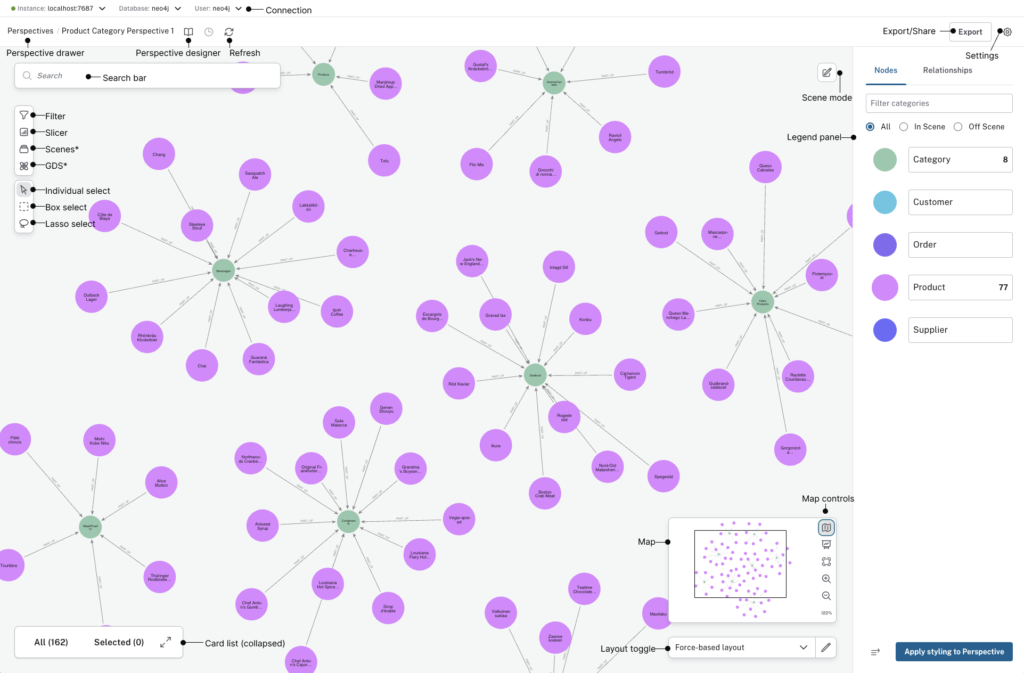
For example, a collection of research papers might contain:
- Researchers
- Universities
- Methods
- Datasets
- Findings
- Citations
Neo4j provides an official Python driver, GraphRAG package and an experimental knowledge-graph builder for extracting entities and relationships from unstructured documents.
Tools: Python, spaCy or an LLM, Neo4j
Dataset: Public articles, papers or reports
Best metric: Entity and relationship precision/recall
Estimated time: 3–7 days
Starter source code
import spacy
from neo4j import GraphDatabase

nlp = spacy.load("en_core_web_sm")

driver = GraphDatabase.driver(
    "neo4j://localhost:7687",
    auth=("neo4j", "password"),
)

def extract_entities(text: str) -> list[tuple[str, str]]:
    doc = nlp(text)

    return [
        (entity.text, entity.label_)
        for entity in doc.ents
    ]

def save_entity(name: str, entity_type: str) -> None:
    driver.execute_query(
        """
        MERGE (entity:Entity {
            name: $name,
            type: $entity_type
        })
        """,
        name=name,
        entity_type=entity_type,
        database_="neo4j",
    )

text = """
Ada Lovelace worked with Charles Babbage on ideas related
to the Analytical Engine.
"""

for name, entity_type in extract_entities(text):
    save_entity(name, entity_type)

driver.close()
Neo4j’s Python driver uses Cypher queries to create, connect and retrieve graph data.
Make it portfolio-ready
Move beyond displaying a pretty graph.
Add questions the graph can answer:
- Which researchers used the same dataset?
- Which methods occur most often?
- Which organisations collaborate?
- Which claims are supported by multiple documents?
- Which entities appear only once and may be extraction errors?
Validate extracted relationships manually. Language models are capable of inventing an extremely well-connected professional network.
How to Structure the Source Code
Use a clean repository layout:
ai-project-name/
├── README.md
├── requirements.txt
├── data/
│   └── README.md
├── notebooks/
│   └── exploration.ipynb
├── src/
│   ├── __init__.py
│   ├── train.py
│   ├── evaluate.py
│   └── predict.py
├── app/
│   └── streamlit_app.py
├── models/
│   └── .gitkeep
├── tests/
│   └── test_predict.py
├── .gitignore
└── LICENSE
Do not commit:
- API keys
- Passwords
- Private datasets
- Large model files
- Virtual environments
- Personal student or customer records
Use environment variables or a secrets manager for credentials.
What Every AI Project README Should Contain
1. Project summary
Explain the project in two or three sentences.
2. Problem definition
State exactly what the model receives and produces.
3. Dataset
Include:
- Source
- Licence
- Number of records
- Labels
- Missing values
- Known biases
4. Method
Describe:
- Preprocessing
- Features
- Model
- Hyperparameters
- Train/test split
- Baseline
5. Results
Include a table such as:
| Model | Precision | Recall | F1 | Notes |
|---|---|---|---|---|
| Baseline | 0.61 | 0.54 | 0.57 | Majority or simple rule |
| Logistic regression | 0.88 | 0.84 | 0.86 | Fast and interpretable |
| Final model | 0.91 | 0.87 | 0.89 | Better recall, slower |
6. Installation
python -m venv .venv
source .venv/bin/activate
pip install -r requirements.txt
python src/train.py
On Windows PowerShell, activation is normally:
.venv\Scripts\Activate.ps1
7. Demo
Add:
- Screenshots
- A short GIF
- Example input
- Example output
- Live deployment
- Limitations
8. Reproducibility
Record:
- Python version
- Package versions
- Random seed
- Model checkpoint
- Dataset version
- Hardware
How to Evaluate an AI Project Properly
Classification
Use:
- Precision
- Recall
- F1 score
- Confusion matrix
- ROC AUC
- Precision-recall AUC for imbalanced data
Regression and forecasting
Use:
- Mean absolute error
- Root mean squared error
- Mean absolute percentage error, where appropriate
- Baseline comparison
- Time-based validation
Recommendation systems
Use:
- Precision@K
- Recall@K
- Hit rate
- Mean reciprocal rank
- Coverage
- Diversity
RAG systems
Evaluate the pipeline in parts:
- Did retrieval find the correct passage?
- Did the answer use the retrieved evidence?
- Was the answer factually correct?
- Were citations accurate?
- Did the system refuse when evidence was missing?
Generative and agentic systems
Track:
- Task-completion rate
- Unsupported claims
- Tool-selection errors
- Cost per successful task
- Latency
- Number of human interventions
- Repeatability
- Safety failures
How to Deploy an AI Student Project
Streamlit
Best for:
- Classifiers
- Upload tools
- Dashboards
- Recommendation demos
- RAG chat interfaces
A basic interface looks like this:
import streamlit as st

st.title("AI Project Demo")

user_input = st.text_area("Enter text")

if st.button("Analyse") and user_input:
    result = model.predict([user_input])[0]
    st.success(f"Prediction: {result}")
Streamlit documents deployment through Community Cloud using a repository and dependency file.
FastAPI
Best for:
- Model APIs
- Agent tools
- Mobile-app backends
- Integration projects
- Separating the model from the user interface
Hugging Face Spaces
Best for:
- Transformer demonstrations
- Gradio or Streamlit interfaces
- Public model cards
- Sharing model checkpoints
Docker
Best for showing that the project can run consistently outside your own laptop.
A Dockerised project is particularly useful for backend, MLOps and platform-engineering portfolios.
How to Make an AI Project Stand Out
Add a baseline
Show that the model beats something simple.
A house-price model should beat predicting the median. A fraud detector should beat predicting every transaction as legitimate. A RAG system should beat answering without retrieval.
Build a small original dataset
Even 50–200 carefully labelled examples can make the project more distinctive.
Document how you collected and labelled them.
Test failure cases
Create a section called:
Where the model fails
This signals maturity, not weakness.
Add monitoring
Track:
- Input drift
- Prediction distribution
- Error rate
- Latency
- API cost
- Failed tool calls
Include tests
At minimum, test:
- Empty input
- Invalid file type
- Missing columns
- Extremely long input
- Unexpected categories
- Failed external API requests
Protect private information
Remove names, addresses, account numbers, medical details and private documents from repositories and screenshots.
How to Describe an AI Project on a Resume
Use this formula:
Built + system + technology + measurable result + deployment
Example:
Built and deployed a Python spam-classification application using TF-IDF and Multinomial Naive Bayes, achieving a 0.94 F1 score on a held-out SMS dataset and adding an interactive Streamlit interface.
Avoid:
Made an AI spam project using machine learning.
The first version shows method, evaluation and delivery. The second merely confirms that a laptop was present.
Best AI Project Ideas by Career Goal
| Career goal | Best projects |
|---|---|
| Machine-learning engineer | Fraud detection, image classification, forecasting |
| Data scientist | House prices, student-risk modelling, recommendations |
| NLP engineer | Spam detection, summarisation, RAG, knowledge graphs |
| Computer-vision engineer | Flower classifier, object detection, multimodal assistant |
| AI application developer | RAG assistant, code reviewer, MCP assistant |
| MLOps engineer | Any project with Docker, API, tests and monitoring |
| Marketing technology | Sentiment analysis, keyword clustering, recommendations |
| Fintech | Fraud detection, forecasting experiment |
| Education technology | Campus chatbot, student-support model, course RAG |
| Automation engineering | Multi-agent workflow, MCP assistant, inventory agent |
Frequently Asked Questions
What is the easiest AI project for a beginner?
An email spam classifier is one of the easiest complete AI projects. It uses a small labelled dataset, runs on an ordinary laptop and teaches text preprocessing, feature extraction, model training and evaluation.
Can I build AI projects without a GPU?
Yes. Spam detection, sentiment analysis, regression, recommendation systems, fraud detection, clustering and many retrieval projects run on a CPU.
A GPU becomes more useful for image-model training, larger transformer inference and LLM fine-tuning.
Which programming language is best for AI projects?
Python is the most practical starting language because its ecosystem includes Pandas, Scikit-learn, TensorFlow, PyTorch, Transformers, spaCy, Librosa and most current agent frameworks.
Where can students find AI datasets?
Useful sources include:
- UCI Machine Learning Repository
- TensorFlow Datasets
- Hugging Face Datasets
- Government open-data portals
- GroupLens MovieLens
- University research repositories
- Kaggle, after checking the original source and licence
How long does an AI project take?
A focused beginner project can take one day. A polished intermediate project usually needs several days. Advanced RAG, agent, multimodal or fine-tuning projects can take one or more weeks once evaluation, deployment and documentation are included.
What is the best AI project for a final-year student?
A RAG assistant, object-detection application, inventory forecasting system, code-review agent or MCP assistant makes a strong final-year project because it combines multiple engineering stages rather than stopping at model training.
Should students use ChatGPT or another coding assistant?
Coding assistants can explain errors, generate tests and accelerate boilerplate. They should not replace understanding.
Students should be able to explain every dependency, preprocessing step, model choice, metric and security decision in the submitted project.
Is it acceptable to copy AI project source code from GitHub?
You may study and reuse appropriately licensed code, but you must follow the licence, give attribution and understand what you submit.
A copied repository with renamed variables is not a portfolio project. It is digital taxidermy.
What makes an AI project good enough for GitHub?
A strong repository should include:
- Clean source code
- Dependency file
- Dataset instructions
- Evaluation results
- README
- Screenshots
- Example inputs
- Known limitations
- Licence
- No exposed credentials
Which advanced AI project is most valuable in 2026?
For broad employability, a properly evaluated RAG system is one of the strongest choices. It demonstrates document processing, embeddings, retrieval, prompting, model integration, citations, deployment and evaluation.
An MCP assistant is more distinctive, while fine-tuning is more infrastructure-intensive.
Final Project Selection Checklist
Before choosing a project, confirm that you can answer yes to most of these questions:
- Does the project solve a specific problem?
- Can I obtain legal, documented data?
- Can I build a baseline first?
- Do I know how success will be measured?
- Can I finish a basic version within two weeks?
- Can the project run without excessive API costs?
- Can I deploy a small demo?
- Can I explain the model’s limitations?
- Can I protect sensitive information?
- Will the finished repository show more than a copied notebook?
The best AI project is not necessarily the most advanced one. It is the project you can finish, evaluate, document and defend under questioning.
Build one solid system before creating five abandoned repositories called final_ai_project_v2_really_final.