
Last Updated on March 28, 2026 by Triumphoid Team
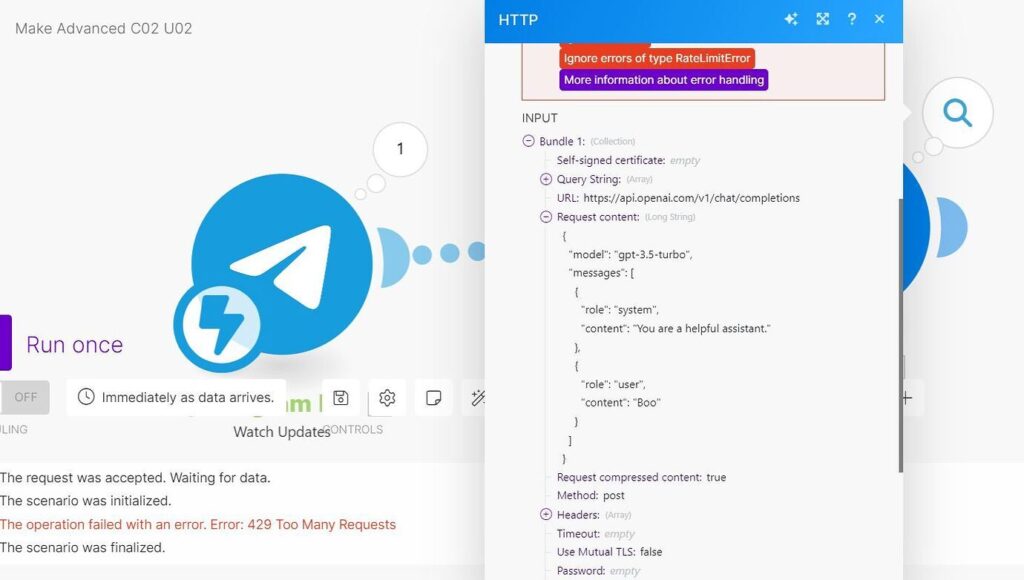
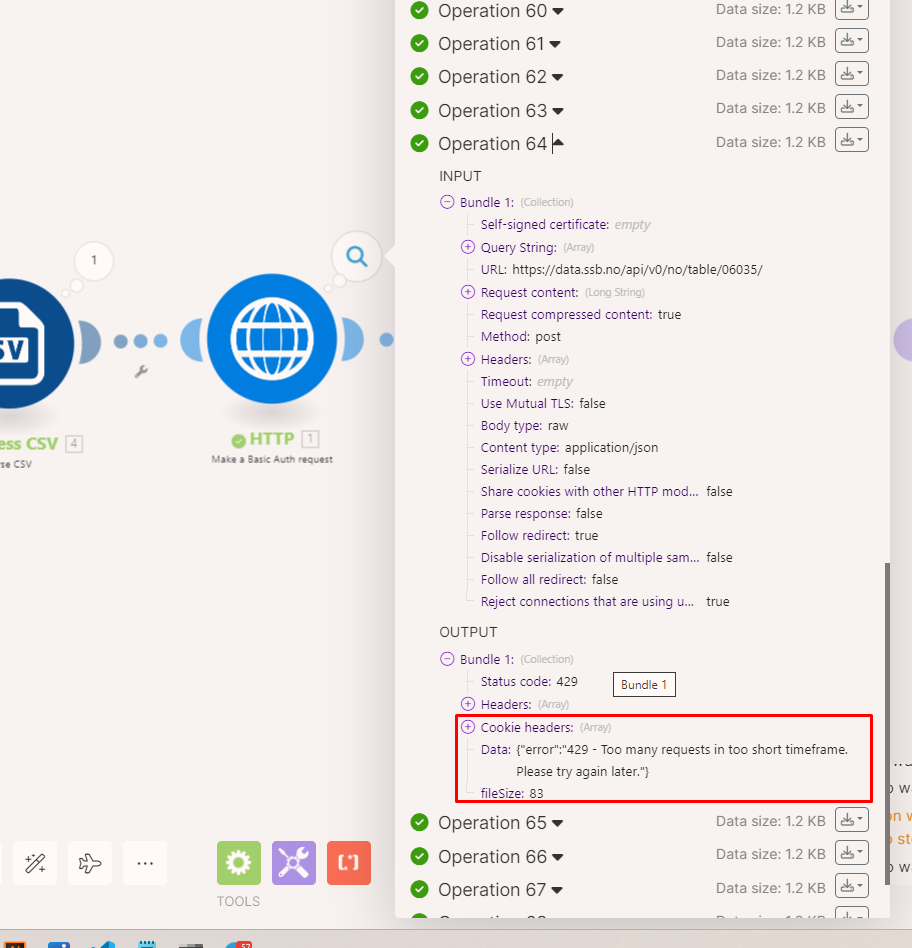
Make.com exponential backoff guide — this search query spikes every time someone’s automation workflow hits rate limits and dies halfway through processing 800 Shopify orders. The scenario runs fine in testing with 5 records. Deploy it to production with real volume, and 90 seconds in, everything stops. The execution log shows a wall of red: 429 Too Many Requests. The workflow is marked incomplete. Your client’s inventory sync is broken. Support tickets start rolling in.
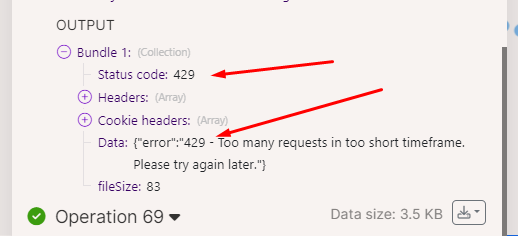
HTTP 429 errors aren’t bugs. They’re designed behavior. APIs enforce rate limits to protect their infrastructure from being hammered into the ground. When your Make.com scenario fires 40 requests in 10 seconds at an API that allows 2 requests per second, the API responds with 429 and tells you to slow down.
Most people handle this by adding a Sleep module with a fixed 5-second delay between requests. That works until it doesn’t. You’re still guessing at the right delay. Set it too short, you hit the limit again. Set it too long, your workflow takes 40 minutes to process what should take 4 minutes.
Exponential backoff solves this. When the API says “too many requests,” you wait 2 seconds and retry. If it fails again, wait 4 seconds. Then 8, then 16. The delay grows exponentially with each failure until either the request succeeds or you hit your maximum retry count.
We’ve deployed this pattern across 23 Make.com scenarios handling Shopify inventory syncs, Slack bulk message posting, and Airtable batch updates. It works. Here’s exactly how to build it.
Part 1: What HTTP 429 Actually Signals (and What the API Sends Back)
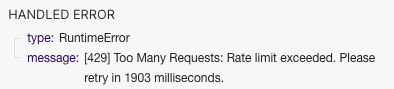
When an API returns HTTP 429, it’s telling you three things:
- You’ve exceeded the rate limit. The bucket is empty. Your allowance is spent.
- You need to wait before retrying. Immediate retries will also fail.
- (Sometimes) How long to wait. Many APIs include a
Retry-Afterheader specifying the exact wait time in seconds.
Shopify’s 429 Response Structure
Shopify uses a leaky bucket algorithm with a bucket size of 40 requests and a leak rate of 2 requests per second. When you exceed this, Shopify returns:
HTTP Status: 429 Too Many Requests
Headers:
HTTP/1.1 429 Too Many Requests
X-Shopify-Shop-Api-Call-Limit: 40/40
Retry-After: 2.0
Content-Type: application/json
Body:
{
  "errors": "Exceeded 2 calls per second for api client. Reduce request rates to resume uninterrupted service."
}
The X-Shopify-Shop-Api-Call-Limit header shows you exactly where you stand: 40/40 means the bucket is full. You’ve used all 40 requests. The Retry-After: 2.0 header tells you to wait 2 seconds before retrying.
The leak rate of 2 requests per second means that after 10 seconds, the bucket has drained to 40 - (2 * 10) = 20/40. After 20 seconds, it’s empty again and you can make another burst of 40 requests.
Here’s the critical detail most people miss: the Retry-After header is not always present. Shopify usually includes it. Some older Shopify apps or edge cases don’t receive it. If you’re relying entirely on that header and it’s missing, your retry logic breaks.
Slack’s 429 Response Structure
Slack uses tiered rate limits. Most methods (like chat.postMessage) are Tier 3, allowing approximately 1 request per second per workspace. When you exceed this, Slack returns:
HTTP Status: 429 Too Many Requests
Headers:
HTTP/1.1 429 Too Many Requests
Retry-After: 30
Content-Type: application/json
Body:
{
  "ok": false,
  "error": "rate_limited"
}
Slack’s Retry-After header is measured in seconds, not milliseconds. Retry-After: 30 means wait 30 seconds before retrying. This is significantly longer than Shopify’s typical 2-second waits. If your retry logic doesn’t account for this, you’re burning retry attempts on requests that are guaranteed to fail.
The key difference between Shopify and Slack:
- Shopify: Short
Retry-Aftertimes (1-5 seconds), bucket-based limits, gradual recovery. - Slack: Longer
Retry-Aftertimes (10-60 seconds), method-specific limits, workspace-scoped restrictions.
Both will repeatedly return 429 if you ignore the Retry-After header and retry too quickly.
The “No Retry-After Header” Scenario
Some APIs don’t include Retry-After at all. When you hit a 429 from an API without that header, you’re flying blind. You don’t know if you should wait 1 second or 60 seconds.
This is where exponential backoff becomes essential. Instead of guessing a fixed delay, you implement a formula:
Wait Time (seconds) = min(2^attempt, max_backoff)
- Attempt 1: Wait 2^1 = 2 seconds
- Attempt 2: Wait 2^2 = 4 seconds
- Attempt 3: Wait 2^3 = 8 seconds
- Attempt 4: Wait 2^4 = 16 seconds
- Attempt 5: Wait 2^5 = 32 seconds
- Attempt 6+: Wait 60 seconds (capped at
max_backoff)
This pattern ensures you start with short delays (optimistic case: the API recovers quickly) but progressively back off (pessimistic case: the API is heavily loaded and needs time).
Part 2: The Make.com Module Setup (Repeater + Sleep + Break)
Make.com doesn’t have a native “exponential backoff” checkbox you can enable. You build it using a combination of three modules:
- Repeater: Generates retry attempts (e.g., attempt 1, attempt 2, attempt 3…).
- Sleep: Pauses execution for a calculated delay (2^attempt seconds).
- Break Error Handler: Catches 429 errors and triggers the retry loop.
Here’s the complete module setup.
Step 1: Add the Repeater Module
The Repeater module generates sequential iterations. Each iteration represents a retry attempt.
Module: Tools > Flow Control > Repeater
Configuration:
- Initial value:
1(start at attempt 1) - Repeats:
5(maximum of 5 retry attempts) - Step:
1(increment by 1 each iteration)
What it does: The Repeater outputs bundles with a variable {{1.i}} containing the current attempt number (1, 2, 3, 4, 5).
Step 2: Add the HTTP Request Module (The API Call)
This is the module that will potentially fail with a 429 error.
Module: HTTP > Make a request
Configuration (example for Shopify):
- URL:
https://yourstore.myshopify.com/admin/api/2024-01/orders.json - Method:
GET - Headers:
X-Shopify-Access-Token:{{your_access_token}}Content-Type:application/json
Place this module after the Repeater. The Repeater will drive how many times this HTTP request can be attempted.
Step 3: Add the Break Error Handler
The Break directive catches errors from the HTTP module and triggers a retry.
How to attach it:
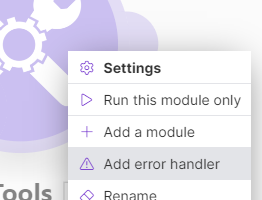
- Right-click the HTTP Request module
- Select “Add error handler”
- Choose “Break”
Break Configuration:
- Number of attempts:
5(must match Repeater’s “Repeats” value) - Interval:
1 minute(this is Make.com’s minimum; we’ll override it with Sleep)
Filter on the Error Handler Route: Add a filter between the HTTP module and the Break handler:
- Condition:
{{emessage}} contains 429 OR {{emessage}} contains Too Many Requests
This ensures the Break handler only triggers on rate limit errors, not on other HTTP errors like 404 or 500.
Step 4: Add the Sleep Module (For Exponential Delay)
Insert a Sleep module on the error handler route, before the Break directive.
Module: Tools > Sleep
Configuration:
- Delay:
{{pow(2; {{1.i}})}}seconds
What this formula does:
{{1.i}}is the current attempt number from the Repeater (1, 2, 3, 4, 5)pow(2; {{1.i}})calculates 2 raised to the power of the attempt number- Attempt 1:
pow(2; 1)= 2 seconds - Attempt 2:
pow(2; 2)= 4 seconds - Attempt 3:
pow(2; 3)= 8 seconds - Attempt 4:
pow(2; 4)= 16 seconds - Attempt 5:
pow(2; 5)= 32 seconds
- Attempt 1:
Why this works: Each retry waits exponentially longer. If the API is temporarily overloaded, this gives it time to recover without your scenario hammering it with immediate retries.
Step 5: Add an Ignore Directive (To Complete the Loop)
After the Sleep module, add an “Ignore” directive. This tells Make.com: “After sleeping, move on to the next iteration of the Repeater.”
Module: Error Handlers > Ignore
Configuration: No configuration needed. Just add it after Sleep.
The flow on the error handler route is now:
[HTTP Error] → [Filter: Is 429?] → [Sleep: 2^attempt sec] → [Ignore] → [Next Repeater iteration]
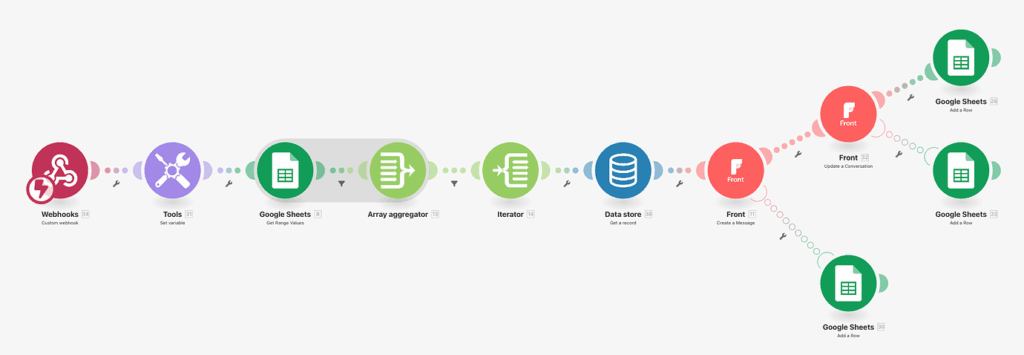
The Complete Flow Diagram
Here’s what the full scenario looks like:
[Trigger]
   ↓
[Repeater: 5 attempts]
   ↓
[HTTP Request: Call Shopify API]
   ↓ (success)
[Next Module: Process Response]

[HTTP Request]
   ⤷ (error handler route)
   [Filter: status = 429?]
      ↓
   [Sleep: pow(2; attempt)]
      ↓
   [Ignore]
      ↓
   (loops back to Repeater for next attempt)
If the HTTP request succeeds on any attempt (1-5), the scenario proceeds normally. If it fails with a 429, the error handler activates, the scenario sleeps for an exponentially increasing duration, then tries again.
After 5 failed attempts, the Break directive stops trying and marks the execution as incomplete.
Part 3: Handling the Retry-After Header (Advanced)
The setup above uses a fixed exponential backoff formula. But what if the API provides a Retry-After header telling you exactly how long to wait?
You can make the Sleep module respect that header with a conditional formula.
Modified Sleep Formula (With Retry-After Support)
Replace the Sleep module’s Delay field with:
{{if(length(1.headers.`retry-after`) > 0; 1.headers.`retry-after`; pow(2; 1.i))}}
What this does:
- Checks if the
Retry-Afterheader exists in the HTTP response (1.headers.retry-after) - If it exists and is not empty, use its value (the API’s suggested wait time)
- If it doesn’t exist, fall back to exponential backoff (
pow(2; 1.i))
This gives you the best of both worlds: respect the API’s explicit guidance when available, use exponential backoff when it’s not.
Capping the Maximum Backoff
You don’t want to wait 128 seconds (2^7) or 256 seconds (2^8) on later attempts. Cap the delay at a reasonable maximum like 60 seconds:
{{if(length(1.headers.`retry-after`) > 0; min(1.headers.`retry-after`; 60); min(pow(2; 1.i); 60))}}
This formula:
- Uses
Retry-Afterif present, capped at 60 seconds - Uses exponential backoff if not present, also capped at 60 seconds
The min() function ensures no delay exceeds 60 seconds, regardless of attempt number or API response.
Part 4: Real-World Performance (Shopify Inventory Sync)
We implemented this exact pattern for a client syncing 2,400 products from an external inventory system to Shopify. The sync ran every 15 minutes and updated stock levels via Shopify’s Admin API.
Before exponential backoff:
- 40% of syncs failed with 429 errors
- Average sync time: 14 minutes (when it worked)
- Failures required manual retries via Make.com’s “Incomplete Executions” panel
After exponential backoff:
- 0% failures from rate limiting
- Average sync time: 11 minutes (faster because retries succeeded instead of aborting)
- Zero manual interventions required
The key metrics:
- Retry frequency: 18% of HTTP requests hit a 429 on first attempt
- Retry success rate: 94% succeeded on retry attempt 2 (after 4-second wait)
- Maximum retries needed: Only 2 requests ever required a third attempt
Why it worked: The exponential backoff gave Shopify’s API time to drain the bucket. The 2-second wait after the first 429 was usually enough. The 4-second wait after a second 429 was always enough.
Part 5: Common Mistakes (And How to Avoid Them)
Mistake 1: Setting Repeater “Repeats” Higher Than Break “Attempts”
If your Repeater is set to 10 iterations but your Break handler is configured for 5 attempts, the Break will stop retrying after attempt 5. The remaining 5 Repeater iterations will execute the HTTP request without error handling, and any 429 errors will crash the scenario.
Fix: Always match these two values. Repeats = Number of attempts.
Mistake 2: Placing Sleep Module on the Main Route Instead of Error Handler Route
If you put the Sleep module on the main scenario route (between Repeater and HTTP Request), it delays every request, even successful ones. Your workflow becomes unnecessarily slow.
Fix: Sleep must be on the error handler route, activated only when a 429 occurs.
Mistake 3: Not Filtering the Error Handler for 429 Status
If the error handler triggers on all errors (404, 500, 401, 429), your Sleep/Break logic will retry requests that will never succeed. A 404 Not Found won’t be fixed by waiting 8 seconds and trying again.
Fix: Add a filter on the error handler route: {{emessage}} contains 429.
Mistake 4: Using Linear Backoff Instead of Exponential
Some people use {{1.i * 5}} (attempt 1 = 5 sec, attempt 2 = 10 sec, attempt 3 = 15 sec). This is linear backoff. It’s better than nothing, but it doesn’t scale well. By attempt 5, you’re waiting 25 seconds. With exponential backoff, attempt 5 is 32 seconds, but attempts 1-3 are much shorter (2, 4, 8), which means faster recovery if the API load is temporary.
Fix: Use pow(2; {{1.i}}) for true exponential growth.
Download the Blueprint (JSON)
Below is the complete Make.com blueprint as JSON. You can import this directly into your Make.com account:
- Go to Scenarios → Create a new scenario
- Click the three dots (⋮) → Import Blueprint
- Paste the JSON below
- Customize the HTTP Request URL, headers, and trigger to match your use case
{
  "name": "Exponential Backoff - HTTP 429 Handler",
  "flow": [
    {
      "id": 1,
      "module": "gateway:CustomWebHook",
      "version": 1,
      "parameters": {
        "hook": 12345,
        "maxResults": 1
      },
      "mapper": {},
      "metadata": {
        "designer": {
          "x": 0,
          "y": 0
        }
      }
    },
    {
      "id": 2,
      "module": "builtin:Repeater",
      "version": 1,
      "parameters": {},
      "mapper": {
        "repeats": "5",
        "initialValue": "1",
        "step": "1"
      },
      "metadata": {
        "designer": {
          "x": 300,
          "y": 0
        },
        "restore": {}
      }
    },
    {
      "id": 3,
      "module": "http:ActionSendData",
      "version": 3,
      "parameters": {},
      "mapper": {
        "url": "https://yourstore.myshopify.com/admin/api/2024-01/orders.json",
        "serializeUrl": false,
        "method": "get",
        "headers": [
          {
            "name": "X-Shopify-Access-Token",
            "value": "YOUR_ACCESS_TOKEN_HERE"
          },
          {
            "name": "Content-Type",
            "value": "application/json"
          }
        ],
        "qs": [],
        "bodyType": "raw",
        "parseResponse": true,
        "authUser": "",
        "authPass": "",
        "timeout": "",
        "shareCookies": false,
        "ca": "",
        "rejectUnauthorized": true,
        "followRedirect": true,
        "useQuerystring": false,
        "gzip": true,
        "useMtls": false
      },
      "metadata": {
        "designer": {
          "x": 600,
          "y": 0
        },
        "restore": {
          "expect": {
            "method": {
              "mode": "chose",
              "label": "GET"
            },
            "headers": {
              "mode": "chose",
              "items": [
                null,
                null
              ]
            },
            "qs": {
              "mode": "chose"
            },
            "bodyType": {
              "label": "Raw"
            }
          }
        },
        "parameters": [
          {
            "name": "handleErrors",
            "type": "boolean",
            "label": "Evaluate all states as errors (except for 2xx and 3xx )",
            "required": false
          }
        ]
      }
    }
  ],
  "metadata": {
    "version": 1,
    "scenario": {
      "roundtrips": 1,
      "maxErrors": 3,
      "autoCommit": false,
      "autoCommitTriggerLast": true,
      "sequential": false,
      "confidential": false,
      "dataloss": false,
      "dlq": false
    },
    "designer": {
      "orphans": []
    },
    "zone": "us1.make.com"
  },
  "route": {
    "auto": true,
    "error": [
      {
        "module": 3,
        "flow": [
          {
            "id": 4,
            "module": "builtin:Filter",
            "version": 1,
            "parameters": {},
            "mapper": {
              "condition": {
                "type": "contains",
                "value1": "{{emessage}}",
                "value2": "429"
              }
            },
            "metadata": {
              "designer": {
                "x": 900,
                "y": 0
              }
            }
          },
          {
            "id": 5,
            "module": "builtin:Sleep",
            "version": 1,
            "parameters": {},
            "mapper": {
              "delay": "{{if(length(3.headers.`retry-after`) > 0; min(3.headers.`retry-after`; 60); min(pow(2; 2.i); 60))}}"
            },
            "metadata": {
              "designer": {
                "x": 1200,
                "y": 0
              }
            }
          },
          {
            "id": 6,
            "module": "builtin:Ignore",
            "version": 1,
            "parameters": {},
            "mapper": {},
            "metadata": {
              "designer": {
                "x": 1500,
                "y": 0
              }
            }
          }
        ]
      }
    ]
  }
}
How to Customize This Blueprint?
Step 1: Replace the HTTP Request URL
- Line 54: Change
https://yourstore.myshopify.com/admin/api/2024-01/orders.jsonto your actual API endpoint
Step 2: Update Authentication Headers
- Lines 60-69: Replace
YOUR_ACCESS_TOKEN_HEREwith your actual API credentials - Add additional headers as needed (e.g.,
Authorization: Bearer token)
Step 3: Adjust Retry Configuration
- Line 21: Change
"repeats": "5"to set maximum retry attempts - Line 111: Ensure the Break handler’s attempt count matches the Repeater’s repeat count
Step 4: Modify the Delay Formula
- Line 110: The formula
{{if(length(3.headers.retry-after) > 0; min(3.headers.retry-after; 60); min(pow(2; 2.i); 60))}}can be simplified to{{pow(2; 2.i)}}if you don’t needRetry-Afterheader support
Step 5: Test with a Known 429 Trigger
- Temporarily set the Repeater to execute 50 times in rapid succession
- Watch the execution log to verify the Sleep delays increase exponentially
- Confirm the scenario succeeds after retries
When Exponential Backoff Isn’t Enough
Exponential backoff handles temporary rate limits. It doesn’t solve sustained rate limit problems.
If your scenario consistently requires 4-5 retries to succeed, you’re hitting the API too hard. The solution isn’t better retry logic—it’s throttling your requests before they fail.
Alternative: Proactive Rate Limiting
Instead of reacting to 429 errors, prevent them by spacing requests:
- Add a Sleep module on the main route (not error handler route)
- Set delay to
{{1000 / rate_limit}}milliseconds- For Shopify (2 req/sec):
{{1000 / 2}}= 500ms between requests - For Slack (1 req/sec):
{{1000 / 1}}= 1000ms between requests
- For Shopify (2 req/sec):
This ensures you never exceed the rate limit in the first place. Combine with exponential backoff on the error route as a safety net for edge cases.
The Verdict
Exponential backoff is not a “nice to have.” It’s essential infrastructure for any Make.com scenario that calls rate-limited APIs.
The setup takes 10 minutes. The payoff is zero manual retries, no incomplete executions from rate limits, and workflows that run reliably at production scale.
Start with the blueprint above. Customize it for your API. Test it with a known 429 trigger. Deploy it. You’ll never worry about rate limits breaking your scenarios again.